compliance
874 TopicsWelcome to the Microsoft Security Community!
Protect it all with Microsoft Security Eliminate gaps and get the simplified, comprehensive protection, expertise, and AI-powered solutions you need to innovate and grow in a changing world. The Microsoft Security Community is your gateway to connect, learn, and collaborate with peers, experts, and product teams. Gain access to technical discussions, webinars, and help shape Microsoft’s security products. Get there fast To stay up to date on upcoming opportunities and the latest Microsoft Security Community news, make sure to subscribe to our email list. Find the latest skilling content and on-demand videos – subscribe to the Microsoft Security Community YouTube channel. Catch the latest announcements and connect with us on LinkedIn – Microsoft Security Community and Microsoft Entra Community. Index Community Calls: December 2025 | January 2026 | February 2026 Upcoming Community Calls December 2025 Dec. 16 | 8:00am | Microsoft Defender for Office 365 | Ask the Experts: Tips and Tricks Engage in this interactive panel with Microsoft MVPs! Get answers to real-world Defender for Office 365 scenarios, best practices, and tips on migration, SOC optimization, Teams protection, and more. Bring your toughest questions for the live discussion. Dec. 16 | 9:00am | Microsoft Sentinel | Part 2: Don’t Get Left Behind: Complete Your Sentinel Move to Defender Prepare for the July 2026 transition! Unlock Microsoft Defender’s full potential with data onboarding, retention, governance, Content Hub, analytic rules, MTO for simplified management, and Security Copilot for AI-driven insights. Dec. 18 | 8:00am | Security Copilot Skilling Series | What's New in Security Copilot for Defender Discover the latest innovations in Microsoft Security Copilot embedded in Defender that are transforming how organizations detect, investigate, and respond to threats. This session will showcase powerful new capabilities like AI-driven incident response, contextual insights, and automated workflows that help security teams stop attacks faster and simplify operations. January 2026 Jan. 8 | 8:00am | Microsoft Purview | Data Security & Compliance for Azure Foundry AI Apps & Agents As organizations accelerate adoption of Azure AI Foundry to build generative AI applications and autonomous agents, ensuring robust data security and regulatory compliance becomes mission-critical. This session outlines the end-to-end security, governance, and compliance controls that Microsoft Purview, DSPM for AI, offers to provide the governance for your Foundry apps and agents. The guidance provides architects, developers, and security teams with a prescriptive framework to design, deploy, and operate secure, compliant, and enterprise-ready AI solutions on Azure. Jan. 14 | 8:00am | 425 Show | Microsoft MCP Server for Enterprise: Transforming User, Security & Identity Tasks with AI See Microsoft’s MCP Server in action! Discover how AI-powered workflows simplify tasks and strengthen security. Packed with demos, this session shows how to operationalize AI across your organization. Jan. 15 | 8:00am | Microsoft Purview | Purview Data Security and Entra Global Secure Access Deep Dive Learn how Microsoft Global Secure Access (GSA) and Purview extend data loss prevention to the network, inspecting traffic to and from sanctioned and unsanctioned apps, including AI, and block sensitive data exfiltration in real time. The guidance in this session will provide actionable steps to security teams getting started with extending data security to the network layer to support compliance and zero trust strategies. Jan. 20 | 8:00am | Microsoft Defender for Cloud | What’s New in Microsoft Defender CSPM Cloud security posture management (CSPM) continues to evolve, and Microsoft Defender CSPM is leading the way with powerful enhancements introduced at Microsoft Ignite. This session will showcase the latest innovations designed to help security teams strengthen their posture and streamline operations. Jan. 22 | 8:00am | Azure Network Security | Advancing web application Protection with Azure WAF: Ruleset and Security Enhancements Explore the latest Azure WAF ruleset and security enhancements. Learn to fine-tune configurations, reduce false positives, gain threat visibility, and ensure consistent protection for web workloads—whether starting fresh or optimizing deployments. Jan. 22 | 8:00am | Security Copilot Skilling Series | Building Custom Agents: Unlocking Context, Automation, and Scale Microsoft Security Copilot already features a robust ecosystem of first-party and partner-built agents, but some scenarios require solutions tailored to your organization’s specific needs and context. In this session, you'll learn how the Security Copilot agent builder platform and MCP servers empower you to create tailored agents that provide context-aware reasoning and enterprise-scale solutions for your unique scenarios. RESCHEDULED for Jan.27 | 9:00am | Microsoft Sentinel | AI-Powered Entity Analysis in Sentinel’s MCP Server Simplify entity risk assessment with Entity Analyzer. Eliminate complex playbooks; get unified, AI-driven analysis using Sentinel’s semantic understanding. Accelerate automation and enrich SOAR workflows with native Logic Apps integration. February 2026 Feb. 26 | 9:00am | Azure Network Security | Azure Firewall Integration with Microsoft Sentinel Learn how Azure Firewall integrates with Microsoft Sentinel to enhance threat visibility and streamline security investigations. This webinar will demonstrate how firewall logs and insights can be ingested into Sentinel to correlate network activity with broader security signals, enabling faster detection, deeper context, and more effective incident response. Looking for more? Join the Microsoft Customer Connection Program (MCCP)! As a MCCP member, you’ll gain early visibility into product roadmaps, participate in focus groups, and access private preview features before public release. You’ll have a direct channel to share feedback with engineering teams, influencing the direction of Microsoft Security products. The program also offers opportunities to collaborate and network with fellow security experts and Microsoft product teams. Join the MCCP that best fits your interests: www.aka.ms/joincommunity. Additional resources Microsoft Security Hub on Tech Community Virtual Ninja Training Courses Microsoft Security Documentation Azure Network Security GitHub Microsoft Defender for Cloud GitHub Microsoft Sentinel GitHub Microsoft Defender XDR GitHub Microsoft Defender for Cloud Apps GitHub Microsoft Defender for Identity GitHub Microsoft Purview GitHub6.9KViews3likes1CommentThe next chapter for AI-powered work management in Microsoft Planner
Today at Microsoft Ignite, we’re excited to share the next major evolution in work management—one that builds on the journey we began in April 2024, when we unified Microsoft To Do, Planner, and Project for the web into a single, modern experience we called the new Planner. Now available in Microsoft Teams and as a web app, Planner has further been enhanced with the Project Manager Agent, an AI-powered assistant that helps streamline your planning process. Now, we’re taking the next step by bringing advanced AI skills through Project Manager Agent to our platform—delivering intelligent automation and a seamless planning environment that can help empower teams to move faster, stay aligned, and deliver results with less friction. A day in the life: From conversation to coordination It’s Monday morning. A product launch team gathers—some in person, some remote. Instead of action items getting lost in chat threads or emails, Facilitator and Project Manager Agent are now part of the meeting experience. During the meeting, Facilitator listens for spoken intent and captures decisions as actionable tasks. Team members can also prompt Facilitator through the meeting chat to add, update, or assign tasks in real time. This ensures that nothing is missed and that tasks are created directly from the flow of conversation. Project Manager Agent structures these tasks within Planner, assigning owners and due dates as directed by the team. The agent helps team members organize and track their work efficiently by making it easier to create, assign, and update tasks within Teams meetings. Furthermore, the Project Manager Agent works alongside Facilitator to generate a marketing plan, so the team can use the document as a reference for stakeholders. The agents are able to create the document, pulling context from the meeting transcript, meeting chat, and files shared during the meeting. The document is posted in the meeting chat and is also available as an attachment to the task in the meeting plan. As the meeting wraps up, the plan is live in Planner, with clear ownership and next steps. Everyone leaves the meeting aligned, knowing exactly what needs to be done and who is responsible. This is the story we’re showcasing at Ignite: how Planner and agents are helping teams drive work across Teams. What’s rolling out soon to general availability Below is a list of features that are currently available in public preview and rolling out to general availability in the next two weeks. Project Manager Agent skills in Teams meetings: Leveraging the skills of Project Manager Agent, Facilitator can create tasks during meetings and automatically extract tasks from meeting transcripts to ensure nothing is overlooked. These tasks are captured in meeting notes and seamlessly synced to Planner for enhanced post-meeting tracking. Additionally, the Facilitator can generate documents from meetings, helping resolve the "cold start" challenge. Simply @mention Facilitator to create, assign, or access tasks, or to generate required documents. Project Manager Agent skills in Teams channels: Leveraging the skills of Project Manager Agent in Teams channels, users can create tasks, set due dates, and assign tasks seamlessly within their collaborative workspace by @mentioning the respective Channel Agent. Learn more about Project Manager Agent skills in Teams meetings and channels in our announcement blog post. What’s new for Project Manager Agent and Planner Below is a list of features that are new to Project Manager Agent, Channel Agent in Teams, and Planner. Workback plans in Teams channels: Project Manager Agent and the Channel Agent together now support the creation of AI-powered workback plans, automatically generating a reverse timeline of tasks and milestones based on the target deadline and goal provided. A screenshot of a Teams channel shows a conversation with the Channel Agent. The Channel Agent has created a workback plan with tasks and due dates. Ask questions about your plans in Teams channels: You can now ask the Channel Agent questions related to your plans in Planner. Simply @mention the Channel Agent directly in your channel conversation with questions such as: What tasks are assigned to me? What tasks need to be completed this week? Create and update tasks with Channel Agent: You can also ask the Channel Agent to create new tasks and update existing ones. Simply @mention the Channel Agent with prompts such as: Create a task to complete the Quarterly Business Review deck. Assign the LT review prep task to Daniel. For more information, see how to create project tasks using Channel Agent. Status reports with Planner data: Channel Agent uses its knowledge to create status reports for channel members. These status reports are delivered as a Loop file within the channel, allowing team members to review, edit, collaborate, and share with others. Previously, the Channel Agent would generate status reports based on messages in its respective channel, as well as meeting summaries for any meetings the agent was added to. Now, status reports generated by the Channel Agent are enriched with Planner data to provide additional context, improve project visibility for all stakeholders, and enable better decision making by highlighting progress, risks, and blockers. Learn how to generate a status report using Channel Agent. Please note, these new capabilities in Teams channels are currently available in public preview. A Microsoft 365 Copilot license is required to create, interact with, and manage Channel Agent in Teams. Learn how to get started with Channel Agent for Teams channels. Support for Information Barriers: Microsoft Purview Information Barriers are policies in Microsoft 365 that a compliance admin can configure to prevent individuals or groups from communicating and collaborating with each other. Support for Information Barriers in Planner enables organizations to restrict access to plans and tasks based on user groups. This feature can help prevent data leaks, enforce internal policies, and support regulatory mandates by limiting plan visibility and collaboration to authorized segments. Support for Information Barriers is now generally available in basic plans only across: Planner for the web Planner in Teams (web, desktop, and mobile) Learn more about Information Barriers in Microsoft Planner. What’s coming soon to Planner Below is a list of additional compliance features that are currently rolling out or starting to roll out in Planner next month. Please note, these features are not being demoed at Ignite. Check the Microsoft 365 public roadmap for rollout status and additional details. Microsoft Information Protection (MIP) label support in Planner: Up until now, Planner has supported container labels for Microsoft 365 Group-backed and Roster plans, restricting access based on label permissions. This update will enable support for content labels, enforcing Data Loss Prevention controls, such as: Preventing users from copying task content, exporting plans to Excel or other formats, and forwarding tasks or plans to unauthorized users. Restricting users from printing plans or tasks when the content label includes a “block print” directive and restricting users from any form of hard copy generation of sensitive plans. Displaying watermarks on plans and tasks when required and ensuring watermark visibility across all supported clients (web, desktop, and mobile). Inheriting content labels from Loop Task List components or other linked containers, applying the same restriction to the Roster plan created from a Loop file, and respecting label changes. Informing users when label restrictions are in effect, preventing actions that violate label policies, and offering downgrade prompts if label changes would revoke access for certain users. With this rollout, users will be able to apply and modify content labels on Group-backed plans. Roster plans created from meetings will inherit the meeting label. eDiscovery support for Roster plans: Up until now, Planner has only provided eDiscovery support for modern Group-backed plans. This update will enable eDiscovery support for Roster plans as well. Once rolled out to your organization, admins will be able to pull the task data relevant to a user by selecting the individual’s mailbox. When the eDiscovery admin selects a user’s mailbox as the data source, they would see the task that the user was assigned to. Join our sessions at Ignite 2025! Whether you’re on site at the Moscone Center or joining us online, dive deeper with demos and Q&A. We’ll share additional details on the features above and announce some exciting updates coming soon to Planner. Theater session (THR761): Accelerating productivity with Planner and Project Manager agent in Microsoft Teams Time: Thursday, November 20 at 10:00 AM Pacific Speakers: George Bullock, Robyn Guarriello Duration: 25 minutes (in person, live Q&A) Breakout session (BRK287): Planner & agents: Driving work across Teams, Outlook, and Copilot Chat Time: Thursday, November 20 at 4:45 PM Pacific Speakers: Howard Crow, Robyn Guarriello Duration: 45 minutes (in person, streamed live, and on demand) Expert meetups: Visit the Copilot & Agents station for hands-on demos and unblocked Q&A with product experts. Learn more Watch the on-demand Breakout session from Ignite 2025. Sign up to receive future communication about Planner. Check out the Planner adoption page and Planner help & learning page to learn more about Planner. Visit the Microsoft 365 roadmap for feature descriptions and estimated release dates for Planner. Walk through the interactive demos for Project Manager Agent in Planner and Project Manager Agent skills in Teams meetings. Take these hands-on learning courses to enhance your AI business solutions with Copilot and agents at work.3.7KViews3likes12CommentsSecurity Guidance Series: CAF 4.0 Understanding Threat From Awareness to Intelligence-Led Defence
The updated CAF 4.0 raises expectations around control A2.b - Understanding Threat. Rather than focusing solely on awareness of common cyber-attacks, the framework now calls for a sector-specific, intelligence-informed understanding of the threat landscape. According to the NCSC, CAF 4.0 emphasizes the need for detailed threat analysis that reflects the tactics, techniques, and resources of capable adversaries, and requires that this understanding directly shapes security and resilience decisions. For public sector authorities, this means going beyond static risk registers to build a living threat model that evolves alongside digital transformation and service delivery. Public sector authorities need to know which systems and datasets are most exposed, from citizen records and clinical information to education systems, operational platforms, and payment gateways, and anticipate how an attacker might exploit them to disrupt essential services. To support this higher level of maturity, Microsoft’s security ecosystem helps public sector authorities turn threat intelligence into actionable understanding, directly aligning with CAF 4.0’s Achieved criteria for control A2.b. Microsoft E3 - Building Foundational Awareness Microsoft E3 provides public sector authorities with the foundational capabilities to start aligning with CAF 4.0 A2.b by enabling awareness of common threats and applying that awareness to risk decisions. At this maturity level, organizations typically reach Partially Achieved, where threat understanding is informed by incidents rather than proactive analysis. How E3 contributes to Contributing Outcome A2.b: Visibility of basic threats: Defender for Endpoint Plan 1 surfaces malware and unsafe application activity, giving organizations insight into how adversaries exploit endpoints. This telemetry helps identify initial attacker entry points and informs reactive containment measures. Identity risk reduction: Entra ID P1 enforces MFA and blocks legacy authentication, mitigating common credential-based attacks. These controls reduce the likelihood of compromise at early stages of an attacker’s path. Incident-driven learning: Alerts and Security & Compliance Centre reports allow organizations to review how attacks unfolded, supporting documentation of observed techniques and feeding lessons into risk decisions. What’s missing for Achieved: To fully meet the contributing outcomes A2.b, public sector organizations must evolve from incident-driven awareness to structured, intelligence-led threat analysis. This involves anticipating probable attack methods, developing plausible scenarios, and maintaining a current threat picture through proactive hunting and threat intelligence. These capabilities extend beyond the E3 baseline and require advanced analytics and dedicated platforms. Microsoft E5 – Advancing to Intelligence-Led Defence Where E3 establishes the foundation for identifying and documenting known threats, Microsoft E5 helps public sector organizations to progress toward the Achieved level of CAF control A2.b by delivering continuous, intelligence-driven analysis across every attack surface. How E5 aligns with Contributing Outcome A2.b: Detailed, up-to-date view of attacker paths: At the core of E5 is Defender XDR, which correlates telemetry from Defender for Endpoint Plan 2, Defender for Office 365 Plan 2, Defender for Identity, and Defender for Cloud Apps. This unified view reveals how attackers move laterally between devices, identities, and SaaS applications - directly supporting CAF’s requirement to understand probable attack methods and the steps needed to reach critical targets. Advanced hunting and scenario development: Defender for Endpoint P2 introduces advanced hunting via Kusto Query Language (KQL) and behavioural analytics. Analysts can query historical data to uncover persistence mechanisms or privilege escalation techniques, assisting organizations to anticipate attack chains and develop plausible scenarios, a key expectation under A2.b. Email and collaboration threat modelling: Defender for Office 365 P2 detects targeted phishing, business email compromise, and credential harvesting campaigns. Attack Simulation Training adds proactive testing of social engineering techniques, helping organizations maintain awareness of evolving attacker tradecraft and refine mitigations. Identity-focused threat analysis: Defender for Identity and Entra ID P2 expose lateral movement, credential abuse, and risky sign-ins. By mapping tactics and techniques against frameworks like MITRE ATT&CK, organizations can gain the attacker’s perspective on identity systems - fulfilling CAF’s call to view networks from a threat actor’s lens. Cloud application risk visibility: Defender for Cloud Apps highlights shadow IT and potential data exfiltration routes, helping organizations to document and justify controls at each step of the attack chain. Continuous threat intelligence: Microsoft Threat Intelligence enriches detections with global and sector-specific insights on active adversary groups, emerging malware, and infrastructure trends. This sustained feed helps organizations maintain a detailed understanding of current threats, informing risk decisions and prioritization. Why this meets Achieved: E5 capabilities help organizations move beyond reactive alerting to a structured, intelligence-led approach. Threat knowledge is continuously updated, scenarios are documented, and controls are justified at each stage of the attacker path, supporting CAF control A2.b’s expectation that threat understanding informs risk management and defensive prioritization. Sentinel While Microsoft E5 delivers deep visibility across endpoints, identities, and applications, Microsoft Sentinel acts as the unifying layer that helps transform these insights into a comprehensive, evidence-based threat model, a core expectation of Achieved maturity under CAF 4.0 A2.b. How Sentinel enables Achieved outcomes: Comprehensive attack-chain visibility: As a cloud-native SIEM and SOAR, Sentinel ingests telemetry from Microsoft and non-Microsoft sources, including firewalls, OT environments, legacy servers, and third-party SaaS platforms. By correlating these diverse signals into a single analytical view, Sentinel allows defenders to visualize the entire attack chain, from initial reconnaissance through lateral movement and data exfiltration. This directly supports CAF’s requirement to understand how capable, well-resourced actors could systematically target essential systems. Attacker-centric analysis and scenario building: Sentinel’s Analytics Rules and MITRE ATT&CK-aligned detections provide a structured lens on tactics and techniques. Security teams can use Kusto Query Language (KQL) and advanced hunting to identify anomalies, map adversary behaviours, and build plausible threat scenarios, addressing CAF’s expectation to anticipate probable attack methods and justify mitigations at each step. Threat intelligence integration: Sentinel enriches local telemetry with intelligence from trusted sources such as the NCSC and Microsoft’s global network. This helps organizations maintain a current, sector-specific understanding of threats, applying that knowledge to prioritize risk treatment and policy decisions, a defining characteristic of Achieved maturity. Automation and repeatable processes: Sentinel’s SOAR capabilities operationalize intelligence through automated playbooks that contain threats, isolate compromised assets, and trigger investigation workflows. These workflows create a documented, repeatable process for threat analysis and response, reinforcing CAF’s emphasis on continuous learning and refinement. This video brings CAF A2.b – Understanding Threat – to life, showing how public sector organizations can use Microsoft security tools to build a clear, intelligence-led view of attacker behaviour and meet the expectations of CAF 4.0. Why this meets Achieved: By consolidating telemetry, threat intelligence, and automated response into one platform, Sentinel elevates public sector organizations from isolated detection to an integrated, intelligence-led defence posture. Every alert, query, and playbook contributes to an evolving organization-wide threat model, supporting CAF A2.b’s requirement for detailed, proactive, and documented threat understanding. CAF 4.0 challenges every public-sector organization to think like a threat actor, to understand not just what could go wrong, but how and why. Does your organization have the visibility, intelligence, and confidence to turn that understanding into proactive defence? To illustrate how this contributing outcome can be achieved in practice, the one-slider and demo show how Microsoft’s security capabilities help organizations build the detailed, intelligence-informed threat picture expected by CAF 4.0. These examples turn A2.b’s requirements into actionable steps for organizations. In the next article, we’ll explore C2 - Threat Hunting: moving from detection to anticipation and embedding proactive resilience as a daily capability.Security Review for Microsoft Edge version 143
We have reviewed the new settings in Microsoft Edge version 143 and determined that there are no additional security settings that require enforcement. The Microsoft Edge version 139 security baseline continues to be our recommended configuration which can be downloaded from the Microsoft Security Compliance Toolkit. Microsoft Edge version 143 introduced 3 new Computer and User settings; we have included a spreadsheet listing the new settings to make it easier for you to find. As a friendly reminder, all available settings for Microsoft Edge are documented here, and all available settings for Microsoft Edge Update are documented here. Please continue to give us feedback through the Security Baselines Discussion site or this post.Microsoft Ignite 2025: Top Security Innovations You Need to Know
🤖 Security & AI -The Big Story This Year 2025 marks a turning point for cybersecurity. Rapid adoption of AI across enterprises has unlocked innovation but introduced new risks. AI agents are now part of everyday workflows-automating tasks and interacting with sensitive data—creating new attack surfaces that traditional security models cannot fully address. Threat actors are leveraging AI to accelerate attacks, making speed and automation critical for defense. Organizations need solutions that deliver visibility, governance, and proactive risk management for both human and machine identities. Microsoft Ignite 2025 reflects this shift with announcements focused on securing AI at scale, extending Zero Trust principles to AI agents, and embedding intelligent automation into security operations. As a Senior Cybersecurity Solution Architect, I’ve curated the top security announcements from Microsoft Ignite 2025 to help you stay ahead of evolving threats and understand the latest innovations in enterprise security. Agent 365: Control Plane for AI Agents Agent 365 is a centralized platform that gives organizations full visibility, governance, and risk management over AI agents across Microsoft and third-party ecosystems. Why it matters: Unmanaged AI agents can introduce compliance gaps and security risks. Agent 365 ensures full lifecycle control. Key Features: Complete agent registry and discovery Access control and conditional policies Visualization of agent interactions and risk posture Built-in integration with Defender, Entra, and Purview Available via the Frontier Program Microsoft Agent 365: The control plane for AI agents Deep dive blog on Agent 365 Entra Agent ID: Zero Trust for AI Identities Microsoft Entra is the identity and access management suite (covering Azure AD, permissions, and secure access). Entra Agent ID extends Zero Trust identity principles to AI agents, ensuring they are governed like human identities. Why it matters: Unmanaged or over-privileged AI agents can create major security gaps. Agent ID enforces identity governance on AI agents and reduces automation risks. Key Features: Provides unique identities for AI agents Lifecycle governance and sponsorship for agents Conditional access policies applied to agent activity Integrated with open SDKs/APIs for third‑party platforms Microsoft Entra Agent ID Overview Entra Ignite 2025 announcements Public Preview details Security Copilot Expansion Security Copilot is Microsoft’s AI assistant for security teams, now expanded to automate threat hunting, phishing triage, identity risk remediation, and compliance tasks. Why it matters: Security teams face alert fatigue and resource constraints. Copilot accelerates response and reduces manual effort. Key Features: 12 new Microsoft-built agents across Defender, Entra, Intune, and Purview. 30+ partner-built agents available in the Microsoft Security Store. Automates threat hunting, phishing triage, identity risk remediation, and compliance tasks. Included for Microsoft 365 E5 customers at no extra cost. Security Copilot inclusion in Microsoft 365 E5 Security Copilot Ignite blog Security Dashboard for AI A unified dashboard for CISOs and risk leaders to monitor AI risks, aggregate signals from Microsoft security services, and assign tasks via Security Copilot - included at no extra cost. Why it matters: Provides a single pane of glass for AI risk management, improving visibility and decision-making. Key Features: Aggregates signals from Entra, Defender, and Purview Supports natural language queries for risk insights Enables task assignment via Security Copilot Ignite Session: Securing AI at Scale Microsoft Security Blog Microsoft Defender Innovations Microsoft Defender serves as Microsoft’s CNAPP solution, offering comprehensive, AI-driven threat protection that spans endpoints, email, cloud workloads, and SIEM/SOAR integrations. Why It Matters Modern attacks target multi-cloud environments and software supply chains. These innovations provide proactive defense, reduce breach risks before exploitation, and extend protection beyond Microsoft ecosystems-helping organizations secure endpoints, identities, and workloads at scale. Key Features: Predictive Shielding: Proactively hardens attack paths before adversaries pivot. Automatic Attack Disruption: Extended to AWS, Okta, and Proofpoint via Sentinel. Supply Chain Security: Defender for Cloud now integrates with GitHub Advanced Security. What’s new in Microsoft Defender at Ignite Defender for Cloud innovations Global Secure Access & AI Gateway Part of Microsoft Entra’s secure access portfolio, providing secure connectivity and inspection for web and AI traffic. Why it matters: Protects against lateral movement and AI-specific threats while maintaining secure connectivity. Key Features: TLS inspection, URL/file filtering AI Prompt Injection protection Private access for domain controllers to prevent lateral movement attacks. Learn about Secure Web and AI Gateway for agents Microsoft Entra: What’s new in secure access on the AI frontier Purview Enhancements Microsoft Purview is the data governance and compliance platform, ensuring sensitive data is classified, protected, and monitored. Why it matters: Ensures sensitive data remains protected and compliant in AI-driven environments. Key Features: AI Observability: Monitor agent activities and prevent sensitive data leakage. Compliance Guardrails: Communication compliance for AI interactions. Expanded DSPM: Data Security Posture Management for AI workloads. Announcing new Microsoft Purview capabilities to protect GenAI agents Intune Updates Microsoft Intune is a cloud-based endpoint device management solution that secures apps, devices, and data across platforms. It simplifies endpoint security management and accelerates response to device risks using AI. Why it matters: Endpoint security is critical as organizations manage diverse devices in hybrid environments. These updates reduce complexity, speed up remediation, and leverage AI-driven automation-helping security teams stay ahead of evolving threats. Key Features: Security Copilot agents automate policy reviews, device offboarding, and risk-based remediation. Enhanced remote management for Windows Recovery Environment (WinRE). Policy Configuration Agent in Intune lets IT admins create and validate policies with natural language What’s new in Microsoft Intune at Ignite Your guide to Intune at Ignite Closing Thoughts Microsoft Ignite 2025 signals the start of an AI-driven security era. From visibility and governance for AI agents to Zero Trust for machine identities, automation in security operations, and stronger compliance for AI workloads-these innovations empower organizations to anticipate threats, simplify governance, and accelerate secure AI adoption without compromising compliance or control. 📘 Full Coverage: Microsoft Ignite 2025 Book of NewsCSP Account Verified & Authorized yet Indirect Reseller Status: SUSPENDED
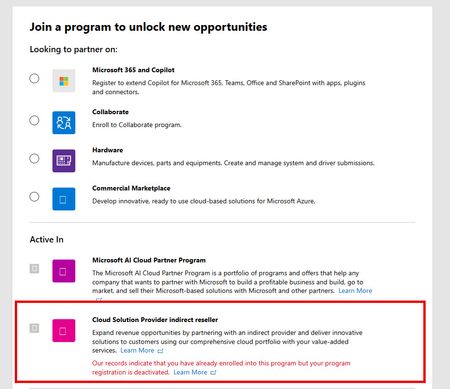
Hello Partner Community Please assist any way you can... JillArmourMicrosoft is this in your wheelhouse? We are an CSP partner that is struggling to have our indirect reseller account suspension lifted even though our partner account is now fully verified and authorised. Our account was originally suspended due to a business registration vs shop location mismatch that was not resolved within a 30 day termination notification time limit. We corrected the address problem AFTER the account was suspended and although our account is now verified and authorised, the Indirect Reseller account suspension has not been automatically lifted and we are unable to contact a human representative to have it manually moved back to the Active state. We have submitted several Partner Support tickets but they do not provide actual support at all and automated responses from these tickets return a disclaimer stating the following with no further correspondence and the ticket automatically closed. Hello, Thank you for contacting Microsoft Partner support about the notice of suspension and termination proceedings. In the Microsoft AI Cloud Partner Program Agreement, both Microsoft and our partners reserve the right to walk away from the partner relationship by providing 30 days' notice to the other. Neither party is required to offer an explanation for the decision to terminate the partner agreement. As Microsoft is exercising its rights under this section 4.b of the Microsoft AI Cloud Program Agreement, we are unable to share an explanation or further details. Kind Regards, *Random Name* (He/Him) Support Engineer Partner Support Delivery - Program Customer Support My Working Hours: M-F 11:30 AM to 08:30 PM AEDT This lack of support is excruciatingly frustrating and terribly aggravating given that we are now subject to an indefinite period of considerable income loss with no recourse. Note that along with the suspension, emails have been sent to our customers notifying them that we are no longer qualified to act as their licensing provider which has been distressing for both our sales team and the customers. Our distributor is doing the best they can to help but they are unable to provide any real assistance and from what I hear, are unable to get any sensible advice from their Microsoft reps. Upon speaking with several other indirect resellers and distributors alike, it is my understanding that many partners are suffering the same or similar denial of service and I question whether this practice is even legal under Australian law regardless of any contractual fine print and disclaimers after the fact. This denial of support is a huge failure of Microsoft's policy makers and extremely poor business practice in general. If Microsoft wish to declare utter contempt for the small businesses that have supported them for several decades then those businesses might consider alternative platforms for their customers going forward. To conclude, I welcome any support or feedback from the community to help resolve this particular problem and help others with the same issue. Kind Regards, One very Frustrated Reseller.SolvedTalking Microsoft 365 Compliance at the European SharePoint Conference
Paul Robichaux and I led a session about Microsoft 365 Compliance at the European SharePoint Conference in Dublin on December 2, 2025. During the session, we discussed how intelligent versioning works and its value in saving storage, priority cleanup and its ability to delete files even if the files are under retention hold, and the recent revamp of the Purview eDiscovery solution. We were thrilled at the attendance. Here’s what happened. https://office365itpros.com/2025/12/03/microsoft-365-compliance-espc/16Views0likes0CommentsEmpowering organizations with integrated data security: What’s new in Microsoft Purview
Today, data moves across clouds, apps, and devices at an unprecedented speed, often outside the visibility of siloed legacy tools. The rise of autonomous agents, generative AI, and distributed data ecosystems means that traditional perimeter-based security models are no longer sufficient. Even though companies are spending more than $213 billion globally, they still face several persistent security challenges: Fragmented tools don’t integrate together well and leave customers lacking full visibility of their data security risks The growing use of AI in the workplace is creating new data risks for companies to manage The shortage of skilled cybersecurity professionals is making it difficult to accomplish data security objectives Microsoft is a global leader in cloud, productivity, and security solutions. Microsoft Purview benefits from this breadth of offerings, integrating seamlessly across Microsoft 365, Azure, Microsoft Fabric, and other Microsoft platforms — while also working in harmony with complementary security tools. Unlike fragmented point solutions, Purview delivers an end-to-end data security platform built into the productivity and collaboration tools organizations already rely on. This deep understanding of data within Microsoft environments, combined with continually improving external data risk detections, allows customers to simplify their security stack, increase visibility, and act on data risks more quickly. At Ignite, we’re introducing the next generation of data security — delivering advanced protection and operational efficiency, so security teams can move at business speed while maintaining control of their data. Go beyond visibility into action, across your data estate Many customers today lack a comprehensive view of how to holistically address data security risks and properly manage their data security posture. To help customers strengthen data security across their data estate, we are excited to announce the new, enhanced Microsoft Purview Data Security Posture Management (DSPM). This new AI-powered DSPM experience unifies current Purview DSPM and DSPM for AI capabilities to create a central entry point for data security insights and controls, from which organizations can take action to continually improve their data security posture and prioritize risks. The new capabilities in the enhanced DSPM experience are: Outcome-Based workflows: Choose a data security objective and see related metrics, risk patterns, a recommended action plan and its impact - going from insight to action. Expanded coverage and remediation on Data Risk Assessments: Conduct item-level analysis with new remediation actions like bulk disabling of overshared SharePoint links. Out-of-box posture reports: Uncover data protection gaps and track security posture improvements with out-of-box reports that provide rich context on label usage, auto-labeling effectiveness, posture drift through label transitions, and DLP policy activities. AI Observability: Surface an organization’s agent inventory with assigned agent risk level and agent posture metrics based on agentic interactions with the organization’s data. New Security Copilot Agent: Accelerate the discovery and analysis of sensitive data to uncover hidden risks across files, emails, and messages. Gain visibility of non-Microsoft data within your data estate: Enable a unified view of data risks by gaining visibility into Salesforce, Snowflake, Google Cloud Platform, and Databricks – available through integrations with external partners via Microsoft Sentinel. These DSPM enhancements will be available in Public Preview within the upcoming weeks. Learn more in our blog dedicated to the announcement of the new Microsoft Purview DSPM. Together, these innovations reflect a larger shift: data security is no longer about silos—it’s about unified visibility and control everywhere data lives and having a comprehensive understanding of the data estate to detect and prevent data risks. Organizations trust Microsoft for their productivity and security platforms, but their footprint spans across third-party data environments too. That’s why Purview continues to expand protection beyond Microsoft environments. In addition to bringing in 3rd party data into DSPM, we are also expanding auto-labeling to three new Data Map sources, adding to the data sources we previously announced. Currently in public preview, the new sources include Snowflake, SQL Server, and Amazon S3. Once connected to Purview, admins gain an “at-a-glance” view of all data sources and can automatically apply sensitivity labels, enforcing consistent security policies without manual effort. This helps organizations discover sensitive information at scale, reduce the risk of data exposure, and ensure safer AI adoption all while simplifying governance through centralized policy management and visibility across their entire data estate. Enable AI adoption and prevent data oversharing As organizations adopt more autonomous agents, new risks emerge, such as unsupervised data access and creation, cascading agent interactions, and unclear data activity accountability. Besides AI Observability in DSPM providing details on the inventory and risk level of the agents, Purview is expanding its industry-leading data security and compliance capabilities to secure and govern agents that inherit users’ policies and controls, as well as agents that have their own unique IDs, policies, and controls. This includes agent types across Microsoft 365 Copilot, Copilot Studio, Microsoft Foundry, and third-party platforms. Key enhancements include: Extension of Purview Information Protection and Data Loss Prevention policies to autonomous agents: Scope autonomous agents with an Agent ID into Purview policies that work for users across Microsoft 365 apps, including Exchange, SharePoint, and Teams. Microsoft Purview Insider Risk Management for Agents: With dedicated indicators and behavioral analytics to flag specific risky agent activities, enable proactive investigation by assigning risk levels to each agent. Extension of Purview data compliance capabilities to agent interactions: Microsoft Purview Communication Compliance, Data Lifecycle Management, Audit, and eDiscovery extend to agent interactions, supporting responsible use, secure retention, and agentic accountability. Purview SDK embedded in Agent Framework SDK: Purview SDK embedded in Agent Framework SDK enables developers to integrate enterprise-grade security, compliance, and governance into AI agents. It delivers automatic data classification, prevents sensitive data leaks and oversharing, and provides visibility and control for regulatory compliance, empowering secure adoption of AI agents in complex environments. Purview integration with Foundry: Purview is now enabled within Foundry, allowing Foundry admins to activate Microsoft Purview on their subscription. Once enabled, interaction data from all apps and agents flows into Purview for centralized compliance, governance, and posture management of AI data. Azure AI Search honors Purview labels and policies: Azure AI Search now ingests Microsoft Purview sensitivity labels and enforces corresponding protection policies through built-in indexers (SharePoint, OneLake, Azure Blob, ADLS Gen2). This ensures secure, policy-aligned search over enterprise data, enabling agentic RAG scenarios where only authorized documents are returned or sent to LLMs, preventing oversharing and aligning with enterprise data protection standards. Extension of Purview Data Loss Prevention policies to Copilot Mode in Edge for Business: This week, Microsoft Edge for Business introduced Copilot Mode, transforming the browser into a proactive, agentic partner. This is AI-assisted browsing will honor the user’s existing DLP protections, such as endpoint DLP policies that prevent pasting to sensitive service domains, or summarizing sensitive page content. Learn more in our blog dedicated to the announcements of Microsoft Purview for Agents. New capabilities in Microsoft Purview, now in public preview, to help prevent data oversharing and leakage through AI include: Expansion of Microsoft Purview Data Loss Prevention (DLP) for Microsoft 365 Copilot: Previously, we introduced DLP for Microsoft 365 Copilot to prevent labeled files & emails from being used as grounding data for responses, therefore reducing the risk of oversharing. Today, we are expanding DLP for Microsoft 365 Copilot to safeguard prompts containing sensitive data. This real-time control helps organizations mitigate data leakage and oversharing risks by preventing Microsoft 365 Copilot, Copilot Chat, and Microsoft 365 Copilot agents from returning a response when prompts contain sensitive data or using that sensitive data for grounding in Microsoft 365 or the web. For example, if a user searches, “Can you tell me more about my customer based on their address: 1234 Main Street,” Copilot will both inform the user that organizational policies prevent it from responding to their prompt, as well as block any web queries to Bing for “1234 Main Street.” Enhancements to inline data protection in Edge for Business: Earlier this year, we introduced inline data protection in Edge for Business to prevent sensitive data from being leaked to unmanaged consumer AI apps, starting with ChatGPT, Google Gemini, and DeepSeek. We are not only making this capability generally available for the initial set of AI apps, but also expanding the capability to 30+ new apps in public preview and supporting file upload activity in addition to text. This addresses potential data leakage that can occur when employees send organizational files or data to consumer AI apps for help with work-related tasks, such as document creation or code reviews. Inline data protection for the network: For user activity outside of the browser, we are also enabling inline data protection at the network layer. Earlier this year, we introduced integrations with supported secure service edge (SSE) providers to detect when sensitive data is shared to unmanaged cloud locations, such as consumer AI apps or personal cloud storage, even if sharing occurs outside of the Edge browser. In addition to the discovery of sensitive data, these integrations now support protection controls that block sensitive data from leaving a user device and reaching an unmanaged cloud service or application. These capabilities are now generally available through the Netskope and iboss integrations, and inline data discovery is available in public preview through the Palo Alto Networks integration. Extension of Purview protection to on-device AI: Purview DLP policies now extend to the Recall experience in Copilot+ PC devices to prevent sensitive organizational data from being undesirably captured and retained. Admins can now block Recall snapshots based on sensitivity label or the presence of Purview sensitive information types (SITs) in a document open on the device, or simply honor and display the sensitivity labels of content captured in the Recall snapshot library. For example, a DLP policy can be configured to prevent recall from taking snapshots of any documents labeled “Highly Confidential,” or a product design file that contains intellectual property. Learn more in the Windows IT Pro blog. Best-in-class data security for Microsoft environments Microsoft Purview sets the standard for data security within its own ecosystem. Organizations benefit from unified security policies and seamless compliance controls that are purpose-built for Microsoft environments, ensuring sensitive data remains secure without compromising productivity. We also are constantly investing in expanding protections and controls to Microsoft collaboration tools including SharePoint, Teams, Fabric, Azure and across Microsoft 365. On-demand classification adds meeting transcript coverage and new enhancements: To help organizations protect sensitive data sitting in data-at-rest, on-demand classification now extends to meeting transcripts, enabling the discovery and classification of sensitive information shared in existing recorded meeting transcripts. Once classified, admins can set up DLP or Data Lifecycle Management (DLM) policies to properly protect and retain this data according to organizational policies. This is now generally available, empowering organizations to strengthen data security, streamline compliance, and ensure even sensitive information in data-at-rest is discovered, protected, and governed more effectively. In addition, on-demand classification for endpoints is also generally available, giving organizations even broader coverage across their data estate. New usage posture and consumption reports: We’re introducing new usage posture and consumption reports, now in public preview. Admins can quickly identify compliance gaps, optimize Purview seat assignments, and understand how consumptive features are driving spend. With granular insights by feature, policy, and user type, admins can analyze usage trends, forecast costs, and toggle consumptive features on and off directly, all from a unified dashboard. The result: stronger compliance, easier cost management, and better alignment of Purview investments to your organization’s needs. Enable DLP and Copilot protection with extended SharePoint permissions: Extended SharePoint permissions, now generally available, make it simple to protect and manage files in SharePoint by allowing library owners to apply a default sensitivity label to an entire document library. When this is enabled, the label is dynamically enforced across all unprotected files in the library, both new and existing, within the library. Downloaded files are automatically encrypted, and access is managed based on SharePoint site membership, giving organizations powerful, scalable access control. With extended SharePoint permissions, teams can consistently apply labels at scale, automate DLP policy enforcement, and confidently deploy Copilot, all without the need for manually labeling files. Whether for internal teams, external partners, or any group where permissions need to be tightly controlled, extended SharePoint permissions streamline protection and compliance in SharePoint. Network file filtering via Entra GSA integration: We are integrating Purview with Microsoft Entra to enable file filtering at the network layer. These filtering controls help prevent sensitive content from being shared to unauthorized services based on properties such as sensitivity labels or presence of Purview sensitive information types (SITs) within the file. For example, Entra admins can now create a file policy to block files containing credit card numbers from passing through the network. Learn more here. Expanded protection scenarios enabled by Purview endpoint DLP: We are introducing several noteworthy enhancements to Purview endpoint DLP to protect an even broader range of exfiltration or leakage scenarios from organizational devices, without hindering user productivity. These enhancements, initially available on Windows devices, include: Extending protection to unsaved files: Files no longer need to be saved to disk to be protected under a DLP policy. With this improvement, unsaved files will undergo a point-in-time evaluation to detect the presence of sensitive data and apply the appropriate protections. Expanded support for removable media: Admins can now prevent data exfiltration to broader list of removable media devices, including iPhones, Android devices, and CD-ROMs. Protection for Outlook attachments downloaded to removable media or network shares: Admins can now prevent exfiltration of email attachments when users attempt to drag and drop them into USB devices, network shares, and other removable media. Expanded capability support for macOS: In addition to the new endpoint DLP protections introduced above, we are also expanding the following capabilities, already available for Windows devices, to devices running on macOS: Expanded file type coverage to 110+ file types, blanket protections for non-Office or PDF file types, addition of “allow” and “off” policy actions, device-based policy scoping to scope policies to specific devices or device groups (or apply exclusions), and integration with Power Automate. Manageability and alert investigation improvements in Purview DLP: Lastly, we are also introducing device manageability and alert investigation improvements in Purview DLP to simplify the day-to-day experience for admins. These improvements include: Reporting and troubleshooting improvements for devices onboarded to endpoint DLP: We are introducing additional tools for admins to build confidence in their Purview DLP protections for endpoint devices. These enhancements, designed to maximize reliability and enable better troubleshooting of potential issues, include near real-time reporting of policy syncs initiated on devices and policy health insights into devices’ compliance status and readiness to receive policies. Enhancements to always-on diagnostics: Earlier this year, we introduced always-on diagnostics to automatically collect logs from Windows endpoint devices, eliminating the need to reproduce issues when submitting an investigation request or raising a support ticket. This capability is expanding so that admins now have on-demand access to diagnostic logs from users’ devices without intervening in their operations. This further streamlines the issue resolution process for DLP admins while minimizing end user disruption. Simplified DLP alert investigation, including easier navigation to crucial alert details in just 1 click, and the ability to aggregate alerts originating from a single user for more streamlined investigation and response. For organizations who manage Purview DLP alerts within their broader incident management process in Microsoft Defender, we are pleased to share that alert severities will now be synced between the Purview portal and the Defender portal. Expanding enterprise-grade data security to small and medium businesses (SMBs): Purview is extending its reach beyond large enterprises by introducing a new add-on for Microsoft 365 Business Premium, bringing advanced data security and compliance capabilities to SMBs. The Microsoft Purview suite for Business Premium brings the same enterprise-grade protection, such as sensitivity labeling, data loss prevention, and compliance management, to organizations with up to 300 users. This enables SMBs to operate with the same level of compliance and data security as large enterprises, all within a simplified, cost-effective experience built for smaller teams. Stepping into the new era of technology with AI-powered data security Globally, there is a shortage of skilled cybersecurity professionals. Simultaneously, the volume of alerts and incidents is ever growing. By infusing AI into data security solutions, admins can scale their impact. By reducing manual workloads, they enhance operational effectiveness and strengthen overall security posture – allowing defenders to stay ahead. In 2025, 82% of organizations have developed plans to use GenAI to fortify their data security programs. With its cutting-edge generative AI-powered investigative capabilities, Microsoft Purview Data Security Investigations (DSI) is transforming and scaling how data security admins analyze incident-related data. Since being released into public preview in April, the product has made a big impact with customers like Toyota Motors North America. "Data Security Investigations eliminates manual work, automating investigations in minutes. It’s designed to handle the scale and complexity of large data sets by correlating user activity with data movement, giving analysts a faster, more efficient path to meaningful insights,” said solution architect Dan Garawecki. This Ignite, we are introducing several new capabilities in DSI, including: DSI integration with DSPM: View proactive, summary insights and launch a Data Security Investigation directly from DSPM. This integration brings the full power of DSI analysis to your fingertips, enabling admins to drill into data risks surfaced in DSPM with speed and precision. Enhancements in DSI AI-powered deep content analysis capabilities: Admins can now add context before AI analysis for higher-quality, more efficient investigations. A new AI-powered natural language search function lets admins locate specific files using keywords, metadata, and embeddings. Vector search and content categorization enhancements allow admins to better identify risky assets. Together, these enhancements equip admins with sharper, faster tools for identifying buried data risks – both proactively and reactively. DSI cost transparency report and in-product estimator: To help customers manage pay-as-you-go billing, DSI is adding a new lightweight in-product cost estimator and transparency report. We are also expanding Security Copilot in Microsoft Purview with AI-powered capabilities that strengthen both the protection and investigation of sensitive data by introducing the Data Security Posture Agent and Data Security Triage Agent. Data Security Posture Agent: Available in preview, the new Data Security Posture Agent uses LLMs to help admins answer “Is this happening?” across thousands of files—delivering fast, intent-driven discovery and risk profiling, even when explicit keywords are absent. Integrated with Purview DSPM, it surfaces actionable insights and improves compliance, helping teams reduce risk and respond to threats before they escalate. Data Security Triage Agent: Alongside this, the Data Security Triage Agent, now generally available, enables analysts to efficiently triage and remediate the most critical alerts, automating incident response and surfacing the threats that matter most. Together, these agentic capabilities convert high-volume signals into consistent, closed-loop action, accelerate investigations and remediation, reduce policy-violation dwell time, and improve audit readiness, all natively integrated within Microsoft 365 and Purview so security teams can scale outcomes without scaling headcount. To make the agents easily accessible and help teams get started more quickly, we are excited to announce that Security Copilot will be available to all Microsoft 365 E5 customers. Rollout starts today for existing Security Copilot customers with Microsoft 365 E5 and will continue in the upcoming months for all Microsoft 365 E5 customers. Customers will receive advanced notice before activation. Learn more: https://aka.ms/SCP-Ignite25 Data security that keeps innovating alongside you As we look ahead, Microsoft Purview remains focused on empowering organizations with scalable solutions that address the evolving challenges of data security. While we deliver best-in-class security for Microsoft, we recognize that today’s organizations rarely operate in a single cloud, many businesses rely on a diverse mix of platforms to power their operations and innovation. That’s why we have been extending Purview’s capabilities beyond Microsoft environments, helping customers protect data across their entire digital estate. In a world where data is the lifeblood of innovation, securing it must be more than a checkbox—it must be a catalyst for progress. As organizations embrace AI, autonomous agents, and increasingly complex digital ecosystems, Microsoft Purview empowers them to move forward with confidence. By unifying visibility, governance, and protection across the entire data estate, Purview transforms security from a fragmented challenge into a strategic advantage. The future of data security isn’t just about defense—it’s about enabling bold, responsible innovation at scale. Let’s build that future together.Security Guidance Series: CAF 4.0 Building Proactive Cyber Resilience
It’s Time To Act Microsoft's Digital Defense Report 2025 clearly describes the cyber threat landscape that this guidance is situated in, one that has become more complex, more industrialized, and increasingly democratized. Each day, Microsoft processes more than 100 trillion security signals, giving unparalleled visibility into adversarial tradecraft. Identity remains the most heavily targeted attack vector, with 97% of identity-based attacks relying on password spray, while phishing and unpatched assets continue to provide easy routes for initial compromise. Financially motivated attacks, particularly ransomware and extortion, now make up over half of global incidents, and nation-state operators continue to target critical sectors, including IT, telecommunications, and Government networks. AI is accelerating both sides of the equation: enhancing attacker capability, lowering barriers to entry through open-source models, and simultaneously powering more automated, intelligence-driven defence. Alongside this, emerging risks such as quantum computing underline the urgency of preparing today for tomorrow’s threats. Cybersecurity has therefore become a strategic imperative shaping national resilience and demanding genuine cross-sector collaboration to mitigate systemic risk. It is within this environment that UK public sector organizations are rethinking their approach to cyber resilience. As an Account Executive Apprentice in the Local Public Services team here at Microsoft, I have seen how UK public sector organizations are rethinking their approach to cyber resilience, moving beyond checklists and compliance toward a culture of continuous improvement and intelligence-led defence. When we talk about the UK public sector in this series, we are referring specifically to central government departments, local government authorities, health and care organizations (including the NHS), education institutions, and public safety services such as police, fire, and ambulance. These organizations form a deeply interconnected ecosystem delivering essential services to millions of citizens every day, making cyber resilience not just a technical requirement but a foundation of public trust. Against this backdrop, the UK public sector is entering a new era of cyber resilience with the release of CAF 4.0, the latest evolution of the National Cyber Security Centre’s Cyber Assessment Framework. This guidance has been developed in consultation with national cyber security experts, including the UK’s National Cyber Security Centre (NCSC), and is an aggregation of knowledge and internationally recognized expertise. Building on the foundations of CAF 3.2, this update marks a decisive shift, like moving from a static map to a live radar. Instead of looking back at where threats once were, organizations can now better anticipate them and adjust their digital defences in real time. For the UK’s public sector, this transformation could not be timelier. The complexity of digital public services, combined with the growing threat of ransomware, insider threat, supply chain compromise, and threats from nation state actors, demands a faster, smarter, and more connected approach to resilience. Where CAF 3.2 focused on confirming the presence and effectiveness of security measures, CAF 4.0 places greater emphasis on developing organizational capability and improving resilience in a more dynamic threat environment. While the CAF remains an outcome-based framework, not a maturity model, it is structured around Objectives, Principles, and Contributing Outcomes, with each contributing outcome supported by Indicators of Good Practice. For simplicity, I refer to these contributing outcomes as “controls” throughout this blog and use that term to describe the practical expectations organizations are assessed against. CAF 4.0 challenges organizations not only to understand the threats they face but to anticipate, detect, and respond in a more informed and adaptive way. Two contributing outcomes exemplify this proactive mindset: A2.b Understanding Threat and C2 Threat Hunting. Together, they represent what it truly means to understand your adversaries and act before harm occurs. For the UK’s public sector, achieving these new objectives may seem daunting, but the path forward is clearer than ever. Many organizations are already beginning this journey, supported by technologies that help turn insight into action and coordination into resilience. At Microsoft, we’ve seen how tools like E3, E5, and Sentinel are already helping public sector teams to move from reactive to intelligence-driven security operations. Over the coming weeks, we’ll explore how these capabilities align to CAF 4.0’s core principles and share practical examples of how councils can strengthen their resilience journey through smarter visibility, automation, and collaboration. CAF 4.0 vs CAF 3.2 - What’s Changed and Why It Matters The move from CAF 3.2 to CAF 4.0 represents a fundamental shift in how the UK public sector builds cyber resilience. The focus is no longer on whether controls exist - it is on whether they work, adapt, and improve over time. CAF 4.0 puts maturity at the centre. It pushes organizations to evolve from compliance checklists to operational capability, adopting a threat-informed, intelligence-led, and proactive security posture, by design. CAF 4.0 raises the bar for cyber maturity across the public sector. It calls for departments and authorities to build on existing foundations and embrace live threat intelligence, behavioural analytics, and structured threat hunting to stay ahead of adversaries. By understanding how attackers might target essential services and adapting controls in real time, organizations can evolve from awareness to active defence. Today’s threat actors are agile, persistent, and increasingly well-resourced, which means reactive measures are no longer enough. CAF 4.0 positions resilience as a continuous process of learning, adapting, and improving, supported by data-driven insights and modern security operations. CAF 4.0 is reshaping how the UK’s public sector approaches security maturity. In the coming weeks, we’ll explore what this looks like in practice, starting with how to build a deeper understanding of threat (control A2.b) and elevate threat hunting (control C2) into an everyday capability, using the tools and insights that are available within existing Microsoft E3 and E5 licences to help support these objectives. Until then, how ready is your organization to turn insight into action?