Forum Discussion

ShaniF
Apr 23, 2020Copper Contributor
Power Automate - create an event from a Form
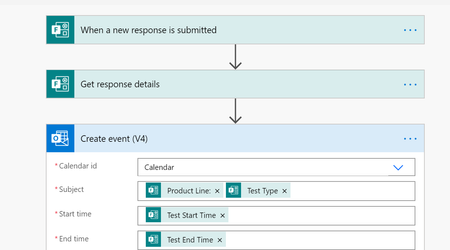
Hi all, I created a Form so other engineers could submit a request to schedule a testing time in my lab. In the form they are asked to insert the date, test start time and test end time. I created...

Maruthi Gadde
Apr 23, 2020Iron Contributor
ShaniFIn your Microsoft Form you have 3 Fields. Date, Test Start Time and Test End Time...
The Date Fields Take a Valid date.
The Start Time Should be Like 12:30
The End Time Should be Like 13:30
In the Power Automate Outlook Event action you are only passing the Start Time and the End Time. You are not giving a Date.
The Date Should be in the format 2020-04-23T05:00:00
In Your Start Date you could use DateTStartDate
make sure your users enter Time in 24 hour Format and ensure you have a validation in the powerautomate…

ShaniF
Apr 29, 2020Copper Contributor
Thanks! this was helpful. I was able to add the date to the event. thanks!
 BonnieDenhamStarApr 22, 2022Copper ContributorScreenshot?
 SobsDlangsMay 03, 2021Copper Contributor
ShaniF Please share a screenshot of how you were able to resolve this