Forum Discussion

Márton Bacsó
May 29, 2017Brass Contributor
Missing group links in OneDrive
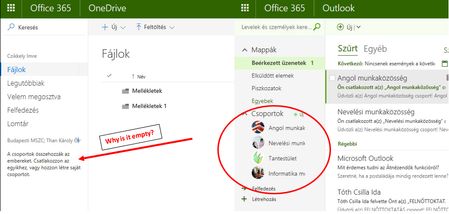
We have been using O365 Education since September in a secondary school. Some of my collagues are reporting that the links for their groups' storage space is missing under OneDrive. - The links a...

Márton Bacsó
May 31, 2017Brass Contributor
A very polite and helpful guy from Microsoft called me this morning. After trying out everything it seems that the problem can be solved by "Following" the group on the group's SharePoint site. He also talked to his supervisor and it seems that it is not a bug, but a feature. I can't see how is it better than it is used to...
Anyway... If anyone could suggest me a turn around which leaves out my colleagues clicking on the "Follow" button on all of their groups' site, that would be nice. :-)
Benjamin FLECHEL
Feb 27, 2018Copper Contributor
Hello,
We have exactly the same issue : Groups seems OK, they appear in the classical view, but not in the new one.
Did you find something to do ? Perhaps a Powershell command to force the following option for everybody ?
Regards,
Benjamin
We have exactly the same issue : Groups seems OK, they appear in the classical view, but not in the new one.
Did you find something to do ? Perhaps a Powershell command to force the following option for everybody ?
Regards,
Benjamin
- Salvatore BiscariFeb 27, 2018Silver Contributor
This behavior is by design for the Modern experience in OneDrive for Business.
See also https://blogs.technet.microsoft.com/odfb/2017/05/10/group-sites-not-visible-in-onedrive-for-business/

