Forum Discussion

I have a question about using SMTP after setting up MFA.
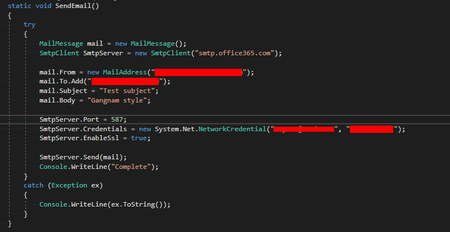

Seyoon_Park Hi, as far as I know you should be prompted for an app password when enabling MFA using smtp. Not sure what you're trying to do but sounds like something similar to this? https://docs.microsoft.com/en-us/exchange/mail-flow-best-practices/how-to-set-up-a-multifunction-device-or-application-to-send-email-using-microsoft-365-or-office-365
 Seyoon_ParkSep 28, 2020Copper Contributor
As you said, when I complete the MFA setup, a pop-up will pop up asking me to enter my app password when I log in. However, when sending an email using SMTP in code, no pop-up occurs.
I have read the article you linked, but this is also related to exchange online. What I don't understand now is what SMTP and Exchange Online have to do with it.
Can I know what Exchange Online and SMTP have to do with it?
- ChristianBergstromSep 28, 2020Silver Contributor
Seyoon_Park Hello, well according to your attached info you're using SMTP with the setting smtp.office365.com (online) to send, so would you mind elaborate what you're trying to accomplish and how your environment is set up.
- Seyoon_ParkOct 05, 2020Copper Contributor
ChristianBergstrom Hello,
Trying to accomplish:
1. Set up MFA in my account.
2. To find out if MFA has no effect on SMTP.
3. I thought setting MFA would require additional settings for SMTP, but it didn't matter at all, so I'm asking because it's werid.
My environment:
1. There is nothing but the MFA setting and the code above.