Forum Discussion

Custom notification sounds on multiple accounts in New Outlook
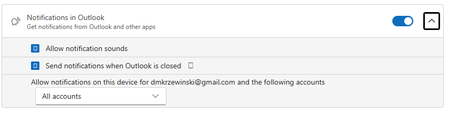

No. In the screenshot, All accounts only means that every listed account is allowed to send Windows notifications. It does not copy the primary account’s selected sound to the other accounts.
Try this:
- Open New Outlook Settings > General > Notifications.
- If an account selector appears, select each account separately and enable mail notifications and sound.
- Keep Allow notification sounds enabled in Windows and leave the account setting on All accounts.
- Send a test message to each mailbox.
If secondary accounts still use the default sound, this is a New Outlook multi-account limitation or bug. Windows treats them as notifications from the same Outlook app and provides no setting to force one custom sound across all accounts.
The practical options are to use the default sound for every account, report the behavior through Help > Feedback, or use Classic Outlook rules if different sounds are essential.
- DarylMarkAug 21, 2026Tin Contributor
Thanks, but that was actually one of the first things I tried - long before posting this question.
I'll assume (based on your response) there's not much to be done - whether bug or limitation.Maybe MS will roll out a fix at some point in the future.