Forum Discussion

Upgrade plan for Marketplace offers in admin center

 Microsoft
kitameraki_com I understand your perspective that this seems like an inconsistent customer experience. If there are buttons and menus for selecting a different plan from the M365 admin center (and this was achieved previously by your customers), then it would seem to be an expected experience by design.
The documentation you reference refers to the SaaS fulfillment API, and that one mention of the admin center may need to be corrected if out of date. Thanks for flagging this.
Customers should be able to upgrade their current plan in one of two ways:
- Customer manages the app through Teams admin center
- Customer manages the SaaS subscription through Azure portal
A customer must have subscription owner or contributor permissions to initiate a change and will only be able to change to another plan that is:
- within the same SaaS offer as the subscribed plan
- has an identical contract duration and billing frequency as the subscribed plan
There are some cases when change plan might not work:
- If the subscription is under the Tenant level with Read permissions; customers can't change the plan.
- Customer can request permissions from the person who has the Owner role on the subscription.
- If there's no payment method associated with the Azure subscription, customers cannot upgrade from free to paid plans.
- Customer should add a payment method to the desired Azure subscription or choose a subscription with existing payment method.
- If the desired plan has a minimum/maximum user limitation that doesn't include availability for the current number of users on the active subscription.
- Customer can remove excess licenses to be within the limitation before upgrading, or contact the software company to ask about available plans for the required number of users.
I hope this information helps you successfully guide your customers to manage their subscriptions to your products and change plans as desired.
- kitameraki_comMar 24, 2026Brass Contributor
hi Kyle_Callahan
Thanks for taking the time to reply.Customers should be able to upgrade their current plan in one of two ways:
- https://learn.microsoft.com/en-us/microsoftteams/purchase-third-party-apps#manage-subscriptions-in-teams-admin-center
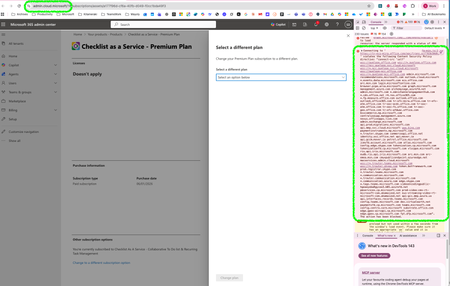
Yes they should! Unfortunately, the documentation you are sharing is not helping since it is redirecting to the exact same admin center page where the plan drop down list is empty (my screenshot).
Having developed several teams apps with SaaS subscription, I can assure you that I have successfuly tested this change plan 100 time before, and all necessary conditions are met for the change plan to work... but it does not, at least for all our apps.
The upgrade using Azure does work, but not all customers have an access to Azure.
happy to have a walkthrough with anyone about this.
Regards,
