appsource
40 TopicsWork IQ Cost and Pricing Model for Agents published in Marketplace
I would very much like to ask for assistance and input in regards of "Consumption, cost forecasting, break-even analysis and recommended customer pricing. " I believe a bit of context is required. We are about to publish two Work IQ MCP Agent in Marketplace. Both agents will be integrated to our existing Apps that are published in Marketplace. 1. iGlobe CRM for Teams and 2. iPlanner Pro for Outlook and Teams. Both Apps are multitenant Apps running on customers own tenant. The Apps can only be deployed from Marketplace. Lets use iPlanner Pro Agent as an example. In short, iPlanner Pro Agent uses Work IQ and MCP tools to understand emails, meetings and Microsoft 365 context, while iPlanner Pro turns that intelligence into structured Planner execution, including the appropriate plan, bucket, assignment, priority and supporting email context. Including saving the email or attachments on the task. A prompt could look like this "Find the latest email from email address removed for privacy reasons. Create a task for in Planner, put it in the correct Plan and bucket, assign it to the appropriate owner, set a due date for next week and save the email on the Planner Task" Work IQ and MCP provide context and intelligence, iPlanner Pro executes the structured actions, and Microsoft Planner remains the source of truth. To my understanding Work IQ API usage is billed through Copilot Credits rather than a separate per-user Work IQ license. Microsoft 365 Copilot includes Work IQ functionality within native Microsoft Copilot experiences, but third-party solutions such as iPlanner Pro consume Copilot Credits when they call Work IQ APIs. Work IQ does not require a separate API subscription, SKU or per-user licence. API usage is consumption-based and is measured in Copilot Credits. Work IQ operation Credit consumption Planning note Chat API Variable Depends on grounding, retrieval and reasoning complexity. Context API Variable Depends on the scenario and the sources used. Tool API 0.1 credit per API call Static component: $0.001 per call at $0.01 per credit. Example: 1,000 Tool API calls consume 100 credits, equivalent to $1.00 at the planning rate. Now here comes my confusion. 1. How do we know how many credits we are using with a prompt like the example I showed? the consumption is 0.1 credit per API call. 2. If I understand the above correct, the total consumption is calculated on the customer tenant. That consumption includes much more than just iPlanner Pro. Is that correct? 3. OR, will the sum of all customer using iPlanner Pro Agent be direct to us and we will be billed based on the total consumption of all our customers? If that is the case ( I don't think it is) then how do we know how much each customer consumed? 4. If consumption and billing is on the customer, how can the customer see what iPlanner Pro cost in consumed credits? This is important in regards of giving a cost forecast for customers. I am sure they would want that before start using the Agent. It is also important in regards of the question of if we should charge or offer it as a free agent? If we are billed then we will need to change for it. If the customer is billed then we probably will not be able to charge for it. I hope I have been able to explain my confusion. I tried asking contacts I have at Microsoft, but unfortunately haven't heard anything. That is why I am asking in the community. Have any one else the same challenge? what have you done? Can Microsoft assist here? I will be happy to take a Teams call and others are welcome to join. Thank you164Views0likes0Comments
Getting first customers after publishing what actually worked for you?
I published two transactable SaaS offers earlier this month (Microsoft 365 security and compliance assessment). The technical side went fine, with good support from the ISV team. Getting the offers in front of customers is where I'm stuck. So far I've reached Rewards Tier 3 and activated the listing optimisation benefit. I understand customer references are the gate to co-sell readiness, which feels like a chicken-and-egg problem when you have none yet. For publishers further along than me: what actually produced your first few customers? Was it private offers to targeted tenants, co-sell once you had references, the Marketplace Rewards activities, or something outside the marketplace entirely? I'd rather spend my limited time on what works than keep guessing.102Views0likes0Comments
Are Shopify merchants using Dynamics 365 and Microsoft 365 Copilot a meaningful market segment?
Hi Marketplace community, We are testing a market assumption before investing further in a Microsoft 365 Copilot solution for retail loyalty operations. The solution, Loyalty Manager Copilot AI, helps teams review loyalty-program health and take bounded, reviewable actions, such as approving a win-back reward, from within a Copilot conversation. Some merchants we encounter use Shopify or Shopify Plus for the storefront, while Microsoft systems support parts of the back office. Readers who want to understand or try the current app can https://marketplace.microsoft.com/en-us/product/WA200010024. We know the technical pattern exists: Shopify at the storefront, with Dynamics 365 Business Central or other Microsoft business applications behind it. What We are trying to understand is whether the user and buying pattern is large enough to matter. For retailers using Shopify together with Dynamics 365 and Microsoft 365: Are loyalty, CRM, or marketing users working in Teams and Microsoft 365 Copilot regularly? Is Copilot adoption reaching these business roles, or is it still concentrated in IT, finance, and administration? Who usually evaluates or sponsors a cross-platform loyalty solution: the merchant, a Microsoft partner, a Shopify partner, or another stakeholder? Would an AppSource solution connecting loyalty operations to Copilot fit an established workflow, or would it require creating a new behavior? We would especially value firsthand observations from merchants, ISVs, system integrators, and Microsoft partners. We are not looking for a product pitch. We are trying to determine whether this represents a meaningful audience or a narrow edge case.Lead traction from MS Teams Store vs MS Marketplace
Hello community! We have both a Teams app and a SaaS offer published in Microsoft Marketplace. We’ve noticed that we’re getting new organic installs directly from the Microsoft Teams Store, but these installs don’t seem to be reflected properly in Partner Center statistics. In particular, we can’t see enough details about these users/installs or track them in the same way we can track leads, views, and other activity for our SaaS offer. How are you tracking this audience? Is there another Microsoft report, analytics tool, or data source we should be using to understand where these Teams Store installs are coming from, at least those who click "Get it now" and don´t complete the installation. We would love to follow up them to provide security detales for their admin teams, so they can approve the installation. Would really appreciate any insights from those who have experience with this. 🙏SolvedCould Marketplace Become an AI Discovery Agent?
Today, customers still find apps in Marketplace by searching keywords or browsing categories. In a large catalog like the Marketplace, that often feels like guesswork. Publishers describe similar solutions differently, and customers rarely know the exact keywords to use. Many customers end up scrolling through listings, getting tired, and leaving. When that happens, we as publishers never get the chance to connect with them. What if Marketplace used AI to change that? Instead of searching, customers could simply describe what they need: “I need a time-tracking app that works natively in Microsoft 365 and Microsoft Teams, has light project management, follows our security policies, and keeps all company data inside our tenant in line with General Data Protection Regulation (GDPR).” An AI agent could instantly suggest the best matching apps and guide the customer directly to Get it now. And maybe the next step is even bigger: What if Marketplace became an agent or coworker for Microsoft Copilot, helping users discover and install the right apps simply by asking? Curious what others think—could this be the future of Marketplace discovery?Using OneDrive workspaces to maintain QBR history and monitor quarterly account performance changes
Hi Marketplace community, I wanted to share a practical Microsoft 365 agent pattern we have been working on for recurring account-review workflows. In merchant services, quarterly business review preparation often starts with the same basic ingredients: a CSV or TSV export, a set of merchant accounts, performance metrics, PowerPoint scorecards, and follow-up notes. The challenge is not just generating one review. It is maintaining a repeatable QBR history across many accounts and making it easier to spot what changed from one quarter to the next. With https://marketplace.microsoft.com/en-us/product/WA200010195, we are exploring a Microsoft 365-native workflow where the agent helps account teams: - Generate QBR scorecards for one merchant or multiple merchant accounts from CSV/TSV data. - Create PowerPoint outputs for each account. - Save each run into an organized OneDrive workspace. - Maintain an index of accounts and per-account status for the run. - Support follow-up workflows with draft email content. - Use sample workbook content to demonstrate quarter-over-quarter change detection across volume, authorization performance, acceptance cost, disputes, and refunds. The core adoption pattern is simple: use OneDrive not just as file storage, but as the persistent workspace for recurring business reviews. Each QBR run becomes easier to revisit, share, compare, and operationalize. For teams managing many customer or merchant accounts, this turns QBR preparation from a one-off deck-building task into a more durable account-performance workflow. I would be interested to hear how other Marketplace builders are approaching similar patterns: - Are you using OneDrive or SharePoint as the durable workspace for agent-generated outputs? - How are you helping users compare business performance across reporting periods? - Are customers asking for more “history and change tracking” rather than just one-time generated artifacts? The app is listed on Microsoft Marketplace here: https://marketplace.microsoft.com/en-us/product/WA200010195App ratings are not displayed when a Marketplace listing includes a free trial
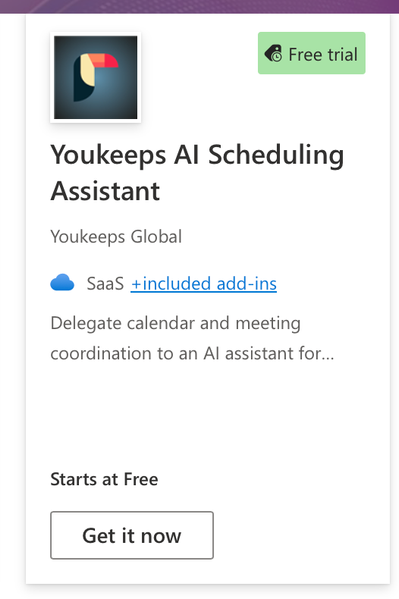
Hi community! We’ve noticed that app ratings are not displayed on Microsoft Marketplace browse and search result cards when an offer includes a Free trial badge. For example, the one listing displays its rating of 3.6 (107 ratings) directly on the card. Youkeeps AI Scheduling Assistant listing has customer ratings, but its card displays the Free trial badge without any rating information. Could you please confirm whether this is expected behavior or a display issue? Is there a way to show both the Free trial badge and the app rating on the listing card?304Views2likes1Comment
GST/VAT in Microsoft-managed countries
Hi, I am in a Microsoft -managed jurisdiction and have a transactable offer in AppSource. I have only recently onboarded some customers and I don’t fully understand how GST is being managed. We are in Scenario 5 as described in https://learn.microsoft.com/en-us/partner-center/marketplace-offers/tax-details-marketplace which means Microsoft collects from the customer at the list price + GST. Ignoring store fees for this purpose, Microsoft pays the (10%) GST to the tax authority then pays out the balance. Unfortunately, the way GST works here, we have to show the amount we receive from Microsoft as gross revenue and then deduct a further 10% to pay to the tax authorities. In other words, we get no credit for the tax Microsoft has paid. As I understand it, the publisher should invoice Microsoft for the sale price + GST then Microsoft invoices the customer at the price plus GST and claims an input tax credit for the GST it pays to the publisher. There may be some specific tax ruling that overrides this. Would be very grateful if any ISV in a similar jurisdiction has encountered this issue.
What changed for co-sell after QRP retirement — what ISVs should update now
Microsoft retired QRP last week and consolidated referrals into Partner Center. What most ISVs haven't caught yet is that the new AI-based matching reads your solution descriptions and industry tags differently than QRP did. If your listing hasn't been updated since early 2025, you may be getting matched to lower-quality leads or missed entirely. Three things worth reviewing now: your solution area tags, your customer segment fields, and your co-sell 1-pager format. Happy to share more detail on what I've seen reviewing several listings. Drop your questions below.432Views2likes5CommentsUpgrade plan for Marketplace offers in admin center
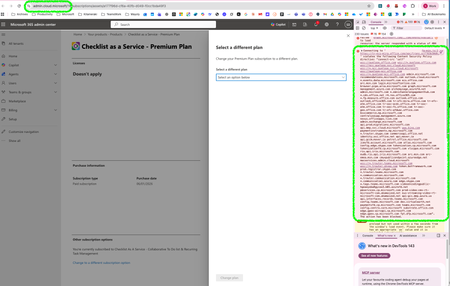
Hi Community, I’m reaching out here after spending nearly 6 months discussing an issue with Microsoft Support, without getting a satisfactory answer. We have published transactable SaaS apps in the Microsoft Marketplace. Each of our SaaS offers includes multiple plans (e.g., Premium, Pro, Leader). About six months ago, our customers started reporting that they could no longer upgrade their plan via the Microsoft 365 Admin Center. We were able to reproduce the issue ourselves. Symptom: when attempting to upgrade, the dropdown list that should display available upgrade plans is empty. This functionality worked correctly before. After multiple discussions with Microsoft Support engineers, their supervisor, and their manager, the official response we received is: “change to different plan functionality (for marketplace offers) in Admin Center is by design not enabled, which is why the dropdown does not display available plans.” This directly contradicts Microsoft documentation, which indicates that plan changes should be supported: https://learn.microsoft.com/en-us/partner-center/marketplace-offers/pc-saas-fulfillment-life-cycle Despite sharing this documentation, Microsoft Support maintains that this behavior is by design and that customers cannot upgrade plans from the Admin Center. My questions to the community: Are there ISVs here who have published transactable SaaS offers with multiple plans? If so, can your customers upgrade plans through the Microsoft 365 Admin Center? Are your customer experiencing the same issue? Can any SME confirm or contradict Microsoft Support’s statement that “by design, customer cannot upgrade plans using M365 Admin center”? For reference, here is our Microsoft Support ticket ID: 2508260010000694. I’m happy to share additional information upon request. Thank you in advance for any insights or confirmation. Sang, ps: I recently notice change of domain name in M365 admin center and the log showing this. Weird coincidence.