Forum Discussion

Static Column Data Filter
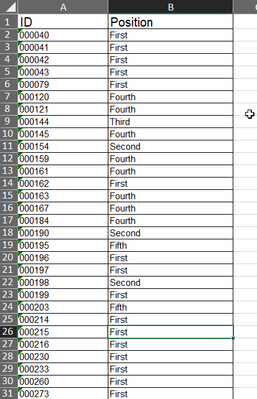
- Feb 21, 2022
Sridhar0311 the easiest is using FILTER() (which assumer you have the latest Excel)
I also took the liberty to format your data as a table but the formula could be done using row-column references instead:
=FILTER(Table2[ID],Table2[Position]=A$2,"")


In order to demonstrate that nothing is too complicated, given sufficient effort, to be made even more complicated!
One might expect the formula
= FILTER(Data[ID], Data[Position]=@position)that returns a single spilt column to generalise to return 5 columns. Since FILTER does not accept an array of criteria, one might try
= MAP(position,
    LAMBDA(pos,
      FILTER(Data[ID], Data[Position]=pos)
    )
  )
That returns an error "Nested Arrays are not supported" which is somewhat disappointing.
To get over that challenge, one can return a Lambda function that contains the list. This function, that takes a null parameter string rather like TODAY() or PI(), can be returned as a row array.
That leaves one with the problem of extracting the numbers these 'Thunks' contain without triggering further errors. The solution is to use MAKEARRAY, first picking out a single thunk from the array, then expanding it to form a column array and, finally using INDEX to select a specific value to place within the result array.
= LET(
    n, MAX(COUNTIFS(Data[Position],position)),
    lists, MAP(position,
      LAMBDA(pos,
        LAMBDA(FILTER(Data[ID], Data[Position]=pos)))),
    item, MAKEARRAY(n,5,
      LAMBDA(r,p,
        INDEX(INDEX(lists,1,p)(),r))),
    IFERROR(item,"")
  )
This is all pretty heavy going and probably not justified in the present situation as the result does not need to be an array. There are situations, though, where the result array is used as further processing steps, in which case the technique is invaluable.