Forum Discussion

Search for (an exact?) match in C, that is contained in the text on B.
 Sep 20, 2023
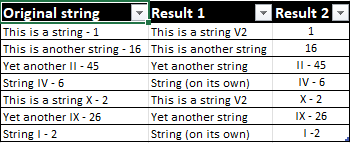
In my first reply i didn't realize that in column [Cut down strings] there are dashes in the end in the first 2 rows: "This is a string -" and "This is another string -". However i'd suggest to use a table without dashes like this: "This is a string" and "This is another string". In the attached file i've changed the formula for column [Result 2] to return the results "1" and "16" and "X - 2".
I don't know why it doesn't work in the other file. I'd delete both tables of the other file and start over.
Does the attached suggestion help you? The formulas in the file have to be entered with ctrl+shift+ enter if one doesn't work with Office 365 or Excel for the web or Excel 2021.

After reading a bit about what you said about CTRL + SHIFT + ENTER, I think I got why I should use that, but it doesn't seem to work when I modified the formula for the table. It does work in the file you sent, but on the table, I get the formula written if I convert it to an array.
I don't think I changed the logic of the formula you made, just the source of the data, but for some reason, that won't work. That being said, without doing that, it luckily seems to work in a table as a simple formula.
- OliverScheurichSep 20, 2023Gold Contributor
In my first reply i didn't realize that in column [Cut down strings] there are dashes in the end in the first 2 rows: "This is a string -" and "This is another string -". However i'd suggest to use a table without dashes like this: "This is a string" and "This is another string". In the attached file i've changed the formula for column [Result 2] to return the results "1" and "16" and "X - 2".
I don't know why it doesn't work in the other file. I'd delete both tables of the other file and start over.
- JorgeE570Sep 20, 2023Copper ContributorAmazing!
I'll be honest, it's quite late here, and I don't think I'll get those formulas. I'll take a look at them tomorrow to try and figure out how it works. Nevertheless, I can confirm that these work perfectly fine!
I can't help but ask: In the last file you sent, the curly braces (formula as an array? I have a VERY basic understanding of this, as I'd never heard about it, and had some 10 minutes of search on the topic) don't seem to do anything. So the formula "as is" and as an array seems to work the same. Could you explain the purpose of this?
Last, but not least, I can't thank you enough for this! I spent... I don't know how many, but many hours trying to figure this out.
Thank you, thank you, thank you!!!