Forum Discussion

Top n vs. Others in Excel
- Feb 04, 2026
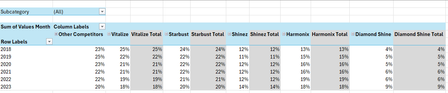
Thank you very much for providing the full context. Looking at the chart I better understand what Your challenge was 🤔
The attached option uses the same approach we've been discussing these last days. In summary:
- TableSource is filtered by the Slicer(s)
- PIVOTBY calc. the %age by [Year] & [Brand] relative to the Row Total. Data are sorted DESC according to [Brand] "best Total"
- The formula (below):
- Takes the PIVOTBY resulting array to Group [Brand] above - if any - the TOPN parameter
- Padds the [Brand] left with the appropriate number of Zero Width Space chars. to ensure [Brand] will be ordered according to there rank in the PivotTable & Chart, with [Grouped Brand] always as the last [Brand] whatever its rank is
- Unpivots the data as a single array that's used as PivotTable Data Source
PivotTable
- [Brand] must be sorted A-Z
- Until MSFT releases the PivotTable Auto Refresh functionality, any change on the Slicer(s) requires a Refresh of the PivotTable
Side effect of the Zero Width Spaces
- None on screen
- According to my researches none on printing - to be checked though...
- [Brand] on PivotTable/Chart <> TableSource[Brand]*
* I will provide more information on a separate post later
Formula
I did my best to make the variable names as clear as possible and decomposed as much as possible - any question let me know:
// Source_PivotTable
=LET(
  TOPN_value,         IF( ISBLANK( SETTINGS!TOPN_Default ), 5, SETTINGS!TOPN_Default ),
  GROUPED_BrandName,  IF( ISBLANK( SETTINGS!TOPN_GROUPED_Names ), "Other Brands", SETTINGS!TOPN_GROUPED_Names ),

  pivotedAllBrands,
    PIVOTBY(
      TableSource[Year], TableSource[Brand], TableSource[Values Month],
      PERCENTOF,
      0, 0, 1, 0, -2,
      TableSource[NOT_Filtered],
      1
    ),

  OtherBrand_Exists?,           COLUMNS( pivotedAllBrands) -1 > TOPN_value,
  groupedOtherBrand_If_Exists,
    IF( OtherBrand_Exists?,
      LET(
          TopnBrand_series,     CHOOSECOLS( pivotedAllBrands, SEQUENCE(, TOPN_value, 2 ) ),
          TopnBrand_values,     DROP( TopnBrand_series, 1 ),
          GroupedBrand_values,  BYROW( TopnBrand_values, LAMBDA(rw, 1 -SUM(rw) ) ),
          AllBrand_series,      VSTACK(
                                  HSTACK( TAKE( TopnBrand_series, 1 ), GROUPED_BrandName ),
                                  HSTACK( TopnBrand_values, GroupedBrand_values )
                                ),
          AllBrand_series
      ),
      pivotedAllBrands
    ),

       prep_UnPivoting_BEG,  "------------------------------------------------------",
            LeftCol_ToDrop,   --NOT( OtherBrand_Exists? ),
                brandNames,   DROP( TAKE( groupedOtherBrand_If_Exists, 1 ),, LeftCol_ToDrop ),
                brandCount,   COLUMNS( brandNames ),
           brandRanks_Desc,   SEQUENCE(, brandCount, brandCount, -1 ),
          paddedBrandNames,   REPT( UNICHAR(8203), brandRanks_Desc ) & brandNames,
                     years,   DROP( TAKE( pivotedAllBrands,, 1 ), 1 ),
                    values,   DROP( groupedOtherBrand_If_Exists, 1, LeftCol_ToDrop ),
            valuesNotBlank,   NOT( ISBLANK( values ) ),
       prep_UnPivoting_END,  "------------------------------------------------------",

    UnPivotedData,
      LET(
        UnPivot,            LAMBDA(array, TOCOL( IF( valuesNotBlank, array ) ) ),
        UnPivoted_years,    UnPivot( years ),
        UnPivoted_brands,   UnPivot( paddedBrandNames ),
        UnPivoted_values,   TOCOL( values ),
        HSTACK( UnPivoted_years, UnPivoted_brands, UnPivoted_values )
      ),

  VSTACK( {"Year", "Brand", "Value"}, UnPivotedData )
)
Cheers
Lz.

Hi Lorenzo ,
I'm so sorry for responding late. This didn't show up in my notifications and it only came in my email today.
Yes, I'd love to learn more about this. In fact I was thinking about the Pivot Auto refresh earlier this week and I think it would be a great idea to have some visual cue reminding the user to refresh.
I haven't made any changes to the workbook (PivotChart_v2) that you sent.
Definitely eager to learn more...
Best regards,
YP

Hi Anonymous29007 / YP
I'm so sorry for responding late. This didn't show up in my notifications
No worries at all (this site currently bugs on file attachments & notifications)
- Defined Name 'PivotBrands' that refers to the top-left cell of the PivotTable (also renamed PivotBrands)
- For clarity/alignment, renamed 'Source_PivotTable' as 'Source_PivotBrands'
- On CALCS!F4 an on-sheet LAMBDA named 'PivotBrands_Refresh_Status'
- (Done on UI sheet) Wherever you want enter =PivotBrands_Refresh_Status & copy/paste special the format* (only) from CALCS!F4 (* Conditional Format w/Icon Set)
NB: this doesn't prevent you from renaming the sheets
PivotBrands_Refresh_Status:
=LAMBDA(pivot_table,pivot_data_source,
  LET(
    ASSUMPTION_1,   "Only 1 row_field and only 1 column field in 'DataSource' are Pivoted.",
    ASSUMPTION_2,   "The same 'col_field_name' is used in 'DataSource' & 'pivot_data_source'.",

    Pivoted_DataSource,
      LET(
         PivotSource_array, DROP(pivot_data_source, 1),
                   pivoted, PIVOTBY( CHOOSECOLS(PivotSource_array, 1), CHOOSECOLS(PivotSource_array, 2), CHOOSECOLS(PivotSource_array, 3),
                             SUM, 0, 0, 1, 0, -2
                            ),
           SPECIFIC_CUSTOM, "Actual pivot_table Headers are preceded w/Zero Width Spaces to push 'TOPN_GROUPED_Names' at end.",
           cleaned_headers, SUBSTITUTE( TAKE(pivoted, 1), UNICHAR(8203), ""),
             initial_order, SEQUENCE(, COLUMNS(pivoted) ),
              custom_order, IF( cleaned_headers = SETTINGS!TOPN_GROUPED_Names, MAX(initial_order), initial_order -1),
         SORTBY( pivoted, custom_order )
      ),
    Row_fields_count, ROWS(Pivoted_DataSource) -1,

    Col_fields_count,
      LET(
                 DataSource,  TableSource[#All],
               data_headers,  TAKE(DataSource, 1),
        data_col_field_name,  INDEX(pivot_data_source, 1, 2),
       data_col_field_index,  XMATCH(data_col_field_name, data_headers),
       ROWS( UNIQUE( CHOOSECOLS( DROP(DataSource, 1), data_col_field_index) ) )
      ),

   PivotTableAs_array,
     LET(
         PivotStart_address,  CELL("address", pivot_table),
            pivot_start_row,  VALUE( REGEXEXTRACT(PivotStart_address, "(?<=\$)\d+$" ) ),
            pivot_start_col,  COLUMN( INDIRECT( REGEXEXTRACT(PivotStart_address, "(?<=\$)[^$]+(?=\$)" ) & "1" ) ),
          Pivot_ASSUMPTIONS,  "No field in Filters area & 1 field in Rows area",
              pivot_end_row,  pivot_start_row +1 +Row_fields_count,
      pivot_max_bottom_addr,  ADDRESS(pivot_end_row, pivot_start_col +Col_fields_count),
       pivot_max_used_range,  INDIRECT( TEXTJOIN(":",, PivotStart_address, pivot_max_bottom_addr) ),
            array_resized_V,  DROP(pivot_max_used_range, 1),
            array_resized_H,  FILTER(array_resized_V,
                                MMULT( SEQUENCE(, Row_fields_count +1), --NOT( ISBLANK(array_resized_V) ) )
                              ),
      IF( TAKE(array_resized_H, 1, 1) = "", array_resized_H,
        VSTACK( HSTACK( "", DROP( TAKE(array_resized_H, 1),, 1) ), DROP(array_resized_H, 1) )
      )
    ),

   OUTPUT,  "1 if pivot_table is up to date, 0 otherwise",
   N( SUM( TOCOL(--(PivotTableAs_array = Pivoted_DataSource), 2) ) = COUNTA(Pivoted_DataSource) )
 )
)(PivotBrands, Source_PivotBrands)
Any question let me know
Cheers
Lz.
- Anonymous29007Feb 13, 2026Brass Contributor
Hi Lorenzo,
Thank you so much for this improvement. It works well on my end.
I never knew this challenge would be appear deceptively simple 😅. I truly learnt a lot from how you approached this and it's given me a newfound interest for advanced Excel. Thank you for sparking my interest in advanced Excel.
Your time, dedication and passion for solving these problems, truly amazes me. Some day, I wish I could be half of the exceptional problem solver you are 😀.
Thank you so much once again!
Kind regards,
YP
- LorenzoFeb 17, 2026Silver Contributor
Hi Anonymous29007 / YP
I don't think the 'Zero Width Space' hack has a lot of used cases so I took a bit of time to document it, just in case a similar requirement surfaces in the future… While doing this I realized there was an opportunity to do a tiny - really tiny - optimization on the formula you've been using so far. In attached v2b, I changed:
brandRanks_Desc, SEQUENCE(, brandCount, brandCount, -1 ),with:
brandRanks_Desc, SEQUENCE(, brandCount, brandCount -1, -1 ),the reason is explained in NOTES #1 of the HOW-TO_PVT_CustomFieldsOrder file, with an example in sheet 'AS_LAST'
Hope this makes sense. Any question let me know
Cheers
Lz.PS: The Chart issue with the dynamic array has been reported to MSFT…
- Anonymous29007Feb 18, 2026Brass Contributor
Hi Lorenzo,
Thank you so much for documenting the "Zero Width Space" approach and for spotting that optimisation. I really appreciate the extra effort. This will be really helpful to others who might have similar use cases who will now have the notes and example for reference. The change to the SEQUENCE formula makes sense, and I’m fine adopting it.
Thanks again for sharing the HOW-TO_PVT_CustomFieldsOrder file and the v2b file. I really appreciate you going the extra mile for keeping the solution tidy! :)
Kind regards,
YP