Forum Discussion

Mirror cell including highlight color
- Mar 05, 2022
Use conditional formatting to highlight information
You can apply conditional formatting to a range of cells (either a selection or a named range), an Excel table, and in Excel for Windows, even a PivotTable report.
Highlight patterns and trends with conditional formatting
You can format a whole cell range and vary the exact format as the value of each cell varies.
Hope I was able to help you with this information.
I know I don't know anything (Socrates)

Use conditional formatting to highlight information
You can apply conditional formatting to a range of cells (either a selection or a named range), an Excel table, and in Excel for Windows, even a PivotTable report.
Highlight patterns and trends with conditional formatting
You can format a whole cell range and vary the exact format as the value of each cell varies.
Hope I was able to help you with this information.
I know I don't know anything (Socrates)
 KoniseggMar 05, 2022Copper Contributor
NikolinoDE thanks for the reply.
I understand how to use conditional formatting for a specified range but none of these ways describe how to mirror another cell.
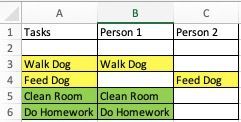
I want to exactly mirror cell A1 to cell C1 so that anytime I change the text or highlight color of A1, the changes will automatically happen to C1. That way I am only updating one cell, but all the others mirroring it will change as well.
- NikolinoDEMar 05, 2022Platinum Contributor
With VBA I can only help out here.
It's the easiest and fastest:).
Private Sub Worksheet_SelectionChange(ByVal Target As Range)
Sheets("Tabelle1").Range("A1").Copy Destination:=Sheets("Tabelle1").Range("C5")
End Sub
In the attached file the example
Hope I was able to help you with this information.
I know I don't know anything (Socrates)
- SPS_25Feb 07, 2025Copper Contributor
I am running into same issue - I want to mirror not just data, but formatting. I did download the mirror_cell.xlsm example, but I am unsure of how to perform this. Please guide me to do so, thank you
