Forum Discussion

How to fill a range of Sheet A with data from Sheet B by repeating this action for each value
Hi,
I have two sheets A & B.
- Sheet A has a table where A1:H1 is the header. The range C2:C9 of this table is blank but there is data in the ranges A2:B9 and D2:H9.
- Sheet B has data in the range A1:A43.
I have to fill the range C2:C9 of Sheet A with data from Sheet B by repeating this action for each value in Sheet B.
As variant
function main(workbook: ExcelScript.Workbook) {

    const data = workbook.getWorksheet("SheetB")
        .getUsedRange().getValues().slice(1)
    const range = workbook.getWorksheet("SheetA")
        .getRange("A2:H10")

    let i = 0
    for (let item of data) {
        let next = range.getOffsetRange(9 * i, 0)
        i > 0 ? next.copyFrom(range) : ''
        next.getColumn(2).setValues(item[0])
        i += 1
    }
}

11 Replies
- SergeiBaklanDiamond Contributor
As variant
function main(workbook: ExcelScript.Workbook) { const data = workbook.getWorksheet("SheetB") .getUsedRange().getValues().slice(1) const range = workbook.getWorksheet("SheetA") .getRange("A2:H10") let i = 0 for (let item of data) { let next = range.getOffsetRange(9 * i, 0) i > 0 ? next.copyFrom(range) : '' next.getColumn(2).setValues(item[0]) i += 1 } } Dan1ExcelUserCopper Contributor
SergeiBaklanyour formula works but there are three extra rows between each tables after it pasted the range A2:H10 with the cell values it copied from Sheet B.
Many thanks!
- SergeiBaklanDiamond Contributor
Dan1ExcelUser , in my test I have such data in SheetA
and in SheetB
assuming rows below are blank, not ones with empty strings ""
Result is without extra rows
If problem still exists perhaps you may share workbook with actual data structure removing sensitive information.
- Dan1ExcelUserCopper Contributor
****I updated the screenshot because there was sensitive information.*****
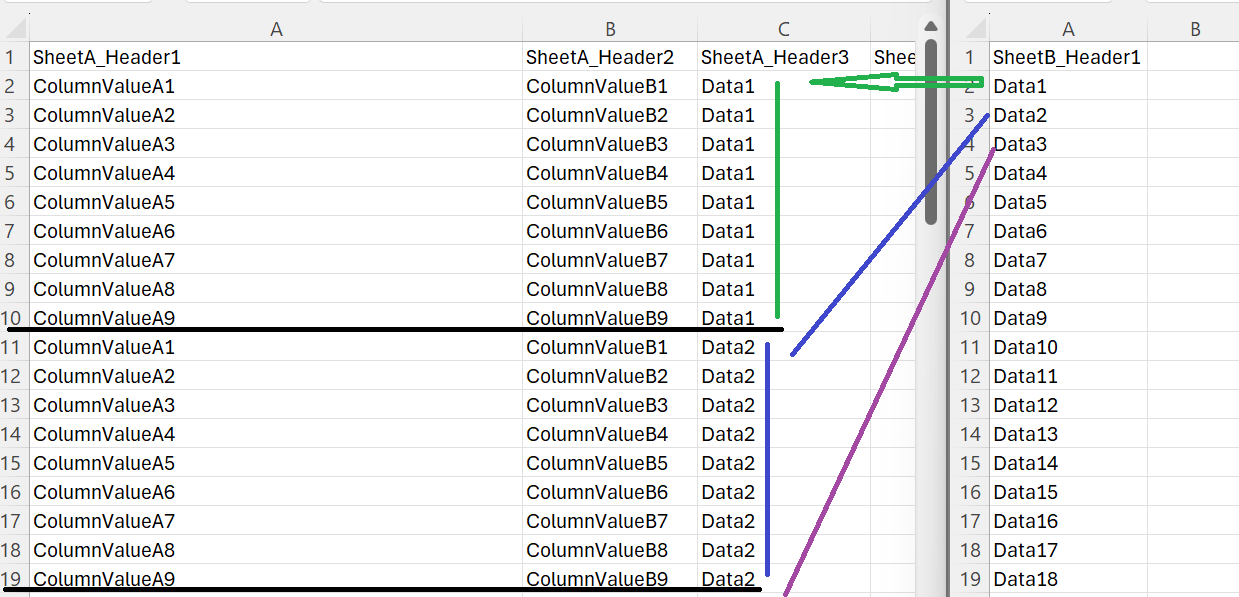
Values copied from Sheet B are text and all of them are different. However, all Sheet A values are the same. It's like I'm making new tables in Sheet A as many values there are in sheet B by copying and pasting them into the column C of Sheet A.
So, I think that I need a macro to do that because I used a script to record my actions unfortunately it doesn't work:
- Copy Data1 from Sheet B
- Paste it into column C of Sheet A
- Copy the range A2:H10 of SheetA with the new values added into the column C
- Paste it below
- Replace the Data1 previously copied by Data2
- and repeat step 3-5 for Data3 and so on.
Do you have any idea how can I improve the script or create the macro?
 Patrick2788Silver Contributor
I don't see any reason why m_tarler 's solution does not accomplish this task. If each item is not repeated a fixed amount of times then something more sophisticated would need to be done. From what I gather with your example, it's fixed at 9 times each.
- Dan1ExcelUserCopper Contributor
Ok I understand but it doesn't work for me.
- m_tarlerBronze Contributor
Still want more info. For example in the image you copy Data1 and Data2 9x each but how do you decide that? Is that a fix number (i.e. always 9)? Is that based on the values in column A repeating the cycle and if so will the same value always be first (e.g. "ORA_AR_ACCOUNTS_RECEIVABLE_MANAGER_JOB" is always 1st) or does it dynamically have to determine the repeat? Will the repeat count always be the same at least in a given data set?
A relatively simple way to create a list with N duplicates is
=TOCOL( CHOOSECOLS( [array], SEQUENCE( , N, 1, 0) ) )
you may want to further TAKE only a portion of [array] which may include DROP alreay used values and TAKE a length = ROUNDUP( [target array] / N ) or something like that
As for:
" and deleted the cell value of Sheet B that I have previously copied/pasted"
that is not possible using a formula (you would need to use a Macro or Script to do something like that) or Manually copy the "calculated" values and paste values and then delete the values on the other list. OR just keep an ongoing list and never delete, just let the formula keep going up.
Hopefully that gives you ideas on how to do it or at least on what and type of additional info that would be useful to help.
- Dan1ExcelUserCopper Contributor
Thanks for your formula but it doesn't work or I don't see how to use it.
- Dan1ExcelUserCopper Contributor
Hi, thanks for your help.
- You are right, Sheet B has 43 rows and 1 column (range A1:A43), and Sheet A has 9 rows and 8 columns (range A1:H9);
- But the column C (range C2:C9) of Sheet A is blank;
- As you can see in attachment, I have to fill this range by copying one cell value from Sheet B to fill column C of Sheet A.
- And, to repeat the copy/paste action one by one for each cell value in Sheet B but I have to duplicate before the data of Sheet A and deleted the cell value of Sheet B that I have previously copied/pasted.
- m_tarlerBronze Contributor
Hi, but we are missing some information here.
I have to fill the range C2:C9 of Sheet A with data from Sheet B by repeating this action for each value in Sheet B.
What action? and also you have 8 rows on Sheet A being filled by 43 rows of Sheet B? That might be addressed as part of the "this action" but the statement indicates "this action for each value in Sheet B" so that doesn't add up either.