Forum Discussion

Dan1ExcelUser
Feb 05, 2025Copper Contributor
How to fill a range of Sheet A with data from Sheet B by repeating this action for each value
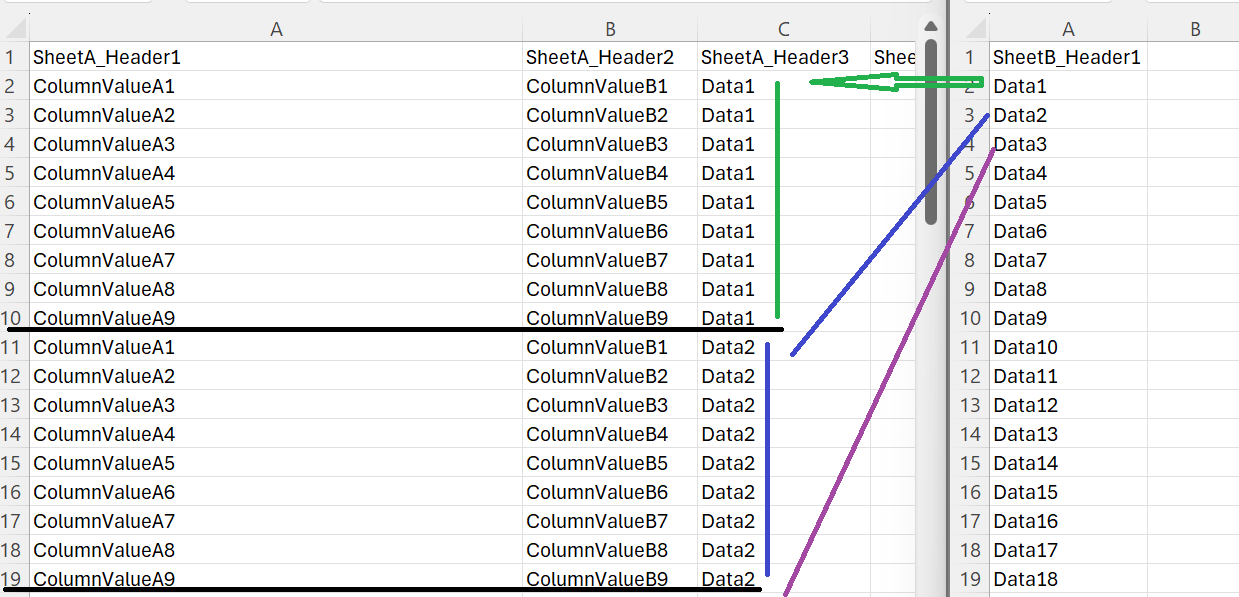
Hi, I have two sheets A & B. Sheet A has a table where A1:H1 is the header. The range C2:C9 of this table is blank but there is data in the ranges A2:B9 and D2:H9. Sheet B has data in the range A...
- Feb 10, 2025
As variant
function main(workbook: ExcelScript.Workbook) {

    const data = workbook.getWorksheet("SheetB")
        .getUsedRange().getValues().slice(1)
    const range = workbook.getWorksheet("SheetA")
        .getRange("A2:H10")

    let i = 0
    for (let item of data) {
        let next = range.getOffsetRange(9 * i, 0)
        i > 0 ? next.copyFrom(range) : ''
        next.getColumn(2).setValues(item[0])
        i += 1
    }
}


Dan1ExcelUser
Feb 05, 2025Copper Contributor
Hi, thanks for your help.
- You are right, Sheet B has 43 rows and 1 column (range A1:A43), and Sheet A has 9 rows and 8 columns (range A1:H9);
- But the column C (range C2:C9) of Sheet A is blank;
- As you can see in attachment, I have to fill this range by copying one cell value from Sheet B to fill column C of Sheet A.
- And, to repeat the copy/paste action one by one for each cell value in Sheet B but I have to duplicate before the data of Sheet A and deleted the cell value of Sheet B that I have previously copied/pasted.