Forum Discussion

Help with Linking Columns
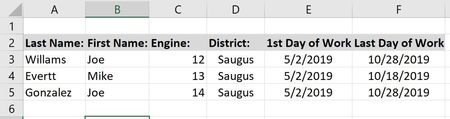

here is the actual spread sheet. thank you again so much Twifoo for your time. So as more people add to the master list it automatically links more people to the designated worksheet that they chose under "Unit" So when i click on Engine 12 worksheet it will show me all the people that are on engine 12 instead of sorting through the Master worksheet. thank you so much Sir. Twifoo

- spalmerMay 05, 2019Iron Contributor
ok i did it. So if Mike were typing all his info in, all that would auto populate in the Engine 12 Worksheet. Thank you Sir
- TwifooMay 06, 2019Silver Contributor
In the attached file, I modified the Column Labels in G4, H4, and K4 in the Master Sheet to CPR Expiry, Evaluation, and Card Expiry. The corresponding Column Labels in Engine 12 Sheet were also modified to conform thereto. The purpose of the modification is to make those Column Labels unique. You can further modify such Column Labels, provided you ensure they are unique.
In the Master Sheet, I added a Helper Column for Count with this formula:
=COUNTIF(L$5:L5,L5)
In the Engine 12 Sheet, I also added a Helper Column for Count with this formula:
=ROW()-2
Note that in the Engine 12 Sheet, I inserted a top row, wherein A1 returns the Sheet Name with this formula:
=RIGHT(CELL("filename",A1),
LEN(CELL("filename",A1))-
FIND("]",CELL("filename",A1)))The formula in A3, copied down rows and across columns, in the Engine 12 Sheet is:
=IFNA(INDEX(Master!$B$5:$M$92,
MATCH($A$1&"|"&$K3,INDEX(Master!$L$5:$L$92&"|"&Master!$M$5:$M$92,0),0),
MATCH(A$2,Master!$B$4:$M$4,0)),"")If the foregoing formula fulfills your requirements, you can do the same in the other Engine Sheets.