Forum Discussion

Help for ERM software migration using Excel
- Apr 07, 2022
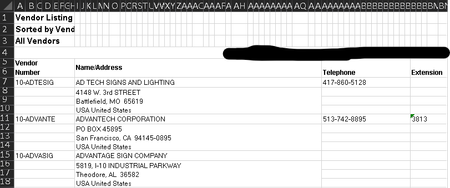
This is a first attempt to 'put my money where my mouth is'. It is not elegant, but I was struggling with the irregularities in the data.
LoadDataλ
= LAMBDA(vendor, idx,
     LET(
        inputCol, INDEX({1, 2, 5, 2, 2, 2, 2, 2, 2, 3, 4}, idx),
        inputEntry, INDEX({0, 0, 0, 1, 2, 3, 4, 5, 6, 0, 0}, idx),
        item, IF(
            inputEntry,
            SplitAddrλ(INDEX(rawData, 2 + 4 * (vendor - 1), 2), inputEntry),
            INDEX(rawData, 1 + 4 * (vendor - 1), inputCol)
        ),
        item
     )
  );

rawData = RawData!$A$5:$E$16;

SplitAddrλ
= LAMBDA(ref, k,
    INDEX(TEXTSPLIT(ref, , CHAR({44, 10}), FALSE, " "), k)
  );


Interesting. Let's first see if there's a simple way to do this. Do you have any choices on how you receive that data from Sage100?
I ask because I've seen something similar happen when I get a report from American Express on our monthly charges: since I'm bringing it into Excel, and they give a choice of downloading their data as Excel or as CSV (comma separated value), I naturally picked "Excel"...but somebody at their end thinks it's helpful to make the Excel download "pretty," so they've added colors and formatting, so that the addresses appear as what you're showing, multiple lines!!! It's NOT exported as an Excel table, which is just stupid, frankly, on their part.
But the CSV export from Amex is perfectly useable, and is in the kind of format you are wanting to have.
So my first question: can you get the data from Sage100 as CSV or some other format that is closer to what you need in the first place?

To top this off, that list started out as just shy of 10,000 vendor entries, and our team had to delete old/unused vendors manually, one by one, to finally curate the file as it is now. If we attempted to re-run reports, we would have to start from scratch, basically, putting us possible weeks over deadline.
I absolutely abhor Sage's UI.
- keonijaredApr 07, 2022Copper Contributormathetes - sorry, I am new to this forum, and wanted to make sure I tagged your response properly. Thanks so much for even replying, really.
- mathetesApr 07, 2022Gold Contributor
Well, I wish you well. Looking even more closely at that mess they've given you, it looks even harder given that it would appear at least as if they merged a bunch of cells to make the three lines of address appear as a single (merged) cell. So to read and parse out each line, and then, in the case of the state and zip, different parts of one line......that gets very tricky.
There may be some other Excel experts here who can help. My own skills are more limited
If you haven't done so, though, I'd certainly give Sage100 a call to compliment them on how pretty their data looks and then, getting to the point, complain about how utterly useless it is! Maybe they don't realize it! But you'd think that a company involved in data processing would have one or two people who know that databases work better with addresses broken up into their discrete components. In fact, a call or letter to a senior person (even the President) might get results that you don't get from the folks down the line.
- keonijaredApr 07, 2022Copper ContributorAye mathetes, I very much appreciate even taking a look. Yes, the issue is that ANY reports Sage100 exports to Excel (data-only, workbook, or otherwise) has these merged cells like you see, and other issues like putting the addresses for each vendor in the same column as the name.... Ugh.
I very much concede that I'm not a master at Sage, but I definitely looked through my options before committing so much time on the report we edited down, and this was the closest thing I could create from it.
I'm attempting now to use Text to Columns, using CTRL+J for carriage return as a delimiter to try and split the name/address column up into different columns, but still running into issues here. At any rate, thank you so much, and I appreciate the well wishes. I hope someone out there looks at this and instantly can say I'm missing something easy here.