Forum Discussion

Get the total time between multiple timestamps during the day
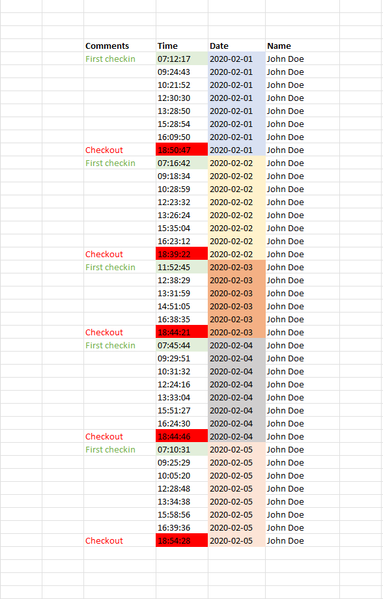
- Jul 25, 2022
scaffnull Just saw your question about additional names. Here is a table for days and names:
=MAXIFS(Table1[Time],Table1[Date],F3#,Table1[Name],G2#)-MINIFS(Table1[Time],Table1[Date],F3#,Table1[Name],G2#)Were Table1 is were the data is, F3# is a formula =UNIQUE(Table1[Date]) with all the unique dates and the G2# is a formula with all the unique names.
See attached.

mtarler Thank you for your help. Is there a way you would have a similar solution to the photo I attached?
I'm trying to calculate the total time the person has checked in for that day, and also get a value for total time outside. So "Gate 1 In" means the person checks in, "Gate 1 Out" means the person checks out.
Thank you for any kind of help.

scaffnull so I have a number of questions that need to be considered but a 'simple' answer is that you might want a formula like:
=SUMIFS(Table1[Time],Table1[Date],date,Table1[Name],name,Table1[Gate],"Gate 1 out")-
 SUMIFS(Table1[Time],Table1[Date],date,Table1[Name],name,Table1[Gate],"Gate 1 in")
so basically you sum all the time stamps for that date and name going out minus the time stamps going in.
Then you have all the questions:
how to determine the name and date and location of those formulas. So will that list always be formatted that way? does the output have to be centered like that? Will you add the formulas and such manually? For the time "out" is that 24hours - time in or ONLY the time out in BETWEEN the in times? Is there a chance they will clock "out" after midnight?
So I could see creating a formula that could ASSUMING that particular sorting/list order it would automatically list the requested outputs in the first few lines of the grouping (i.e. IF the date/name changed 1,2,3... lines above then output ... formula). BUT I think a separate table like the solution given above would be cleaner.
- scaffnullAug 02, 2022Brass ContributorWow! Really, thank you so much! Great job. Real excel guru 🙂
- mtarlerAug 02, 2022Silver Contributor
scaffnull So I just piled them all into 1 equation. It isn't pretty but may do your needs:
=CHOOSE(MIN(5,COUNTIFS(Table3[[#Headers],[Name]]:[@Name],[@Name],Table3[[#Headers],[Date]]:[@Date],[@Date])),
   [@Name] & " : " & TEXT( [@Date],"yyyy-mm-dd"),
   "Total time In: " & TEXT(SUMIFS([Time],[Name],[@Name],[Date],[@Date],[Gate],"*Out")-SUMIFS([Time],[Name],[@Name],[Date],[@Date],[Gate],"*In"),"h\h m\m"),
   "Total time out: " & TEXT(MAXIFS([Time],[Name],[@Name],[Date],[@Date],[Gate],"*Out")-MINIFS([Time],[Name],[@Name],[Date],[@Date],[Gate],"*In")-SUMIFS([Time],[Name],[@Name],[Date],[@Date],[Gate],"*Out")+SUMIFS([Time],[Name],[@Name],[Date],[@Date],[Gate],"*In"),"h\h m\m"),
   "Total: " & TEXT(MAXIFS([Time],[Name],[@Name],[Date],[@Date],[Gate],"*Out")-MINIFS([Time],[Name],[@Name],[Date],[@Date],[Gate],"*In"),"h\h m\m"),
"")
see attached
- mtarlerAug 01, 2022Silver ContributorIt appears your 'formulas' are all off by a column, but I figured it out I think. That said you should know about FORMULATEXT() so you don't have to copy and paste or retype the formula you just use that formula where you want to show the corresponding text of the formula and it updates when you update or edit the original formula.
w/r to this sheet, can you attach a copy?
as for total in and total out, did you try the SUMIFS formula I posted above? - scaffnullAug 01, 2022Brass Contributor
mtarler Thanks again for an answer.
To answer your questions -
The data extracted just comes as text, so I have just formatted a table. And on the right hand side of the table is just notes I made (doesn't have to be like that). I will add data that comes in, and just update the formula to take the updated rows.
For the time "out" is 24 hours, so total time from first check in to last time check out for that day. There won't be a scenario where they check out after midnight.
The only issues that could happen is if the check in / out gate doesn't work and they have two "check in/out" after each other. But that I can sort out and remove one row, because those times it typically diff 4-5 seconds.