Forum Discussion

Fuzzy lookup multiple criteria
- May 20, 2023there are a few options. I just copy useful formulas to a single workbook so I know where to find them.

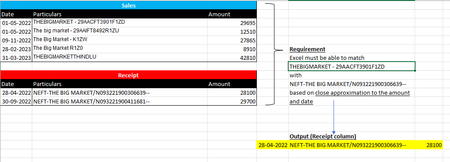
Many thanks, sir. I'll definitely give it a shot. Hope this meet the two requirements of matching with Date and Amount. I apologise for the file that is attached regarding the example.

g_avinash So I forgot to check / use your file so I'll delete my other file (prevent confusion) and attach this file which is your file with my NearMatch lambda added. I then used this equation:
=LET(nm,FILTER($A$11:$C$12,($B$11:$B$12=NearMatches(B3,$B$11:$B$12,,,," ")),""),XLOOKUP(C3,TAKE(nm,,-1),nm,"",-1))to find the near matches then to find the nearest $$ less than or equal to the value. I did NOT add any date condition as you haven't noted what that should be and you still need to determine how $$ and date should be prioritized. is a date 'close by' more important that an amount close to the value? how much so? how to balance the 2?
As another thought, if you want to go down the AI road, Excel has integrated an AI API call. See this article if you are interested:
- g_avinashMay 19, 2023Copper Contributor
Sir I have made the necessary changes to acomodate the formula, but it is not working. File attached.
Sir, you can see in the screenshot that the formula has fail to compare with A2 & E15
- mtarlerMay 20, 2023Silver Contributor
when I opened the file the custom Lamabda function wasn't in there anymore. When I added it back here is the result:
- g_avinashMay 20, 2023Copper Contributor
Thank you very much!
Sir, how to reuse the lambda function. Where can I save the custom formula "NearMatches" that you have created? so that I can reuse the same formula in other workbooks.
- g_avinashMay 19, 2023Copper ContributorThank you sir.
