Forum Discussion

Extracting table values if values in two columns have identical values in other rows
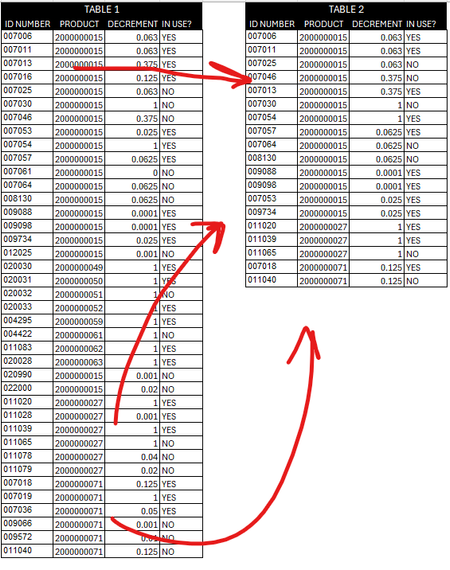

LachlanB98 With 40,000+ rows of data, efficiency is definitely a concern when using a formula-based method. Might I suggest that you first concatenate the Product and Decrement columns into a single criteria range, then use the UNIQUE function with the optional [exactly_once] argument set to TRUE. From there, the table can be filtered using the ISNA / XMATCH method to exclude all records that appeared only once. For example:
=LET(
    arr, C3:C41 & "|" & D3:D41,
    unq, UNIQUE(arr,, TRUE),
    FILTER(B3:E41, ISNA(XMATCH(arr, unq)))
)
However, to make this method perform as efficiently as possible when dealing with large datasets, move the arr and unq variables to their own spilled ranges in the worksheet and avoid the LET function altogether. For example:
Cell G3:
=C3:C40002 & "|" & D3:D40002

Cell H3:
=UNIQUE(G3#,, TRUE)

Cell J3:
=FILTER(B3:E40002, ISNA(XMATCH(G3#, H3#)))
Note: when testing this method with 40,000 rows of data, the calculation time was approx. 7 seconds with LET and only a fraction of a second without. I'm not sure if this is just a bug with the current version of MS365, but I don't remember there ever being an efficiency problem in the past using XMATCH with arrays vs ranges.
See attached...

Great point.
However, if use XMATCH with binary search it works fast
=LET(
  pd,  product & "| " & decrement,
  u,   SORT( UNIQUE(pd,,1) ),
  f,   FILTER( table, ISNA( XMATCH(pd,u,,2) ) ),
  VSTACK( {"ID NUMBER","PRODUCT","DECREMENT","IN USE?"}, f )
)- PeterBartholomew1Jun 04, 2024Silver Contributor
Well spotted! And I think the formula wins the time trial. When I was timing the original formula with helper ranges the calculation was taking about 230ms. Combining them into
= LET(
    prodDecr,    product & "|" & decrement,
    exactlyOnce, UNIQUE(prodDecr,, TRUE),
    multiple?,   ISNA(XMATCH(prodDecr, exactlyOnce)),
    FILTER(Table1, multiple?)
  )
and the time required leapt to 8000ms! Forcing the binary search and the time reduced to 150ms. I am so used to the idea that XLOOKUP and XMATCH perform sorts as part of the solution process to gain efficiency that this came as a surprise.
Once as I had come to terms with the fact that COUNTIFS does not perform well on datasets of this size (10,000ms), I tried a different strategy of sorting the dataset and comparing each record with prior and subsequent records to determine the filter criterion.
=LET(
    sortedTbl,     SORT(Table1, {2,3}),
    CurrentPD,     CHOOSECOLS(sortedTbl,2,3),
    priorPD,       DROP(VSTACK({0,0}, CurrentPD),-1),
    nextPD,        DROP(VSTACK(CurrentPD,{0,0}),1),
    matchesnext,   BYROW(CurrentPD = nextPD, AND),
    matchesPrior,  BYROW(CurrentPD = priorPD, AND),
    matchesEither, MAP(matchesPrior, matchesnext, OR),
    FILTER(sortedTbl, matchesEither)
  )
That was back down to 250ms so, no prizes, but a pretty credible performance!
- SergeiBaklanJun 05, 2024Diamond Contributor
Thank you for sharing performance test results. I had approximately the same result, but used simpler method for calculation time, like
=LET(
   start, NOW(),
   result,...,
   end, NOW(),
   VSTACK( result, TEXT(end-start, "ss.000" )
)
XMATCH sorts nothing inside, my assumption it takes a lot of time to map found position in sorted array back on unsorted one. That's end user job if use binary search.
Bit surprized that BYROW is relatively fast, nice approach.
- djclementsJun 04, 2024Silver Contributor
SergeiBaklan Good tip. The [search_mode] never even crossed my mind when I was running my earlier tests (heavy sigh). This is the perfect situation to implement Binary search for improved performance. Thanks for that.
