Forum Discussion

Sk-73
Mar 30, 2022Iron Contributor
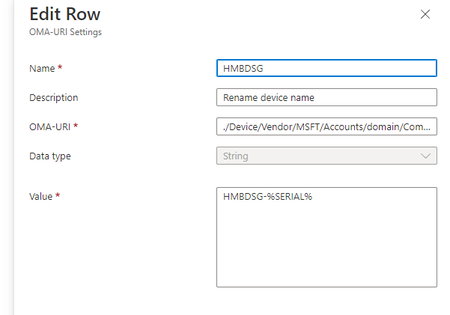
Rename all the Windows laptops and desktop computer name
Dear all, Can I check with you guys, I've created a custom profile to rename my device, but it doesn't work as expected. There's no error code for my reference. OMA-URL: ./Device/Vendor/MSFT/Acc...
 Mar 31, 2022
If you have a list identified then you can target it for bulk actions based on the same. Region 1 list 1, Region 2 list 2.
rahuljindal
Mar 31, 2022Bronze Contributor
Have you considered using bulk actions instead? It is much easier that way. Here is a little something on the feature. https://rahuljindalmyit.blogspot.com/2021/04/intune-lets-talk-about-device-bulk.html

Sk-73
Mar 31, 2022Iron Contributor
yes, it's a really cool function in Intune manager.
Currently, our users are based in two regions, I think the bulk action will apply to all.
Currently, our users are based in two regions, I think the bulk action will apply to all.
- rahuljindalMar 31, 2022Bronze Contributor
If you have a list identified then you can target it for bulk actions based on the same. Region 1 list 1, Region 2 list 2.
- Sk-73Mar 31, 2022Iron Contributor
Hirahuljindal can I check with u, after the bulk action was created, where can I find the profile? If I want to edit something. Thanks.
- rahuljindalMar 31, 2022Bronze ContributorThe policy goes out as a device action. You cannot edit it later. I will suggest to test on a couple of devices before renaming all.
- Sk-73Mar 31, 2022Iron ContributorI just realized this can be selected the device I need to rename is not just applied to all. Awesome! Many thanks for ur kind help! Cheers