Forum Widgets
Latest Discussions

windows 10 professional firewall or defender block specific words
I have windows 10 professional and i want to block specific words in internet. Any web content with those words willl block connection. I do remember some years back such can be firewall do it. I do not see this option. I tried to set up inbound rules but no option that it will do packet inspection and isolate https connection and check the stream has specific word like "abc" and block that tcp/ip connection. Pls how can we do this.prasadkakaAug 28, 2026Occasional Reader9Views0likes0Comments
Security issues
Why does logging into account via password or PIN usually limit access to sensitive information (requiring further authentication), but if you log in via one time code it removes all of the sensitive information protection? This seems like a security flaw to me, (and can it be resolved or fixed?)BeWillAug 24, 2026Copper Contributor28Views0likes0Comments
Enabling bitlocker encryption via group policy
Hopefull that someone might be able to offer some guidance here, I'm attempting to deploy bitlocker to a fleet of windows 11 25H2 machines using legacy Active Directory group policy. I just can't seem to get this to work, the scripts I have tried worked just fine when run from a command line, even tried using PSexec to run as the system user, but whenever I try via group policy it pops up an error - "Bitlocker could not be enabled" "The bitlocker key cannot be obtained" I have run get-tpm and confirmed everything is as it should be Any help would be greatly appreciated, after many hours spent without progress I'm starting to wonder if this is even still possible. Unfortunately we don't have SCCM or Entra join so I can't leverage any of these technologies.ScottA000Jul 21, 2026Copper Contributor83Views0likes2CommentsBritish Columbia permanent DST impact
BC in Canada is going to be staying on DST permanently from Nov 2026. Is there any information about how Microsoft will handle this in Windows? For example, will there be a new Timezone and, if so, when can we expect that to be rolled out? Thanks.PhilHaseldenMay 13, 2026Tin Contributor1KViews7likes4Comments
Locked out of my account
I have a personal Microsoft account, this current. I also made some kind of business account just so i could use Visio. I have a new phone. I don't have access to the old phone that has the Microsoft authenticator app. I know my account details yet i cannot login. There is no option other than using the authenticator app. HOW DO I GET ACCESS BACK FOR MY ACCOUNT?Nicholai2356May 02, 2026Copper Contributor140Views0likes6CommentsWin11 Heavy sound stutter, don't know what else to do
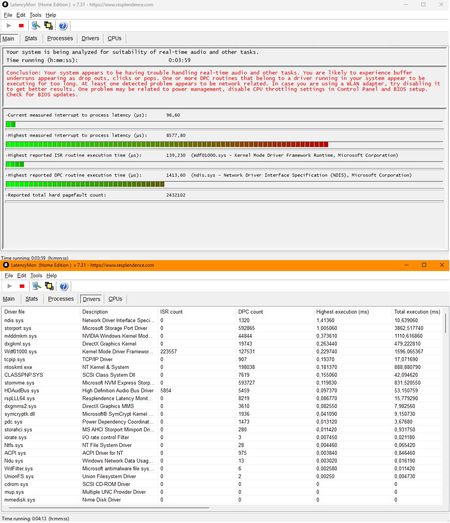
I've been having this issue for about a week now without any success in solving it. I updated BIOS, CPU firmware, GPU driver (nvidia 595.79) and realtek audio driver with a file from their website, I also updated my WiFi adapter. Windows is up-to-date with no optional updates. I usually have several monitoring/device programms running like MSIAB/RTSS, razer synapse etc while listening to music through spotify and sometimes with discord open which has never been a problem in the last few years. https://teufel.de/concept-e-450-digital-51-set-104762000?srsltid=AfmBOorsYlrK9AyTv9PYuchRwzbmmRaxhVEHvE4QhKD_F6XhrzTIbSHU is my 5.1 surround sound system, discontinued but still working perfectly fine (you might have to translate the website). My power plan is set to ultimate performance, nvidia global setting is set to prefer maximum performance, cpu min/max set to 100%, no throttling in BIOS and I even created a power throttling key in RegEdit to disable it. I will add screenshots from LatencyMon and other stuff that might be useful. LatMon while under full LOAD with Prime95 LatMon while IDLE My network connections, I disabled my WiFi adapter days ago, NordLynx, OpenVPN is from NordVPN My device manager with my audio/sound and network devices, SteelSeries is from my rarely used headset My sound settings from my digital output, someone on reddit mentioned setting it to 96000 Hz stopped it for him, unfortunately not for me.MachlathMar 14, 2026Copper Contributor388Views0likes1Comment
Hardware-Level Resilience (RMAU) (Remote Acess Management Update)to mitigate Ring 0 Kernel Outages.
Proposal: Windows RMAU (Remote Access Update) Resilience Architecture Author:CAB4devs Credits:CAB4Devs Unabbreviated name: RAMU (Remote acess management update) Project Name: RAMU the best fix for mass malware attacks and Driver failures! Head of idea: CAB4devs Professions of author: Unofficial IT Computer science Programming (Non of these are degrees) 1. Executive Summary: The "Global Kill-Switch" Problem The 2024 global outage proved that when the Windows Kernel (Ring 0) fails, the OS becomes a "brick." Current recovery requires manual, physical intervention (Safe Mode + BitLocker keys), which is impossible to scale for 8.5 million+ devices. RMAU (Remote Access Update) is a proposed system that allows Microsoft to "tap into" any bricked Windows machine via a secure, hardware-independent "Emergency Hatch." It allows a central Microsoft engineer to perform mass file deletions, registry fixes, or command execution on millions of devices simultaneously, without the local user doing anything. 2. How It Works (The "Zero-OS" Logic) To work without new physical hardware, RMAU leverages the existing UEFI (Firmware) and Windows Recovery Environment (WinRE). The "Heartbeat" Trigger: If Windows fails to boot 3 times, the UEFI triggers the "RMAU Pre-Boot Agent." The "Main Server" Connection: This agent bypasses the broken Windows OS and establishes a tiny, encrypted network tunnel directly to Microsoft’s RMAU Central Command. Zero User Interaction: The user sees a screen saying "System Recovery in Progress – Managed by Microsoft Support." They do not need to type passwords or BitLocker keys; the hardware "handshakes" with the server using the device's unique TPM (Trusted Platform Module) ID. 3. The Microsoft Employee Experience (The Admin UI) When an outage happens, a Level 4 Microsoft Engineer logs into the RMAU Master Console. The Admin UI View: Global Map: A real-time heatmap showing millions of Blue-Screened devices. Mass-Action Command Line: A console where the engineer types: TARGET: ALL_BSOD_DEVICES_WITH_DRIVER("C-00000291*.sys") ACTION: DELETE_FILE("C:\Windows\System32\Drivers\C-00000291*.sys") ACTION: REBOOT Remote Desktop (Individual): For single-user bugs, the employee sees a "Ghost Screen"—a low-latency view of the target PC’s file system and registry, allowing them to type commands as if they were sitting at the desk. 4. Security: The "Nuclear Launch" Protocol Because this system can "do anything," it must be the most secured system on Earth. The Physical Cord (Center-Side): To prevent a hacker from "mass-tapping" into computers from home, the RMAU Master Console is Air-Gapped. The only way to send a global command is to physically plug a "Golden Key" (USB-HSM) into the server inside a Microsoft high-security vault. The Quorum (3-of-5): No one person can fix the world. Five high-ranking officials (CEO, CISO, etc.) must each provide a unique biometric scan (Retina/Fingerprint) and a code from an OOB Android Device to authorize the "Global Delete" command. ID-Locked: Every keystroke an employee makes is recorded and tied to their biometric ID. If an employee tries to "spy" on a user, the system automatically flags them for federal investigation. 5. Real-World Use Case: 2024 Scenario vs. General Bugs Scenario A: The 2024 CrowdStrike Event Without RMAU: IT teams drove to offices for weeks to manually fix PCs. With RMAU: The Microsoft Engineer identifies the bad file C-00000291*.sys. They send a Mass-Tap Command. Within 60 seconds, all 8.5 million computers receive the "Delete" signal at the hardware level. The PCs reboot, and the world is back online in under 5 minutes. Scenario B: The "Random Driver" Bug If a specific brand of laptop (e.g., Dell) starts crashing due to a bad update, the PM can target only those specific Serial Numbers. They can remotely open a CMD Prompt on the bricked device, run sfc /scannow, and repair the system while the user sleeps. 6. Legal & Privacy Compliance To stay legal, RMAU follows the "Emergency-Only" doctrine: Consent by Terms: Users agree to "Emergency Remediation" in the EULA. Strict Limitation: The hardware hatch only opens if the OS is non-functional. It cannot be used to "spy" on a working computer. Immutable Audit: All logs are made available to government regulators to prove Microsoft only deleted the "Bad File" and didn't touch user data. 7. The "No-Hardware" Update (How to Deploy) This doesn't need a new PC. It can be sent as a BIOS/Firmware Update. Code Implementation: Microsoft writes a "RMAU UEFI Extension" and sends it via Windows Update. It installs into the motherboard's firmware. The "Silent Guard": Once installed, it sits dormant. It never turns on unless it detects a Kernel Panic or a Boot Loop, ensuring zero impact on battery or performance. Final Verdict for the Forum: "Microsoft, we need to stop relying on 'Safe Mode.' We need a system that assumes the OS is dead and fixes it from the outside. RMAU is the answer." (Pronunciation: Ram Moo254Views0likes3Comments
0.011W Power Floor on i7-1255U: A Step Toward Microsoft’s Sustainability Vision
It is inspiring to see Microsoft leading the tech industry toward a greener future. Initiatives such as the Carbon Negative 2030 goal and the Energy Saver features in Windows 11 are important steps in environmental stewardship. These efforts show that software and hardware can work in harmony to preserve our planet. As a researcher, I have spent 18 months exploring how to further support this vision by identifying the absolute efficiency “floors” of the Intel Core i7-1255U (Alder Lake). My study focuses on a configuration that enhances Microsoft’s energy-saving protocols to achieve maximum hardware longevity. Key Technical Findings (18-Month Case Study): Dynamic Power Floors: Through precise optimization, I observed CPU power draw dropping to a floor of 0.011W at 1.8MHz during deep idle/sleep states, with the GPU reaching a 0W floor. Efficiency in Motion: During active productivity tasks, the system can reach 0.4W – 0.5W at a voltage range of 0.6V – 0.8V, demonstrating impressive scaling flexibility. Thermal Performance: The system consistently operates between 25°C – 35°C. In cooler ambient environments (15°C – 25°C), hardware can maintain 16°C – 20°C, virtually eliminating thermal stress. Battery Endurance: Using a standard 3-cell battery with 5% wear (originally marketed for 6 hours), these optimizations enabled up to 10 hours of continuous video playback. Uncompromised Stability: Over 18 months of daily usage, the system has encountered zero Blue Screen of Death (BSOD) events. This confirms that pushing efficiency boundaries can be done while maintaining the rock-solid reliability expected of the Windows platform. This study is a tribute to the versatility of Windows 11 and the engineering behind modern silicon. By maximizing the life of the devices we already own, we contribute directly to reducing global e-waste. Detailed technical logs (HWiNFO) and configuration data are available for verification here: 👉 [[Intel 12th] 0.011W Package Power Floor via Custom Optimization | Microsoft Community Hub] I look forward to discussing these efficiency milestones with the community and Microsoft engineers.DeletedFeb 05, 2026Not applicable116Views0likes0Comments[Intel 12th] 0.011W Package Power Floor via Custom Optimization
The Challenge Current Windows 11 power management protocols often fail to reach the theoretical hardware residency limits of modern silicon. My research focuses on bridging this gap through a custom-developed optimization framework that interacts directly with kernel-level registers. The Breakthrough Using a proprietary optimization solution I have developed over the past 18 months, I have successfully triggered unprecedented power residency floors on Intel 12th Gen hardware: Package Power Floor: 0.011W (11mW). GPU Power: Fully gated at 0W during idle transitions. Clock Frequency: Observed dips to 1.8MHz during state transitions. Thermal/Active Range: Sustained 0.4W - 0.5W at 25°C - 35°C under light workloads. Technical Context These metrics (0.011W and 1.8MHz) represent peak optimization floors during system fluctuations and state transitions. They demonstrate a significant threshold of hardware residency that is normally bypassed by standard OS power profiles. Verification and Engineering Review The methodology involves complex synchronization of MSR and PCIe offsets that I have integrated into a unified optimization environment. To protect the intellectual property of this software-level integration: Preliminary HWiNFO logs are available for review on Microsoft Q&A: https://learn.microsoft.com/en-us/answers/questions/5708928/breaking-the-efficiency-barrier-intel-12th-gen-ach. The entire optimized environment has been preserved via a verified disk image for formal validation. I am seeking a technical review with a Senior Power Management Engineer or Kernel Architect to discuss these findings. I am prepared to provide a full demonstration of the software framework and the resulting residency logs under a Non-Disclosure Agreement (NDA). Sincerely, Viet Anh (email address removed for privacy reasons)DeletedJan 31, 2026Not applicable190Views0likes1CommentSerious problems in Ring0 kernel-mode modules and security in current versions of Windows
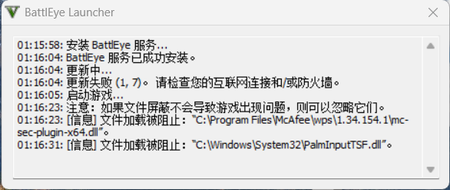
We all know that in the X86 architecture CPUs have four different levels: Ring0(kernel-level), Ring1, Ring2 and Ring3 (user-level). The users, even administrators can only access Ring3, and Microsoft designed the operating system this way to make the system more safe and stable. On the other hand, Microsoft uses signs and security options like "Memory Integrity" in "Core Isolation" in Windows Defender. Normal applications need to use kernel-mode modules to gain access to the kernel (.sys), and if these modules need to be loaded by the system, it should be signed or it will be blocked by Windows Defender or other antivirus software. But now I found a really serious problem in Microsoft's signing activities. BEDaisy.sys is the kernel-mode driver of BattlEye, an anti-cheat software, and it is signed by Microsoft. In BattlEye's EULA, it said that "BattlEye can prevent the cheaters from gaming on the servers which are protected by BattlEye. ", and to make it happen, BattlEye needs to create a service and install kernel-mode components. (Please remember that User Account Control window won't pop up if a service or trusted installer tries to install a kernel-mode driver. ) This EULA is really confusing because it makes the users think "BattlEye does this to protect me from being attacked by other cheaters. " and then accept the EULA and install BattlEye. However, after BattlEye is installed, it can't even block a simple attack from the other cheaters. The other cheaters can even force crash your game. On the contrary, BattlEye tries to block the modules from any other applications which it thinks they are suspicious from loading. It can even block the modules of the anti-cheat software, which makes the protections of the system reduce or even put the system at risk. There is another case. There is a user found his computer attacked by the malware. He was really confused because he had installed the anti-virus software on his system. After looking into his system carefully, he found out that his anti-virus software was down and was killed by mhyprot2.sys, another kernel-mode module of an anti-cheat software. And mhyprotect2.sys is also signed by Microsoft. https://www.trendmicro.com/en_us/research/22/h/ransomware-actor-abuses-genshin-impact-anti-cheat-driver-to-kill-antivirus.html The kernel-mode drivers from both of the cases are signed by Microsoft, and as they run in Ring0 kernel-level, the users have nothing to do to stop them. And as they are signed, most of the anti-cheat software will be less sensitive to them and will be much easier to let them run. . Besides, Windows is designed for everyone, not just for game players. Not all the users would like to sacrifice the security of the system just to play the games. . On the other hand, unlike the cyber security companies, the game companies usually care more about the game itself than the entire system. And they are not responsible for any damage caused by the anti-cheat software. The thing that I am most angry with is that Microsoft actually signed these kinds of kernel-mode modules, which means Microsoft allow these kinds of dangerous things to happen. In my opinion, it is the player's duty to obey the EULA of the games, but it is the game company's duty to do their anti-cheat jobs, and if you want to use the player's device to help you anti-cheat and even want to have Ring0 access, you need to warn the users and notify them. In BattlEye's case, there are three windows will pop up on the screen when you try to install them, but all of them said that BattlEye will minimize its authority and none of them said it needs to gain the authority to shut down other software or block their activities. . . And in total, it is the users who paid for the device and the operating system which they are using, but not the game companies. Taking fully control of the device without noticing the user is illegal. In the end, I really hope that Microsoft can raise the standard of signing a kernel-mode module. These kinds of issues can happen not only in anti-cheat software, but also in any other software, only the problem occurred this time is the anti-cheat software. To tell you the truth, I think Microsoft can only sign the Ring0 kernel-level drivers of the hardware drivers and the anti-virus software. The other applications can only run in Ring3 user-mode like Android. I know it could be hard to make it happen, so you can add whitelist function for the users don't care too much about security or even let them turn off the security options. You can kill the malware by mistake because if that happens, the user can restore them and whitelist them. But you can't miss a malware, because if that happens, the responsibility is usually the one that you can't take. And if the software in the whitelist damages the system, then it is not you Microsoft's responsibility. And for the game players, you can also add isolated gaming environment like Hyper-V, but especially for games, and any other software can't run in it to prevent cheating. Thank you.hiccups641Jan 20, 2026Copper Contributor617Views0likes0Comments

Tags
- windows 1016 Topics
- windows 1110 Topics
- Windows Update5 Topics
- intune4 Topics
- gpo4 Topics
- security4 Topics
- BitLocker3 Topics
- microsoft intune3 Topics
- printer2 Topics
- Driver2 Topics