gpo
4 Topics
Windows 10 11 Enterprise Restrict access to MS Store via group policy
Issue presented: Multiple users are downloading and installing Remote Access tools that are deemed not supported as well as other applications in the environment. We want to restrict access to the MS Store to Administrators or a specific AD group without using AppLocker or InTune. I have seen various threads in multiple sources that are conflicting about disabling the store or setting to the Company Portal for Windows 10/11. If you set the MS Store to Company Portal, in Windows 11 it disables the store. Turn off the Store application GPO: Denies or allows access to the Store application. If you enable this setting, access to the Store application is denied. Access to the Store is required for installing app updates. Other threads as well as the gpo verbiage itself indicate that if you disable the store, all installed applications will no longer update. There are some threads that state the opposite. https://learn.microsoft.com/en-us/windows/configuration/store/?tabs=gpo Has anyone configured a way to restrict users or a specific group of users from using the MS Store while allowing existing applications the ability to update?488Views0likes0Comments
WuFB GPO options missing
I'm running into a problem where the Windows Update for Business options do not appear under Windows Update in the GPME. I just installed the Windows 11 24H2 ADMX files today on our Central Store but still don't see them. But according to this MS article, it should still be an option? https://learn.microsoft.com/en-us/windows/deployment/update/waas-wufb-group-policy160Views0likes0CommentsGPO stettings for Privacy Windows 10 and Windows 11
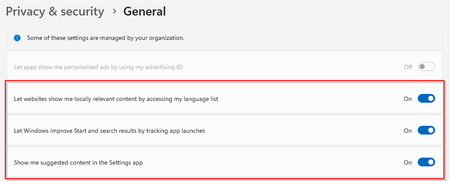
Hello, I have set a security policy in GPO for some privacy & security settings. But I cannot find these settings in GPO. I don't want to edit this using the Windows registry, does anyone perhaps know where these settings are available? Let apps show me personalized ads by using my advertising ID Let websites show me locally relevant content by accessing my language list Let windows improve start and search results by tracking app launches Show me suggested content in the Settings app2.6KViews0likes2CommentsADMX Syntax Questions
Is this the latest ADMX Syntax: https://www.microsoft.com/en-us/download/details.aspx?id=7101 (It's from 2007.) Additionally, I'd like to configure a policy in this way: Enabled: Takes a string from a textbox Disabled: Sets a specific value Not Configured: Default GPO behavior (leave value as-is) The only way I've gotten it to work, without MMC complaining, is this but it doesn't work. Additionally, the changes don't take effect. Once the window is re-opened, it's back to "Not Configured". <policies> <policy name="Policy_OverwriteSettings" class="Machine" displayName="$(string.Policy_OverwriteSettings)" explainText="$(string.Explain_OverwriteSettings)" presentation="$(presentation.presentation_OverwriteSettings)" key="SOFTWARE\Policies\Example" valueName="mydword"> <parentCategory ref="abc:Category" /> <supportedOn ref="SUPPORTED_Platform_Since" /> <disabledValue> <string>3</string> </disabledValue> <elements> <text id="policy_OverwriteSettingsValue" key="SOFTWARE\Policies\Example" valueName="mydword" required="true" /> </elements> </policy> </policies>810Views0likes1Comment