gpo
8 Topics
Windows 10 11 Enterprise Restrict access to MS Store via group policy
Issue presented: Multiple users are downloading and installing Remote Access tools that are deemed not supported as well as other applications in the environment. We want to restrict access to the MS Store to Administrators or a specific AD group without using AppLocker or InTune. I have seen various threads in multiple sources that are conflicting about disabling the store or setting to the Company Portal for Windows 10/11. If you set the MS Store to Company Portal, in Windows 11 it disables the store. Turn off the Store application GPO: Denies or allows access to the Store application. If you enable this setting, access to the Store application is denied. Access to the Store is required for installing app updates. Other threads as well as the gpo verbiage itself indicate that if you disable the store, all installed applications will no longer update. There are some threads that state the opposite. https://learn.microsoft.com/en-us/windows/configuration/store/?tabs=gpo Has anyone configured a way to restrict users or a specific group of users from using the MS Store while allowing existing applications the ability to update?514Views0likes0CommentsWDAC not applying via Group Policy
Hello and greetings from Portugal! I'm trying to implement WDAC via group policy. I've used WDAC Wizard and if I copy the *.cip file to "C:\Windows\System32\CodeIntegrity\CiPolicies\Active" I see that WDAC get enabled, for example using the MSInfo32. But, I cannot enable WDAC via GPO. I've converted the *.xml to *.bin and enable the "Deploy Windows Defender Application Control". I see the event id 7010 "Device Guard successfully processed the Group Policy: Configurable Code Integrity Policy = Enabled" but the thing is MSInfo still doesn't show that WDAC is activated. Can someone please help?2.7KViews0likes5Comments
WuFB GPO options missing
I'm running into a problem where the Windows Update for Business options do not appear under Windows Update in the GPME. I just installed the Windows 11 24H2 ADMX files today on our Central Store but still don't see them. But according to this MS article, it should still be an option? https://learn.microsoft.com/en-us/windows/deployment/update/waas-wufb-group-policy175Views0likes0CommentsGPO stettings for Privacy Windows 10 and Windows 11
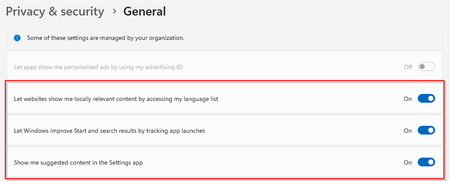
Hello, I have set a security policy in GPO for some privacy & security settings. But I cannot find these settings in GPO. I don't want to edit this using the Windows registry, does anyone perhaps know where these settings are available? Let apps show me personalized ads by using my advertising ID Let websites show me locally relevant content by accessing my language list Let windows improve start and search results by tracking app launches Show me suggested content in the Settings app2.6KViews0likes2CommentsADMX Syntax Questions
Is this the latest ADMX Syntax: https://www.microsoft.com/en-us/download/details.aspx?id=7101 (It's from 2007.) Additionally, I'd like to configure a policy in this way: Enabled: Takes a string from a textbox Disabled: Sets a specific value Not Configured: Default GPO behavior (leave value as-is) The only way I've gotten it to work, without MMC complaining, is this but it doesn't work. Additionally, the changes don't take effect. Once the window is re-opened, it's back to "Not Configured". <policies> <policy name="Policy_OverwriteSettings" class="Machine" displayName="$(string.Policy_OverwriteSettings)" explainText="$(string.Explain_OverwriteSettings)" presentation="$(presentation.presentation_OverwriteSettings)" key="SOFTWARE\Policies\Example" valueName="mydword"> <parentCategory ref="abc:Category" /> <supportedOn ref="SUPPORTED_Platform_Since" /> <disabledValue> <string>3</string> </disabledValue> <elements> <text id="policy_OverwriteSettingsValue" key="SOFTWARE\Policies\Example" valueName="mydword" required="true" /> </elements> </policy> </policies>820Views0likes1Comment
Help with GPO/Update settings - Auto Download, Auto Install, Defer Reboot for specific day/time
Hi MS Tech Community family. I have been asked to setup a very specific update schedule using GPO whilst we seek other patching options. As far as I can tell this isn't possible using GPO, however hope someone can prove me wrong. I have been asked to setup the following. All Updates, Including optional to Automatically download All Updates to automatically install. Notify Users that updates have been installed and are awaiting a reboot. Remove the normal shutdown/restart options in start menu and replace with Update & Shutdown/Restart when updates have been installed. Do not automatically reboot user machine until specific day of month/time (3rd Tuesday at 12noon)Solved3KViews1like4Comments
Windows 10 1903 Group Policy Issues after OSD
Hi, We've recently started deploying Windows 10 1903 (First Win 10 version too...) with SCCM 1902 with MDT and group policy appears to apply, according to the logs but then we find certain settings not actually applied, even though a gpresult shows them as being applied. Checking the various reg keys etc. for our policy settings on a client, I have seen that all of our GPO settings get applied and then some but not all get mysteriously removed, for example the Interactive Logon message gets applied but then removed, as in the registry value is removed. Running a gpupdate /force after this has happened, appears to fix the issue. However using the SMSTSPostAction variable to run a script or command to update Group Policy, doesn't work either, the script/command runs (As per log files) but the above does still occur until we run a gpupdate /force (A ordinary gpupdate does nothing, so most of the time reboots etc. do nothing). We have no Group Policy related Group Policy settings (As in the ones that control whether CSEs process during slow links etc. and whether they process even though there are no changes) and we cannot find any other reason for this not to work correctly. I think until we find a fix, using the RunOnce reg key/value maybe the workaround... Would someone at Microsoft be able to confirm whether this is a confirmed issue at Microsoft and whether there is a fix for it please? Or if there is a fix incoming as potentially some of our security related GPOs are not being correctly applied. Many thanks, Luke9.2KViews0likes15Comments