Recent Discussions
New Skype for Business Community Champ
Hi there, My name is Helbert and I’m one of the new Skype for Business community champ. I’m the principal engineering manager responsible for all the telephone number management for Skype for Business globally. Everything you can think of from number stock/availability, onboarding new markets to port numbers to and from Microsoft will show up in my radar (and touch “my” code). I’m also familiar with other aspect of Skype for Business, mainly around cloud PSTN and Cloud Conferencing and know pretty much all the developers, product owners and managers working in this area, so I can count on good help to shed some light at your questions. I’m very passionate about making things right and always making them better, and this is why I volunteered (really volunteered) to be engaged with this community. I would love to hear your difficulties, feedback (and also compliments, end of the day I’m also a human ). Please let me know how can I help and what you have in mind and I’ll do my best to be of any use. Cheers, Helbert2KViews15likes8CommentsSkype for Business on Mac is now Available!
Great News! On October 27, 2016, Microsoft made the all new Skype for Business on Mac client generally available for download. I've posted a blog with more information in our Product Updates - have a look! https://techcommunity.microsoft.com/t5/Full-Circle-Product-Updates/Skype-for-Business-on-Mac-is-now-Generally-Available/ba-p/251472KViews11likes10Comments
Skype Room Systems v2 - first impressions
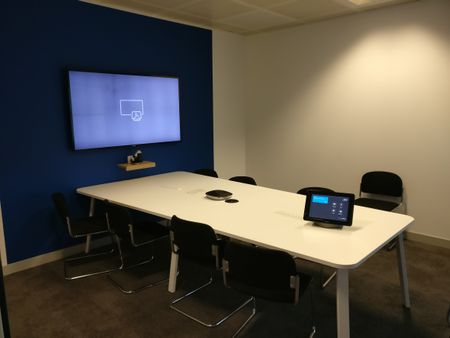
So we just installed a Skype Room Systems v2 (Logitech Group) in our largest conference room. Here are our first impressions when it comes to the software. We have Exchange 2016 on-premise and SfB Online in O365. There's one issue with dialing a number when you don't have PSTN Calling in your region. Maybe this is by design or maybe I just got it wrong (here's my discussion on that) You should disable the Surface Pro 4 built-in front and rear camera because otherwise when you choose to start the video, you have three cameras to choose from. It's not mentioned in the Deployment Guide but we figured it out they are in the Device Manager -> System Devices. Speaking of this, you shouldn't need to choose a camera at all if there's only one (1) camera - just default to that camera. We have a huge 100"+ projector screen in this conference room and when a single attendent call in with video, that person gets a full screen with their huge face. I don't know how we would technically solve this (I guess 2 * 55" is a better setup) but it feels like Big Brother ;). If a presenter in the room connects their laptop via HDMI and start something with a video (like Youtube) the sound outputs into the conference room and the sound is only catched up by the rooms speaker's which gives quite bad results. It should be able to get the sound from the HDMI input but then again, the deployment guide clearly states that "Audio playback over HDMI can only be heard locally" so maybe it's some technical reason why this is not possible. The DIY setup might be a little bit overly complicated selecting the correct inputs/outputs etc. Since the SRS application only works on "certified" versions, it should be possible for Microsoft to automate this and verify the settings remain the same after updates etc. But they have mentioned automated deployment scripts are coming. The dock (Surface Pro 4) screen is quite sensitive to fat fingerprints so after a while you need to clean it but maybe someone has some magical solution for that :) I hope the OMS management/monitoring solution will be available soon so we effectively can monitor the SRS so we can be proactive because users in general don't create a support ticket for conference room systems, they just give up :) Then there are some minor Logitech hardware first impressions but that's not related to Microsoft.28KViews10likes76CommentsIntroducing Microsoft Teams!
Today, at an event in New York City, we announced Microsoft Teams—the new chat-based workspace in Office 365. Microsoft Teams is an entirely new experience that brings together people, conversations and content—along with the tools that teams need—so they can easily collaborate to achieve more. It’s naturally integrated with the familiar Office applications and is built from the ground up on the Office 365 global, secure cloud. Starting today, Microsoft Teams is available in preview in 181 countries and in 18 languages to commercial customers with Office 365 Enterprise or Business plans, with general availability expected in the first quarter of 2017. Check out the Microsoft Teams Community at http://aka.ms/msteamscommunity - join us!1.8KViews10likes6CommentsWe’d love your feedback on Skype for Business Cloud PBX
We’d love to hear about your experience (both positive and negative) with Skype for Business Cloud PBX in a 30-40 minute call at your convenience. • Your valuable feedback will be used to improve Office 365. • We’d provide you with a $150 check as a thank you. • Additional benefit: A direct connection to Microsoft for additional assistance on your Skype for Business deployment. • This is not a sales solicitation, and your feedback will be treated in strictest confidence. • An independent research agency, Moziac Group, will lead the conversations. Entry Requirements: • 100+ paid Cloud PBX licenses AND • 50+ deployed seats of Cloud PBX and/or Cloud PSTN Conferencing Mozaic will follow up based on a very short form you complete here: https://mozaicgroup-my.sharepoint.com/personal/amber_mozaic-group_com/_layouts/15/guestaccess.aspx?guestaccesstoken=iSudN0yesmtHs3WJwgOGYamw%2bO5VV1fJo48TwZl8i58%3d&docid=1_18647472c9e304e4bb0f7ae66d8094012&wdFormId=%7B1D287D6B%2D5868%2D44F3%2DA508%2D07AF538BDE53%7D Thank you for being a valued customer! We are eager to hear your feedback.983Views10likes2CommentsSkype for Business 2019 Standard Edition Server Back!
I'm shouting this from every rooftop, because it's a very important role to me. As you may have heard, at Ignite it was announced that the Standard Edition would NOT be included in Skype for Business 2019 \ vNext. Today I have been given permission and am allowed to confirm that it is BACK IN! Thank you to all who commented and voted on the issue on skypefeedback.com!Skype for Teams
I realize that it is a bit off topic, but does somebody have news regarding Skype for Teams? I know MS is testing it internally, but would love to get some sort of timeline even for a pre-release. As many others, we are about to use Slack, but would prefer to use Skype for Teams. http://mspoweruser.com/microsoft-working-slack-competitor-skype/3.1KViews10likes7CommentsWe invite you to become a Skype for Business guest blogger!
There are over 10k Skype for Business Community Members and we're over the moon to have you here. When we started the Skype for Business Community as part of the Microsoft Technical Community, we wanted to foster an atmosphere where our customers, partners, product team members, and fans could collaborate and share ideas and best practices. We wanted a place where we could post updates and have an opportunity to share details about what's coming and how you can help shape the product. Most importantly, we wanted to create a space where we could learn from eachother. I'm excited to invite you to join us as a guest blogger to do just that. In the coming weeks, we will start publishing our Skype for Business guest blogger series. We're looking for a variety of topics with the goal of sharing best practices, lessons learned, stories from the battlefield (yours), and interesting use-cases. We invite you to share with our community. If you have a topic you'd like to write about, please PM me with the subject and a brief outline of what it is you'd like to write about and we will work with you to see if we can get your topic on the schedule. If you have something to share but don't think a blog is necessary, please be sure you post in the discussion boards, here. Looking forward to having many of you join us! ~Laurie2.1KViews9likes1CommentSkype for Business Video Broadcast - September 23, 2016 @ PT- Behind the scenes and Ignite Update
Join our Broadcast - 1 st Anniversary Broadcast Join the Skype for Business team for our 29 th broadcast which marks a full year since the series began. We will be doing a brief preview of what to expect from the upcoming Ignite 2016 technology conference, and will be sharing some Skype for Business Meeting Broadcast best practices that we’ve gleaned over the course of our first year. Join the Skype Meeting Broadcast, Friday, September 23, 2016, at 9:00 a.m. PST. Speakers: Sean Wilson and Jamie Stark660Views9likes0CommentsExperiences with SRS/Logitech SmartDock
David Phillips asked me to share out experience with the Logitech SmartDock and SRSv2 in another thread, I thought I would start a new post to collect other people's experience. We are refurbishing our head office buildings, the first floor of the first building went live 3 weeks ago, so our experience is limited at this point. This floor has about 250 desks, and now a new collection of collaboration booths, high tables, etc. For the meeting rooms we installed :- 3 x 5 person Rooms with 46" screen, SmartDock, Logitech C930E and Senheisser ML20 Speaker 1 x 9 person Room with 65" screen SmartDock and Logitech Group 2 x 14 person room with 75" screen SmartDock, Logitech Group with extension mic, extron amp and ceiling speakers 3 x 55" Surfacehubs in a variety of different settings We bought the SmartDocks separate to the Surface Pros inside them, didn't find any issue in following the instructions to create the build, and to configure the accounts in Skype Online. We manage them in Intune, but not in OMS (too expensive!). We've configured them with E1, CloudPBX, PSTN Conferencing and a UK Domestic DialPlan. They have wired connections to our direct internet connection, not through the corporate lan, they arent domain joined. Out staffs response has been great, it's a big step up from the ugly collection of speakerphones and TVs we had before. Sound clarity is great, Video and screen sharing are very good. At the moment I would say about 40% of our meetings are using skype, and perhaps an equal number dialing into a legacy audioconferencing provider, the balance is shifting as people discover how much clearer the audio is in Skype. Having a quality solution in every bookable space makes a huge difference, we no longer need to think much about which site a user is at when booking a meeting, just find a point where people and a room are available and let them figure out where they want to be. The Logitech Dock seems pretty good, lots of screws but we don't want something that users will take to bits. Solid feeling, very good swivel function. It would perhaps have been easier with a line out option inside the cable section. There lots of cables going in/out of the dock but our installers have done a good job of making it neat and unmovable. We understand that we've bought into a very new product but its been remarkably stable. We are aware of 3 devices that reached a point where they needed a reboot as they became unresponsive (we schedule a reboot each night), this typically seems to be related to connecting local devices to the hdmi in. We've had quite a lot of difficulty getting hdmi switch boxes working reliably on the hdmi input, we wanted to provide autoswtching between hdmi and mini-dp inputs. Forcing the switch to set an appropriate Edid seems to be helping, but I'm not convinced we've totally figured it right yet. Users have raised 2 areas in the software that could be improved. 1. when dialing out to an external conference provider they cant then connect a laptop into the screen locally. 2. They would like to be able to cancel meetings that don't show up from the device, ideally we would like them to timeout like on a meeting room system. We're now just over 3 weeks away from our second floor going live, 15 SRS and 4 Shubs. I'll update back here with any new expereinces. Looking forward to seeing what happens as the SRSv2 app updates. DM me if you want any recomendations for installers in th UK.14KViews7likes43CommentsSkype for Business Broadcast: Cloud Voice Update
Join the Skype Meeting Broadcast on Thursday, Dec 15, 2016 at 9:00 am PST. Come join Delanda Coleman and Jamie Stark from the Skype for Business marketing team to hear all about Skype for Business Cloud Voice Reporting and manageability as well as PSTN Calling updates including new service in France. There will be lots of demos! Don’t miss it! Calendar Invite below. If you have missed our previous broadcasts they are all available on demand at aka.ms/sfbcastpast1.3KViews7likes2CommentsSalesforce Integration with Skype For Business
A while back you may have heard that there is a way to integrate Skype for Business with Salesforce. We just posted an article to the Skype for Business Community Blog detailing how to do this. Check it out here. Salesforce currently has this feature available as a public Beta. Over time we hope to see continued enhancements to this integration. Let us know what you think!13KViews7likes4CommentsTell us what you think and win a gift (Ends 8/16)
We are planning our content to support the Skype for Business community for the upcoming year and we'd love to hear from you on your overall engagement with the Skype for Business community and our bi-weekly video broadcast series. Any feedback you may have is most appreciated. As a thank you, all survey respondents will be entered into a raffle to win one $50 Amazon gift card! Please fill out the survey by tonight, August 16th! Thanks in advance for your time and input and please let us know if you have any questions! You can take the survey here: https://aka.ms/sfbcommunitysurvey thank you! Delanda Coleman1.2KViews6likes2Comments
Call Queue Time in Seconds not Minutes
Enhancement Suggestion: I think it would be better to have the call queue caller wait time be editable in seconds, not minutes. Currently, as minutes, the least amount of time that can be selected is 1 minute. This is too long for some customers. Please change to have call queue wait time in seconds.4.9KViews6likes16CommentsData File cannot be configured SkypeForBusiness/Outlook
Anyone else seeing this? I'm getting error message ... Your Outlook Data file cannot be configured. c:users\p.....\AppData\local\Microsoft\outlook\p....r.nst. This started right after the upgrade to Office 365 ProPlus, Insider Slow 1705 8201.2025, on 5/24. This occurs when ... Skype For Business is running. Outlook on the desktop is not running. As soon as I launch Office on the desktop (and keep it running), the errors stop. When outlook is stopped, the errors start again. The errors occur about every 1 minute or less.17KViews6likes34Comments
Call Queues Preserving CallerID
I am sure this is on the roadmap, but we're testing call queues and the callerID that an agent receives in a long GUID string rather than the original callerID.17KViews6likes88CommentsTell us your thoughts in our Microsoft Voice Services survey!
Hi all, We are conducting research to better understand the usage of different voice services. Microsoft has built a strong portfolio of voice services and we are looking to feedback to help us form the future of Microsoft Voice Services. If you have a few minutes, we would love to hear your feedback on Voice Services here: https://www.instant.ly/s/iYKnS Thank you in advance for taking the time to help us!1.4KViews6likes1CommentSkype for Business iOS CallKit integration now available!
We recently announced deeper integration of Skype for Business with iOS devices using Apple’s CallKit framework, which enables a better experience for Skype for Business calls on the iPhone. The CallKit API with iOS 10 enables Skype for Business calls to work the same way as the native calling experience on iOS, allowing you to seamlessly extend your personal device as a business phone.To try the new calling experience, update your iOS app today. Learn more at http://aka.ms/ioscallkit3.4KViews6likes2Comments
Skype for Business messaging skype user
I know there has been a lot of discussion about this issue across the web and it seems to be one that from my experience Microsoft cant seem to solve. Between not being able to recieve invites between the two or showing as presence unknow or offline when the user is signed in on the laptop next to me. Anyone else having issues communicating externally and any suggesstions? Ive spent several hours on the phone with Skype for Business support who told me I just have to wait and the invite/messages would eventually get there, but in the business world you cant expect clients to wait for a message to arrive days later.1.4KViews6likes5Comments