Forum Widgets
Latest Discussions

Become a Microsoft Endpoint Configuration Center Ninja
Do you want to become a ninja for Microsoft Endpoint Configuration Manager? We can help you get there! We collected content to get you from endpoint newbie to becoming a MEME "Microsoft Endpoint Manager Expert". The content is structured into three different knowledge levels, with multiple modules: Fundamentals, Intermediate, and Expert. We will keep updating this training on a regular basis and highlight new resources. Content Coming Soon!mlarkinJul 11, 2021Microsoft1.3KViews3likes0CommentsUpdate 1707 for Configuration Manager Technical Preview Branch – Available Now!
Update 1707 for Configuration Manager Technical Preview Branch – Available Now! https://blogs.technet.microsoft.com/enterprisemobility/2017/07/28/update-1707-for-configuration-manager-technical-preview-branch-available-now/1.3KViews2likes0CommentsRSVP - August 29th - Unpacking Endpoint Management talks cloud migration
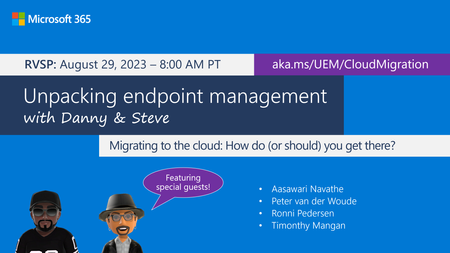
If you have questions, challenges, or best practices on migrating from on-premises endpoint management to the cloud, please join us live on Tuesday, August 29th at 8:00 a.m. PT for Unpacking Endpoint Management! Senior Program Managers @Danny Guillory and @Steve Thomas (GLADIATOR) will be joined by Aasawari Navathe and Microsoft MVPs TIMOTHY_MANGAN, Ronni Pedersen, and Peter van der Woude so it's sure to be a lively conversation---and there will be plenty of brain power to help answer your questions. How can you join? Add the event to your calendar. RSVP and post your questions early. Tune in live at 8:00 a.m. Pacific Time, or catch up on demand! Hope to see you there!Heather_PoulsenAug 25, 2023Community Manager493Views2likes0CommentsIssues with OSD in secondary MCM 2509 site
Hi, having upgraded primary and secondary MCM site to version 2509 I cannot perform OSD anymore on secondary site location - errors: Failed to query Management Point locator QueryMPLocator: no valid MP locations are received Boundary Group in secondary site does have assigned MP and that is secondary MCM site server - however I get this as well: <MPLocation SiteCode="" AssignedSiteCode="" MP="" MPCertificatesEx="" x86UnknownMachineGUID="" x64UnknownMachineGUID=""/> Any help would be highly appreciated.BojanZFeb 03, 2026Tin Contributor102Views1like0Comments
SCCM - 23/24H2 to 25H2 Upgrade
Hello SCCM Community! Having an issue with upgrading devices from 23 and 24H2 to 25H2, I am downloading the newest version in SCCM under Windows Servicing and Feature Upgrades and deploying it to the targeted collection, but nothing shows in Software Center. Upon checking the UpdatesDeployment log, it shows Actionable Updates = 0 in one of the lines, but I'm wondering why WUA is determining updates do not apply to the machine. I believed this could be a GPO restriction but I've confirmed that there are no conflicting GPOs or Registry Edits. Any suggestions? Thanks!ctowensJan 14, 2026Copper Contributor1.8KViews1like1CommentAll Windows Server OS(Mostly 2019) DP's not upgrading to 2207
FYI... This issue is happening again since last week and this time it is not just server DP's but Windows 10 DP's also. It is not a result of MECM server upgrade maybe Feb patches got installed on the primary server but very few DP's are fine. Last friday i upgraded CM from 2203 to 2207 version. I saw no error after the upgrade. I have a bunch of Win 10 computers as DP's and those DP's got upgraded to new version(5.00.9088.1000) but all the Windows Server OS DP's failed to upgrade. FYI... Site server is an admin on all the DP's and nothing has changed. Here is a screenshot of distmgr.log error. vcredist_x64.exe is already installed on all the server DP's last year probably with 223 upgrade. I do not see any errors in the firewall or antivirus software. Not sure what could be the issue.chandrabusaOct 03, 2022Tin Contributor3.4KViews1like10CommentsUPGRADE_EXPERIENCE_INDICATORS in Resource Explorer
We are seeing that the Config Manager hardware inventory contains the UPGRADE_EXPERIENCE_INDICATORS section which shows data that appears to be about upgrade compatibility to specific builds (with CO21H2 being Windows 11 21H2, for example). Could someone please share what the attributes named Upg Ex Prop and Upg Ex U and the color values they have actually mean? We've seen Red, Orange, Yellow, and Green, but it doesn't appear to be documented anywhere what the attributes or values represent. We would like to use these values for collection membership and Windows 11 Upgrade task sequence deployment, but want to fully understand what they represent. Note: We have compared these to what is shown in Endpoint Analytics for Windows 11 readiness status. While green has matched Capable and red has matched Not Capable, we're seeing a mix of Capable and Unknown for both yellow and orange. Thank you.Joe_FriedelApr 19, 2022Iron Contributor10KViews1like4CommentsQuery real-time client data with Configuration Manager Technical Preview 1805
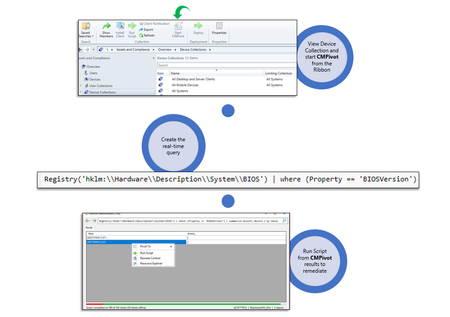
We are excited to let you know that update 1805 for the Technical Preview Branch of System Center Configuration Manager has been released. Technical Preview Branch releases give you an opportunity to try out new Configuration Manager features in a test environment before they are made generally available. Have you ever wanted to take real-time action to quickly respond to an event or discover a wide variety of information about your devices and hunt for anomalies? CMPivot is a new in-console utility that provides access to such real-time state of devices in your environment. It has the ability to immediately run a wide variety of queries on all currently connected devices in the target collection and return the results. You are then able to act upon those results. For example, in the scenario of mitigating speculative execution side channel vulnerabilities, one of the requirements is to update the system BIOS for your devices. You can use CMPivot to quickly query on system BIOS information and find clients that are not in compliance. You can then switch to Run Scripts to quickly remediate them with a scripted solution. Read about it in the Enterprise Mobility + Security blog.EricStarkerMay 15, 2018Former Employee1.3KViews1like0CommentsNew feedback system for Configuration Manager docs
Starting today, the Configuration Manager doc library is using a new feedback system. The feedback section of all articles is now integrated with GitHub Issues. For more information about this change, see the docs platform blog post. Read about it in the Enterprise Mobility + Security blog.EricStarkerMay 03, 2018Former Employee1.5KViews1like0CommentsDesktop Analytics - “Office 365 ProPlus”
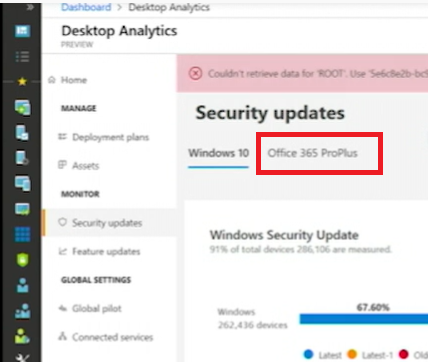
We implemented Desktop Analytics in our environment. I'm missing the Option “Office 365 ProPlus” in the portal. The Video https://www.youtube.com/watch?v=-tAqDSRPW7Q shows at 21:57 an Option “Office 365 ProPlus” We do not see this option in our environment. Did we miss some configuration.1.2KViews1like1Comment




Tags
- cm current branch51 Topics
- Operating System Deployment20 Topics
- software update management15 Topics
- Site Setup and client deployment10 Topics
- App Management9 Topics
- general7 Topics
- SCCM7 Topics
- cloud-attached management6 Topics
- security and compliance6 Topics
- endpoint protection5 Topics