software update management
15 Topics
Updates Not Installing by Install Deadline
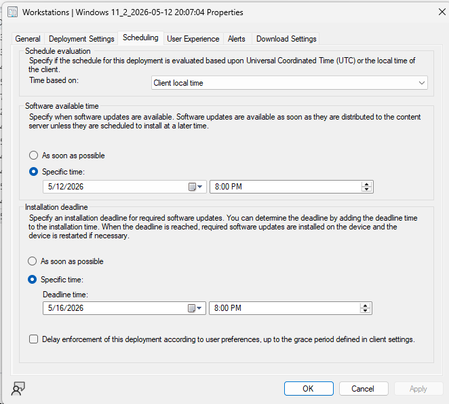
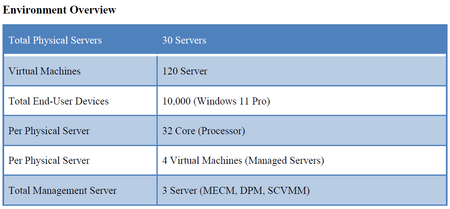
Hello all! We have an organization with about 12,000 Windows 11 Workstations. I'm noticing that even though install deadline is set, and updates are allowed to be installed before install deadline hits, we are noticing in Software Center that updates say "will install after _____" (deadline date). How can I change this? I want updates to install during the maintenance window as well as a reboot. What am I missing? Connor263Views0likes2CommentsSCCM - 23/24H2 to 25H2 Upgrade
Hello SCCM Community! Having an issue with upgrading devices from 23 and 24H2 to 25H2, I am downloading the newest version in SCCM under Windows Servicing and Feature Upgrades and deploying it to the targeted collection, but nothing shows in Software Center. Upon checking the UpdatesDeployment log, it shows Actionable Updates = 0 in one of the lines, but I'm wondering why WUA is determining updates do not apply to the machine. I believed this could be a GPO restriction but I've confirmed that there are no conflicting GPOs or Registry Edits. Any suggestions? Thanks!2KViews1like1Comment
SYSTEM CENTER IMPLEMENTATION & LICENSING Guide
Dear Microsoft Community, Our organization is planning to deploy a comprehensive IT management solution using the Microsoft System Center Suite. The goal is to streamline infrastructure operations, enhance backup and recovery, manage both virtual and physical resources, oversee endpoints, and maintain security and compliance. We need guidance regarding the number and type of licenses required, specifically Client Management Licenses (CML), Server Management Licenses (ML), and System Center Suite licenses.1.1KViews0likes5Comments
Configuration Manager ADR for Windows Servers Not Deploying Updates
Hi everyone, We recently deployed Configuration Manager 2503 in our environment. The environment consists of the following: 1 Primary Site Server including Distribution Point role in head office, 1 Distribution Point server for a field office location, and 1 Site database server. We followed some articles or links online to deploy the Software Update Point on the primary site server that includes the Distribution Point role. The SMS_WSUS_CONFIGURATION_MANAGER, SMS_WSUS_CONTROL_MANANGER, and SMS_WSUS_SYNC_MANAGER components show a green checkmark and OK status. We followed some online articles or links to also create an Automated Deployment Rule as well. Despite creating the Automated Deployment Rules, it does not seem that updates are deploying to the targeted servers that are part of a Device Collection in Configuration Manager. Please advise what we should review to remediate this issue. Thanks.182Views0likes1Comment
Windows/Defender Updates not deployed to SCCM server (all clients work fine!)
After battling for a few weeks with this it finally occurred to me to reach out for help, and I found this forum. So here goes… I have a relatively small environment with Windows Updates managed by SCCM. Currently, all clients are receiving updates as expected, the only client that isn’t is the Windows Server that’s hosting SCCM itself. Should I be configuring the winhttp proxy settings on that one server to point to our proxy (I have tried it and it didn’t seem to make a difference)? Without the winhttp proxy set, when I check the Windows update log, it seems to be trying the automatic proxy settings and quite rightly failing. It runs out of options and tries the user proxy as a last resort. I have checked that I can reach the URL configured in the Windows Update settings in Group Policy from the SCCM server and it works fine. Is there something I need to do differently with the SCCM server versus all the other clients? The SCCM client is installed on the SCCM server and is reporting healthy status with expected policies applied like all other managed clients in the estate. The SCCM server is in the same boundary as other servers that are receiving updates. SCCM 2503 running on Windows Server 2019. WSUS is running on the same server. The Software Update Point is configured with proxy settings. Thanks in advance!!282Views0likes1CommentRe-Join SCCM Client to Intune for Co-Managed join Type
Hello, I have been using SCCM for a long time, I have it is setup for Co-management, and all my workloads are moved over to Intune. I have a few clients that for one reason or other have not been added to Intune. I can get them onboarded, but the join type always ends up Intune. I am trying to find out the correct recipe to reenroll an SCCM client to Intune. I have tried uninstalling the SCCM client and reinstalling. I have tried removing registry keys for Intune to ensure it joins again. I have used DSREGCMD to leave and join back. I have completely removed from Domain and deleted from Intune. I have tried combinations of all of these things together. I have yet to come up with a specific order to do them in. I still think there is some remnant that is preventing a rejoin. Does anyone have details that help me to get systems to rejoin via SCCM? Some may say what is the difference. The difference is there are tools that are not present if the Join type is incorrect. Best regards and thanks.215Views0likes0CommentsSCCM Server fails Windows 11 24H2 upgrade package download
SCCM Server 2403 fails Windows 11 24H2 upgrade package download (both 2024-09B and 2024-10B). Running MP, DP, Site and WSUS database, several other roles on the same Windows Server 2022 VM. Running SUP/Wsus on another dedicated VM in the same subnet. When running ADR, GUI shows error message: 0x87d20417 ADR rule download failed When downloading the updates manually to new deployment package, error message: Failed to download content id 666666666 Cannot create a file when that file already exists Here is a sample from Patchdownloader.log file: Downloading content for ContentID = 18696696, FileName = professional_en-us.esd. Software Updates Patch Downloader 09.10.2024 13:26:50 11808 (0x2E20) Proxy is enabled for download, using registry settings or defaults. Software Updates Patch Downloader 09.10.2024 13:26:50 11808 (0x2E20) Connecting - Adding file range by calling HttpAddRequestHeaders, range string = "Range: bytes=0-" Software Updates Patch Downloader 09.10.2024 13:26:50 8052 (0x1F74) Download file size : 553783259 bytes Software Updates Patch Downloader 09.10.2024 13:26:50 8052 (0x1F74) Download https://learn.microsoft.com/en-us/answers/questions/2101157/sccm-server-fails-windows-11-24h2-upgrade-package?page=1&orderby=Helpful&comment=answer-1859698 in progress: 10 percent complete Software Updates Patch Downloader 09.10.2024 13:26:51 8052 (0x1F74) ....... Download https://learn.microsoft.com/en-us/answers/questions/2101157/sccm-server-fails-windows-11-24h2-upgrade-package?page=1&orderby=Helpful&comment=answer-1859698 in progress: 90 percent complete Software Updates Patch Downloader 09.10.2024 13:27:00 8052 (0x1F74) InternetReadFile() return true and pdwNumberOfBytesRead equals to 0, but ulTotalFileRead=553703152 still less than ulFileSize=553783259, treat it as a retriable error. Software Updates Patch Downloader 09.10.2024 13:27:01 8052 (0x1F74) InternetQueryDataAvailable return code = 183 - Can still retry for 3 times. Will retry in 10 seconds. Software Updates Patch Downloader 09.10.2024 13:27:01 8052 (0x1F74) the same kind of error is logged for several other files related to the upgrade package, but not all. Downloading using Edge browser on the same machine directly from url "[http://dl.delivery.mp.microsoft.com/filestreamingservice/files/75ac9ad5-f29b-4e95-af3f-8a321bd39b92/public/professional_en-us_98014c58afbd29a57aed4f5eb6819f5cc5bce4a4.esd]" works fine, so it should not be a connectivity issue. Downloading Windows 11 23H2 upgrade package works fine. Has anybody else faced the same issue?825Views0likes0Comments
Management point in another domain (no-trust)
Hi folks, we have a situation where we would need to install a MP, DP and WSUS on a server that is in another domain to manage client that are in that domain. I was planning of installing the roles using a service account, import the CA cert from that domain in the Site server. Will there be any issues? I was reading about the communication between the sites roles and I also notice that the site server have to talk with a domain controller and the management point also have to talk with a DC. Which DC are we talking about and why it should talk with them. Does the MP in the other domain will try to reach the DC in the same domain? Does the site server will try to talk with the DC in the other domain? I know it's a strange one but it is the only way I manage to get to reduce the cost and be able to managed PCs that are on the other domain. Thanks! MathieuSolved1.4KViews0likes2CommentsMicrosoft Patching is not working until User logon to the newly imaged device
Hi All, I have a customer that they have two separate SCCM and WSUS environments in the same domain and they use SCCM for OS imaging and WSUS for patch updates. The problem is end user hast to logon to the device after imaging the OS using SCCM to kick start the patching process from WSUS. My client's understanding is that it should work without user logon to the device since GPO targeted to all authenticated users. Please also note that the computer objects and other settings are working without any issues. I would appreciate if anyone come across such a behavior and there is any workaround that we can do kick start the patching regardless of user login or is this behavior by design? Thanks, Dilan658Views0likes0Comments
upgrade windows 10 with task sequence
I upgrade old version of windows 10 on my computers with sccm task sequence sucessfully and it reboot the computer alone. I want to notify the user before the reboot and define a countdown before the restart with of course the possibility of restarting it immediately if the user wants it. How can i do it ?1.1KViews0likes1Comment