Recent Discussions

Cannot find video uploaded to Clipchamp
I uploaded an mp4 file to ClipChamp at work. The upload was successful. I uploaded the file to C:\Users\epizana\OneDrive - SBCTC\Videos\Clipchamp The upload was successful. I can see the mp4 file in the Clipchamp folder. However, I cannot find it in the list of Clipchamp videos. I never had this issue with Microsoft Stream. I could find my uploaded video instantly. It just worked. Any advice how I can find my uploaded video? This is not my personal laptop. I am using this at work. Thanks, Enrique15Views0likes0CommentsIs there a native solution for clipchamp compression?
I have always found clipchamp easy to work with. It's interface is intuitive to me, and the features do anything I need. So, generally I like it... but the one fatal issue I have with it, is the videos it produces are so ridiculously big. I literally just made a post for TikTok and it's 293MB in size. I compressed it with a free only video tools site, and after compression it's just 6MB. I could deal with it if it was like 50% bigger or maybe even 100% bigger... but these videos are just huge. Maybe Microsoft has addressed this and I don't know about it... so if there is a solution, please let me know. Otherwise, I am not sure how to proceed. I like to keep a copy of all my videos as I make them, but its hard to do when they are so ridiculously oversized.37Views1like0Comments
Auto-caption Not working [stuck at 99%]
I’m having an issue with Clipchamp’s auto-captions/transcription feature. Since yesterday, it gets stuck at 99% while creating the transcript and never finishes. I already tried multiple accounts, including both personal and work accounts, and I also tested different files and different speech languages such as English and Japanese, but the same problem still happens. I created a new project and tried exporting/reimporting as a workaround, but the issue remains. Could you please check whether this is a service problem, a bug, or a change in the free plan?85Views0likes0Comments
Filters + Effects broken due to 404 error at API endpoint
I first experienced this issue last night Jan 22nd around 8pm EST (Jan 23rd around 01:00 UTC) This morning, about 13 hours later there is still the same issue. The problem: The 404 Error in the network tab: Payload (appears to be gathering Filters): Templates (which I don't use) are also busted. Would hope this is a P0 for the team. Really enjoy the application, especially the OneDrive integration. Cheers!112Views0likes0Comments
Please Microsoft, just stop...
I get that you are trying to improve features and be more "advanced" than the competition, but you're just hurting yourself and us. You have (or had) such AWESOME applications, but now, none of them really function as well as they did before, so i say this from the bottom of my heart, stop, just stop, for the love of god, stop. You never know how productive doing "nothing" can be...81Views1like0Comments
Cannot auto-generate chapters
Is anyone else experiencing inconsistency with the auto-generated chapter feature in Clipchamp? I have found that the auto-generated chapter and timecodes are really helpful when summarizing videos for people. But now I'm finding I have to do it manually. Some videos, like the ones where I have one or two attendees, do offer the feature. But I just recorded a video with four contributors and there was no option to auto-generate chapters. I'm posting in the community here because I've followed all of the recommended troubleshooting steps. I do have the ability to edit the files. I'm viewing in sharepoint (not the Clipchamp editor) and I've tried moving the file from my OneDrive to my company Sharepoint. Still, no luck. Any insight would be very helpful as I'd love to use this feature for more videos going forward.131Views0likes0CommentsI can't add .vtt subtitle to my video on Onedrive.
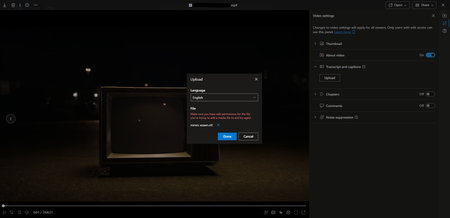
Hello! I need some help about this issue, because I don't know what's going on. I'm the owner of my Onedrive, and all the files, I have all the permissions, but every time I try to add a .vtt file I get this error. The subtitle is fine, I tested it already, so I don't know what's the problem here.173Views1like0Comments
hardware encoder to create content for Stream
has anyone tried using hardware encoders (e.g. Matrox, Epiphan, AJA) to generate content for Stream? context: HE institution trying to design system to record videos within multiple rooms/venues, sending content directly to users' MS accounts, ready for editing/viewing within Stream.97Views0likes0CommentsVideo Error CDN?
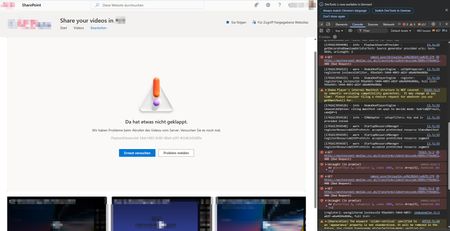
Hello Video Community, a video cannot be played. Deleting cookies does not help. According to the developer tool F12 in Chrome, error messages come from suspected CDN's. GET 400 Bad Request https://westeurope1-mediap.svc.ms/transform/videotranscode/8889cff9eb011943565d1b48801ea96ac9a... [Report Only] Refused to frame 'https://login.microsoftonline.com/' because it violates the following Content Security Policy directive: “frame-src ‘self’ https://support.office.com https://webshell.suite.office.com/ *.cloud.microsoft”. This video runs a little better in Microsoft Edge, but the error message still appears at some point. Is there a solution here?253Views0likes0CommentsHow do I create a link to a video page that does not break if the file is moved in the site?
If I use the share button, it creates a link with an absolute path. The links break if the video is moved, even in the same site. You can use the document ID method but those links go direct to the mp4 file, and not to the page. Surely I can create permanent links to video pages.100Views0likes0CommentsConsistently Poor Video Quality (Auto) Despite Very Fast Speeds
Hi. I'm seeing about 16 Megabytes / second internet speed when I run a internet speed test. According to the test: Your Internet connection should be able to handle multiple devices streaming HD videos, video conferencing, and gaming at the same time. Despite this, when I upload a 1080p video to Stream and when I hit the play button, it consistently auto plays at the lowest resolution (at most 480p, but typically 240p). I've tried encoding the video file multiple different ways, including at a low bit-rate (1 Mbps) and a very high bit-rate (40 Mbps) but it never auto plays at 1080p or even 720p. If I click on some point in the play bar while the Quality is set to "Auto", it will adjust based on bandwidth and begin playing the video back at 1080p. And obviously, if I manually change the playback quality to HD, it will play the video in HD. But my viewers don't necessarily know this hack. From their perspective, they hit the Play button and the video just looks crappy and it's a terrible user experience. Why, if our internet speeds are considered very fast, does Stream automatically play an HD video at 480p or 240p? Why does it take me either manually changing the quality or clicking somewhere on the play bar to change the Quality settings and make the video playback at HD?578Views1like0Comments
Change in Stream viewer analytics & other delayed behavior
We have been getting reports that the view count is not reflected current state. I've tested this myself and watching a video does not add to the count of viewed. Previously this was counted in real time, but it appears to now be delayed by a day or more. We also have reports from a user that uploaded a new video file which they confirmed was uploaded bc they had a link and can view the video in Stream, but cannot see it listed with the other Stream files under "recent" or "created by me" in the Stream or Office UI. Anyone else getting these reports? I'm not seeing any notifications in the admin center.262Views0likes0CommentsEs parte de un error o mal uso?
tengo una inquietud, a que he estado haciendo uso de la aplicación de Microsoft Stream (on SharePoint) al momeno de compartir , dentro de adminisrar acceso, te da opción de determinar una contraseña misma tengo entendido que al destinatario que se le comparte, deberá ingresar la contraseña para que le permita abrir el archivo. pero esto no esta funcionando así. Es un error o mal uso de mi parte?96Views0likes0Comments
A way of exporting Chapters, Interactions, and Transcript in the same file?
Hello! I just wanted to ask if anyone knows how to export chapters information and interaction information, ideally including the transcript but at this point I'd just be happy to be able to export the interactions and chapters from Stream.197Views0likes0CommentsStream videos opening showing transcript
Hi there, I'm currently creating videos that are saved in SharePoint and links are provided through an LMS. Unfortunately the LMS doesn't allow embed codes and I am having to create a view only link set to all people at my company. When the video opens to be viewed it is showing the transcript in full on the right hand side of the video making the UI a bit ugly. Is there a way to create a link that will either open showing the chapters on the right hand side of the video, or alternatively opening the video with transcript hidden from view. I don't care that it is defaulted to appear on the video, I just don't like it sitting on the right hand side.286Views0likes0Comments
This video is temporarily unavailable
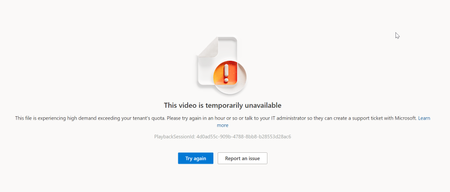
Hello, We met with 50 team members during video Streaming (Teams) uploaded to Microsoft Streams. After 30 seconds of video, it crashed for a few people (more than 10 people were impacted). Errors: Video format MP4. Length: about 9 minutes. Size: 100 mb. Why did this happen? Thank you.615Views0likes0CommentsVideo analytics anonymous users
Hello Regarding video analytics, we generated a link so that any user can open it, which was shared with hundreds of users. When reviewing the analytics, we observed that the information only reflects the views of those users who belong to the same tenant. Are all those views made by anonymous users not counted?231Views0likes0CommentsCan you specify a save location for the Stream Recorder? e.g. as a a parameter?
I'd like to integrate the SharePoint Stream recorder with our own bug reporting system, so users can easily add a video to an issue. Currently, the recorded video shows up in the user's OneDrive folder which then has to be moved to a non personal SharePoint area or downloaded and re-uploaded. This is a pain. It would greatly help the adoption of the stream recorder if we could specify the location of where the video is to be stored in the form of a SharePoint site/folder. Thank you.280Views0likes0Comments


Events
Recent Blogs
- Microsoft Stream makes it easy to quickly create and share videos at work or school. Here are six ways you can get the most out of video.Jan 31, 20245KViews0likes0Comments
- The future of video at work is bright and promising. Today, Microsoft Stream is introducing new experiences that put video into the flow of your everyday work.Nov 15, 202345KViews0likes4Comments
Tags
No tags to show