Recent Discussions

Notification when video encoding is done
Is there a way to notify the user(s) when encoding of the video is complete? I've uploaded videos and they don't show up in the Stream Library for quite some time. It would be helpful to see some type of placeholder in the library that provides an update when the video will finish processing OR maybe an email to notify the user that it has started and when it is done.Solved464Views0likes2CommentsStream features I don't understand
I'm just starting to use Stream this month. There are some things I don't understand. What use is the Recommended bar on the home screen? I don't need recommendations. I just need a searchable list of my Streams. Why don't my most recent Streams show up on the home screen? I've made a dozen new Steams over the last few days, but they don't show up under All or Created by me, etc. Why, when I try to add a Stream to my favorites, does it come back with "Something went wrong..." Why is Microsoft spending a zillion dollars on AI to help me plan a dinner party, when I just want to get my work done?Solved550Views0likes2Comments
"Transcript and captions" disappear from Audio settings list
Hello I uploaded a .mp4 audio file to Sharepoint Stream, then I generated the caption/transcript and successfully downloaded it in word. However, when I checked it today, the "Transcript and captions" option is disappeared from the Audio settings list. The caption is still displaying on the audio but there is no way for me to download it again. Could you please help? Thanks. The caption is still working on the audio: No "Transcript and captions":Solved907Views0likes2Comments
Last Viewed Date for Stream(on SharePoint) Videos
Does anyone know if we can retrieve Last Viewed Date for videos stored on Stream(on SharePoint)? Since these videos are treated as files, I was hoping to use Pnp PowerShell cmdlets or Graph endpoints to check the Last Viewed Date for videos on our tenant in one go.Solved650Views0likes2Comments
Stream web interface no longer integrated to Clipchamp
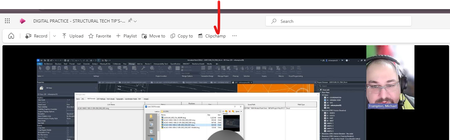
Noticed today there seems to be a disconnect in the web interface of a stream recorded from a meeting. The web interface appears to have lost the import to clipchamp and I now have to download the video content directly to being it back into clipchamp. The clipchamp button in the stream web interface now only opens clipchamp with no action taken. Can somone at microsoft look at this?Solved899Views0likes2Comments
Have You Experienced Inflated Stream Metrics?
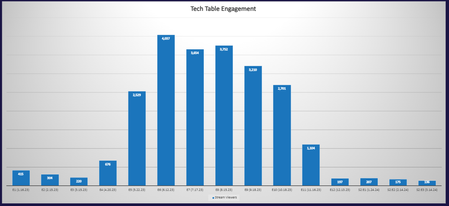
Fellow Stream users, have you experienced inflated Stream metrics, across views and viewers, on your videos? Our Internal Communications and IT teams are trying to explain a massive jump (and subsequent dip back to reality) in viewership for a monthly internal video series hosted on our SharePoint intranet via Stream on SharePoint. Here’s the timeframes and average viewers for context (see chart attached at bottom): From January 2023 to April 2023, we averaged 403 viewers per video From May 2023 to November 2023, we averaged 2,998 viewers per video (a massive spike) From December 2023 to March 2024, 178 viewers per video We have not changed the way we shared or saved these videos. They are uploaded to a document library in Site contents, embedded on news post pages, and featured in a news webpart and Viva Engage. We wish thousands of team members would watch and listen, but those numbers don’t add up when looking at page views on our intranet and post views on Viva Engage! Could our rise or dip in viewership be attributed to the Stream migration? Any advice would be much appreciated. May 2023 to November 2023 is our data anomaly…Solved443Views1like1CommentSharing a Video using Anonymous links no longer allows users to download video
Our end users have reported a new issue this year in which when sharing a video from their SharePoint/OneDrive site collection using the anonymous link + can view privilege (this is using the latest sharing experience), the external users are no longer provided an option to download the video on their end. This functionality was being used by our end users since last year to allow external vendors and customers to download videos. I can still see the Download option (using an anonymous sharing link) for other non-office files like PDFs from the same work tenant. As of last week, my personal development tenant didn't have this issue. However, today while trying to reproduce the error, I can see that the Download option is no longer available for Anonymously shared files from my development tenant either. Is there an update being pushed out that is causing this bug Marc Mroz ?Solved3.8KViews0likes11CommentsStream web part when source is Folder is not listing any videos
Hi all, I added the brand new Stream web part and I wanted to list all videos in a specific folder. I get this message but I know there's at least 1 video to display. When I select the folder I get this: ERROR: {"message":"Can't get data. ListItemDataSource: getItemsForList REST call failed. Status Code: 400 Status Message: [HTTP]:400 - [CorrelationId]:8d54e3a0-f07b-7000-687a-0929a58bfecf [Version]:16.0.0.24127","status":400,"correlationId":"8d54e3a0-f07b-7000-687a-0929a58bfecf","innerError":{"odata.error":{"code":"-1, Microsoft.SharePoint.Client.InvalidClientQueryException","message":{"lang":"en-US","value":"The expression \"web/Lists(guid'2a5ae27-39e3-4f39-8c9b-8a134421ba6')/RenderListDataAsStream\" is not valid."}}}} CALL STACK: Error: {"message":"Can't get data. ListItemDataSource: getItemsForList REST call failed. Status Code: 400 Status Message: [HTTP]:400 - [CorrelationId]:8d54e3a0-f07b-7000-687a-0929a58bfecf [Version]:16.0.0.24127","status":400,"correlationId":"8d54e3a0-f07b-7000-687a-0929a58bfecf","innerError":{"odata.error":{"code":"-1, Microsoft.SharePoint.Client.InvalidClientQueryException","message":{"lang":"en-US","value":"The expression \"web/Lists(guid'2a5ae27-39e3-4f39-8c9b-8a134421ba6')/RenderListDataAsStream\" is not valid."}}}} at https://res-1.cdn.office.net/files/sp-client/sp-dataproviders_en-us_78b65c21626c87657f97.js:1:52070 If I configure the web part to list the recent added videos to the site, it display the videos. Any ideias how to fix this?Solved5.6KViews0likes15Comments
Sharing and Embedding Videos for Entire Organization in Stream (on SharePoint)
My team manages a knowledge base that is used by our entire organization to share documentation on IT-related processes. We have been using Stream (Classic) to upload and share videos by embedding them into the KB articles, so we could take advantage of the view analytics and autogenerated captions. I created a channel and set the access permissions so anyone the org could access it. Now we are being pushed over to the new version of Stream, which doesn't have a channel feature (that I can see, anyway), and so we've been manually setting the access for each video before creating the embed code. But we recently discovered that people are not able to view these videos because they are getting a permissions error, saying that they need to request access. We tried putting videos inside a folder that had permissions set to viewable by anyone in the org, so that files would inherit the permissions, but that didn't work either. Please help us figure this out! We'd love to keep using Stream, but won't be able to if we can't fix this issue.Solved7.5KViews2likes5Comments
How can I share a video to the whole company without sending them a link?
Our company have a Confluence site to which we want to share Teams recordings. Currently when a meeting is recorded, the recording will go to SharePoint (Stream) and then I can use the url to set up an iframe in Confluence and show the video. However, I'm having issues with the permissions. As I understand it, the recording is automatically made available to everyone who attended the meeting, is that correct? However, we sometimes want to make videos available to the entire company, or, at least, to a larger group of people than the meeting attendees. I thought there was an option that was something like "Anyone in the company can view", but I can't see it now - the only options I seem to have are to add everyone via an email address. I don't really want to do this because firstly, it doesn't seem to accept distribution lists, and secondly, it sends everyone a link to the SharePoint page - I want to send them to the Confluence page. How should I manage this?Solved8KViews1like1Comment
New chapters taking all my storage space./How to turn off versioning/delete old versions all at once
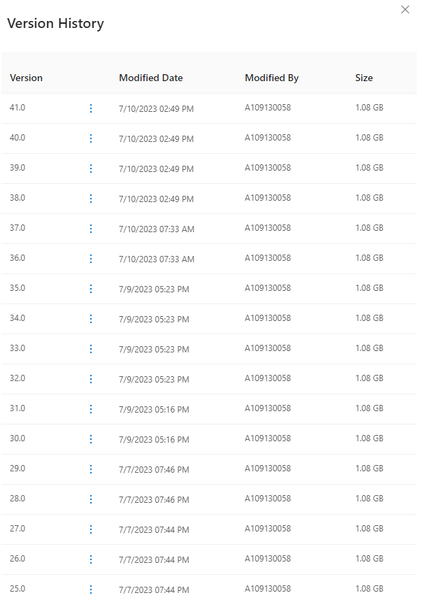
(I'm using education version)Whenever I create or edit a chapter in Stream, it automaticly creates a new version for me in onedrive, the problem is, it actually duplicates the file, for example, if the video size is 1GB and I edited the chapter 50 times, then there would be 50 versions of this video file, and the file size would be 50GB, this issue is really bothering me, it basically takes up all 1TB of my storage, someone help plz. it shows 1.08GB if you check on the detail of this file, but if you check the size of the directory this file is in it shows hundreds of GBsSolved2.2KViews0likes6Comments
Build a power page with a streaming and live streaming service
Hi Everyone, Hope y'all doing great today, Here is my question : I have a lead that would like to build a streaming platform, the volume is hudge : 15K users in the same time at maximum audience for streaming vidéo. It would also require Live events streaming with simultaneous users doing it. I think that stream on sharepoint is doing live events but do you know if we could build a such solution on a power page website for exemple ? Is it even possible on a standard sharepoint ? Kind regardsSolved1.9KViews0likes4CommentsHow do I upload a video to a streams Channel ?
The old Streams classic could do this. But from now on if I choose to "Upload" a video opposed to "Record a Video" it sends me to sharepoint. Which is just a massive Pot of chaos. Stream Channels meant I could organise. Any help would be great, cheersSolved1.8KViews0likes3Comments
Turn off access to Stream on SharePoint
Hello! Does anyone know if there is a way to restrict access to Stream on SharePoint at all? Without altering access to SharePoint in general? I cannot find any information on this at all. and the setting Microsoft Stream for Office 365 E3 appears to be for Stream Classic. Thanks!Solved2.8KViews1like3CommentsThis video has no sound
Sound or Audio Troubleshooting assistance needed. One of our coworkers has created videos using Adobe Premiere Pro then uploaded to Stream on SharePoint Online. While hosted on SharePoint Online, the video has no sound. When playing the video I can hover over the speaker control icon, and the tip balloon will say "This video has no sound." A visitor can then download the video from Stream, and it will play just fine with audio in Windows Media Player. The behavior is the same across different desktop browsers, Stream mobile app, and same when uploaded to a dev tenant. I went on a hunt to learn more about video creation and posting and landed on this article. https://support.microsoft.com/en-us/office/video-formats-you-can-play-on-the-onedrive-website-07c008b2-70e4-4ced-8a9b-f25bed77196a#:~:text=You%20can%20play%20most%20audio,and%20all%20across%20Microsoft%20365 Based on that information, the owner re-produced the video with a lower bitrate and that didn't help. Here are the specs on the file: Dimensions 1920x1080 Codecs MPEG-4 AAC, H.264 Color Profile HD(1-1-1) Duration 05:34 Audio Channels Stereo I'm told this isn't the first time it's happened, only the most recent. Any guidance on how best to resolve?Solved19KViews0likes18CommentsETA for timestamp links in comments?
I believe this feature was in streams classic but not the modern streams product for sharepoint. Being able to insert a timestamp in a comment and have it be an auto jump link to the specific timestamp is a critical feature for collaboration. Other than that loving the product so far, especially the ability to share screen as a backdrop.Solved2.6KViews1like6Comments




Events
Recent Blogs
- Microsoft Stream makes it easy to quickly create and share videos at work or school. Here are six ways you can get the most out of video.Jan 31, 20245KViews0likes0Comments
- The future of video at work is bright and promising. Today, Microsoft Stream is introducing new experiences that put video into the flow of your everyday work.Nov 15, 202345KViews0likes4Comments
Tags
No tags to show