Recent Discussions

Trim feature removed in new Stream?
Has the trim feature been removed in both the new (SharePoint) Stream and tradtional Stream interface? I discovered this today when attempting to trim a video recorded from a Teams meeting. The trim feature was available recently when video recordings of Teams meetings were accessed in OneDrive.Solved135KViews38likes118Comments
Editing a video saved to OneDrive/SharePoint
Once we begin saving all TMRs to OneDrive - how will we edit those videos to trim, set a title, description or new thumbnail? Will we have to upload the video to Stream? If we do that, once the changes are made, do we then have to save back to OneDrive in order to be able to share? How do we make someone else an owner of a video besides the recorder or organizer of the Teams Meeting? Seems like the change to OneDrive is going to make working with videos way more complicated. Is there any how-to guidance/training from Microsoft for end-users on how to work with videos now that they will be saved to OneDrive/SharePoint first? Thank you,93KViews3likes36CommentsCaption/transcription generation issues?
The option to generate captions/transcriptions for videos stored in SharePoint/OneDrive has been working fine in our tenant for months, but yesterday users started reporting an error message. When attempting to generate captions, the message indicated that the request could not be completed. By late evening (10 PM EST), the request process was working, but as of 9:30 this morning, no captions have been generated, even for very short videos. There's nothing in the Service Health section of the admin center, so not sure what's going on. EDIT: I just tried requesting captions in another tenant and am getting the same message as yesterday We're having trouble generating a transcript and captions right now. Try again in a bit.18KViews6likes34CommentsInsert Stream (SharePoint) Link in PowerPoint
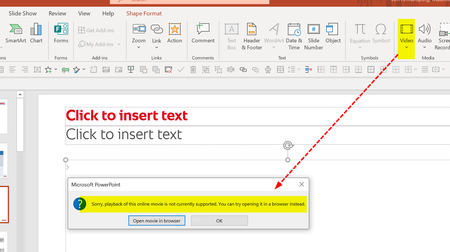
Good Morning everyone, and a Happy New Year, first of all! We have recently started using MS Teams for Webinars we conduct with external customers. As we are using PowerPoint Live for sharing slides, we would love to insert Stream (SharePoint) video links into our PowerPoints. However, inserting Online Videos with a SharePoint link is currently not supported (see error message below). We can only insert Stream (Classic) video links - the drawback of that solution is that it does not work for external webinar attendees. Are there any plans to allow the insertion of Stream (SharePoint) videos? Will those videos be accessible then to external users that do not have a Stream account within our own organization? Thanks and best regards, Max von Armansperg These new52KViews3likes32CommentsRolling out - Custom thumbnails & title & description metadata
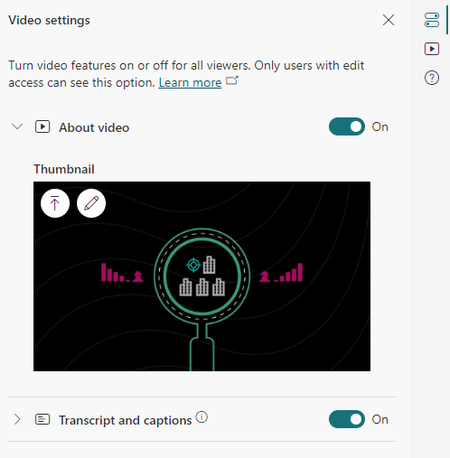
We started rollout of new capabilities to video and audio files stored in SharePoint, OneDrive, Yammer, and Teams allowing you to set a custom thumbnail for a video as well as set the title and description of the video. The description is rich text so you can add bold, italics, underline, bullets, and hyperlinks. Currently as of June 2, 2022 these features are enabled to 50% of normal worldwide users. To set a custom thumbnail... Play a video, open the side pane "Video settings" Under "Thumbnail" Upload an image or scrub to a time in the video and use that as the thumbnail To set the title and description for a video... Play a video, open the side pane "About video" Set the title and/or description of the video (including rich text and hyperlinks) Click save12KViews3likes29Comments
Embedding Stream videos outside Office environment
In Stream (Classic), users have the ability to generate embed (iframe) code. This enables users to embed the videos in environments outside the Office suite - such as in blogs and web sites. As an HE institution, we encourage our instructors to use this feature to embed the videos in their online courses. This is so students do not need to leave the LMS environment to view the videos. Has anyone seen whether or not an embed feature will be added to SharePoint and OneDrive for Business to replace the feature as it exists currently in Stream (Classic)?10KViews2likes28Comments
Embed SharePoint Video on External Sites
Is it possible to embed a Stream on SharePoint video on an external/public site? The technique described in this article, of updating the embed code with a link you set to public, did not work for me: https://answers.microsoft.com/en-us/msoffice/forum/all/onedrive-embed-links-dont-allow-public-viewing/251ddb80-467e-44f7-b7a8-3182e19bf671 The embed code I got was very different from the one in the article.Solved11KViews1like22CommentsArrange videos in a Playlist (Stream on Sharepoint)
Hi all please can anyone tell me if the new Stream (on Sharepoint) features the ability to arrange videos in a playlist or at least is it in the roadmap. If not I would like to log a feature request as this was lacking on the Stream (Classic) environment. ThanksSolved16KViews0likes22CommentsNew Stream Web Part - Source > Folder > From Sites > Only shows recent shared libraries
The new Stream (on SharePoint) web part just hit my org's tenant. When you add the web part to the SharePoint page, there are several source options: Videos on this site, Folder, and Single Video. When you select Folder as the source and the Select Folder button, it gives you the option to select Your Organization, OneDrive, Site, and From sites. Here's the problem I'm running into: When you select From sites, it only allows you to see the Shared (Doc) Libraries you have accessed most recently and is limited to 12. If the Shared (Doc) Library you need is not shown, you have to: Stop editing the SharePoint page Navigate too and open the Shared (Doc) Library where the video file(s) live Wait a few minutes Go back to the SharePoint page you were editing and hope the Shared (Doc) Library shows up when you select From sites. The workaround "works" but it isn't a great experience for the end user. Is there any other way to get the ability to search for the Shared Library?4.7KViews3likes20CommentsNew Stream Webpart - Disappointing
The new Stream Webpart has just come through to our tenant and started to set it up to see how it actually works. Quite disappointing so far, and not fit for purpose in our video architecture. I was hoping for something similar to the Highlighted Content Webpart where you have a lot of sources, filtering and sorting options, etc. Would have liked to see Microsoft use this as a base, and retrofit the ability to play videos inline, additional display options such as Gallery (which they have) and Playlist (which is apparently coming soon). As part of the migration from Stream (Classic) to Stream (on SharePoint) we are looking to upload all our videos to Document Libraries without folders and use metadata for Channels, Categories, etc. This way we can associate our videos to multiple Channels which we wouldn't be able to do with folders. Also, a flat architecture is a much better option for effective filtering, searching, etc. However, the only source options available where we could limit what videos are displayed are using Folder. So, for us, we can't use the new Stream Webpart at all for displaying our videos by Channel, Category, etc. You also can't select multiple sites or sites associated to a hub to return videos from. Only from this site, or a single site. Highlighted Content Webpart allows you to select multiple sites which again is something we need. Stream Webpart Videos on this site (brings back all videos without any filtering options) Folder (no filtering options) Single video Highlighted Content Webpart (a lot of filtering options regardless of what source you select) All sites in the hub This site A document library on this site This site collection The page library on this site (wouldn't apply to videos) Select sites All sites Also, when selecting Folder or Single video and you want to get from another site, it only shows recent or favorited sites (and not all of them) with no ability to search for and select a specific site. This is a real painful experience where you have to go out to the site you want to select first a few times and hope it shows up for you to select. This is also noted in the following post: New Stream Web Part - Source > Folder > From Sites > Only shows recent shared libraries - Microsoft Community Hub The new Stream Webpart also currently has very limited Sorting options available. Stream Webpart Recently created Recently edited Author Highlighted Content Webpart Most recent Most viewed Trending Managed property ascending Managed property descending Looks like we're stuck with File and Media Webpart for single videos, and Highlighted Content Webpart for multiple videos for the foreseeable future. Really hoping to see the new Stream Webpart get some much-needed improvements over the next few months!! Microsoft, any plans for implementing any of these missing features?4.4KViews7likes19Comments
Video Quality Default Setting
I'm a video creator at my org. So, I'm generally viewing things through a hybrid, technical+creative lens. As we begin to share internal videos via Stream (SP), I'm regularly noticing that the video quality playback settings are set to "Auto." Often, that leads to the video playing entirely in a low resolution, where it's mostly pixelated; even the thumbnail image previews with the same low resolution. I understand there are various contributing factors here, but I also discovered that users can toggle the video settings to "1080p." Still, it always defaults back to "auto." I'm wondering if there is a way to lock that setting to 1080p for all users within our organization, because it's not realistic to communicate such a setting change to all users.8.5KViews4likes18CommentsThis video has no sound
Sound or Audio Troubleshooting assistance needed. One of our coworkers has created videos using Adobe Premiere Pro then uploaded to Stream on SharePoint Online. While hosted on SharePoint Online, the video has no sound. When playing the video I can hover over the speaker control icon, and the tip balloon will say "This video has no sound." A visitor can then download the video from Stream, and it will play just fine with audio in Windows Media Player. The behavior is the same across different desktop browsers, Stream mobile app, and same when uploaded to a dev tenant. I went on a hunt to learn more about video creation and posting and landed on this article. https://support.microsoft.com/en-us/office/video-formats-you-can-play-on-the-onedrive-website-07c008b2-70e4-4ced-8a9b-f25bed77196a#:~:text=You%20can%20play%20most%20audio,and%20all%20across%20Microsoft%20365 Based on that information, the owner re-produced the video with a lower bitrate and that didn't help. Here are the specs on the file: Dimensions 1920x1080 Codecs MPEG-4 AAC, H.264 Color Profile HD(1-1-1) Duration 05:34 Audio Channels Stereo I'm told this isn't the first time it's happened, only the most recent. Any guidance on how best to resolve?Solved19KViews0likes18CommentsAudio problems for professional created videos
Hi everyone, i am working for an IT department and received the following incident. I wanted to bring up an issue we've been experiencing with the audio quality of board videos when played on SharePoint. Locally, the videos play perfectly fine, but once uploaded to the SPO, we notice frequent clicking sounds that significantly affect the audio quality. Details: The audio issues seem to occur randomly and are not consistent across all videos. We are following the rules for encoding - Video formats you can play on Microsoft 365 - Microsoft Support MP4 1080p - 5Mbps, Audio AAC 192Kbps - Encoder is Adobe Premiere If you download the file locally there is no clicking - it is only in the Streaming web player Has anyone else experienced similar issues with the web player and .mp4 files? We would appreciate any insights or suggestions on how to resolve this issue. Looking forward to any advice from the community. Best regards Stephan1.9KViews7likes17CommentsStream web part when source is Folder is not listing any videos
Hi all, I added the brand new Stream web part and I wanted to list all videos in a specific folder. I get this message but I know there's at least 1 video to display. When I select the folder I get this: ERROR: {"message":"Can't get data. ListItemDataSource: getItemsForList REST call failed. Status Code: 400 Status Message: [HTTP]:400 - [CorrelationId]:8d54e3a0-f07b-7000-687a-0929a58bfecf [Version]:16.0.0.24127","status":400,"correlationId":"8d54e3a0-f07b-7000-687a-0929a58bfecf","innerError":{"odata.error":{"code":"-1, Microsoft.SharePoint.Client.InvalidClientQueryException","message":{"lang":"en-US","value":"The expression \"web/Lists(guid'2a5ae27-39e3-4f39-8c9b-8a134421ba6')/RenderListDataAsStream\" is not valid."}}}} CALL STACK: Error: {"message":"Can't get data. ListItemDataSource: getItemsForList REST call failed. Status Code: 400 Status Message: [HTTP]:400 - [CorrelationId]:8d54e3a0-f07b-7000-687a-0929a58bfecf [Version]:16.0.0.24127","status":400,"correlationId":"8d54e3a0-f07b-7000-687a-0929a58bfecf","innerError":{"odata.error":{"code":"-1, Microsoft.SharePoint.Client.InvalidClientQueryException","message":{"lang":"en-US","value":"The expression \"web/Lists(guid'2a5ae27-39e3-4f39-8c9b-8a134421ba6')/RenderListDataAsStream\" is not valid."}}}} at https://res-1.cdn.office.net/files/sp-client/sp-dataproviders_en-us_78b65c21626c87657f97.js:1:52070 If I configure the web part to list the recent added videos to the site, it display the videos. Any ideias how to fix this?Solved5.6KViews0likes15CommentsHere are my issues with the new stream.
The only thing that is nice is the improved analytics (they could be improved even more though) Managing permissions for the entire company has proven so incredibly difficult when it was super simple before. We have 15,000 employees and I spent the entire weekend getting emails saying "so and so is requesting access". Uploading does not provide any status indicators anymore. Brutal. Every single video I have saved to onedrive has been migrated over to stream filling my stream with thousands upon thousands of raw video files. If stream on sharepoint is supposed to help with video organization, it is failing miserably right now. I can't replace a video and retain links/analytics, just have to upload an entirely new file and re-send link all over again. We used 'Likes' or 'hearts' as a measurable analytic and thats gone now too. Microsoft. Fix the issue before we have to abandon the platform all together.5.7KViews1like15CommentsIs Automatic Transcription for Videos on SharePoint Available Yet?
This article implies it is: https://support.microsoft.com/en-us/office/view-edit-and-manage-video-transcripts-and-captions-3cb9acb6-05b2-4f59-a50d-7df61123aa20?WT.mc_id=M365-MVP-9501 Has anyone seen it in their tenants? I've had to do it via API calls for the last year. I'm looking forward to it happening automatically.2.6KViews0likes12Comments
Problems with Stream on Sharepoint
Ok, so maybe I'm missing something, but I am already not in love with the new Stream on Sharepoint. It has literally taken everything away that we liked about Stream classic. Maybe I'm missing some of these features and can be enlightened on an easier way to find them, but if they are that hard to find, they aren't accessible. 1. When you click upload, you do not get the box to add all options at once- title, description, etc. You have to wait until after it uploads, then go to the video, and do it there. 2. There is no file upload confirmation. You get a box that says "preparing to upload" or "uploading file" then it just disappears. It doesn't go to a page where you can see the video, and it doesn't show up in the list right away, and when it does, you have to search for it. I didn't realize it was uploading and therefore put the same video in 3 times, which brings me to the next problem. 3 . You can't delete videos from sharepoint. You have to click the three dots, select Open, then open file location, then you have to find the file again, and then you can delete it, and the file doesn't have the new name you gave it in Sharepoint. Why go through so many hoops just to delete a video?? 4. There is no trim! While any significant editing can be done in a video editing software, the ability to just trim off the dead silence or wait time in the beginning or end was a great and easy feature. 5. There is no organization! Again- within Stream on Sharepoint itself, there is no way to create folders, channels, anything. I just see ALL the videos. Mine and anyone else's. The filter options are limited, and don't help much. I have hundreds of videos. I should be able to organize them. Again, I would have to LEAVE Stream, go to another area of Microsoft, Teams, etc and THEN create a folder, group, etc, and then FIND the videos in the long list of files to add them. It's insanity. At the end of the day, Stream on Sharepoint is a headache and a hassle and being forced to move to it (eventually) is extremely frustrating.Solved12KViews10likes12Comments





Events
Recent Blogs
- Microsoft Stream makes it easy to quickly create and share videos at work or school. Here are six ways you can get the most out of video.Jan 31, 20245KViews0likes0Comments
- The future of video at work is bright and promising. Today, Microsoft Stream is introducing new experiences that put video into the flow of your everyday work.Nov 15, 202345KViews0likes4Comments


Tags
No tags to show