Forum Widgets
Latest Discussions

Color mode Greyscale doesn't reflect on client
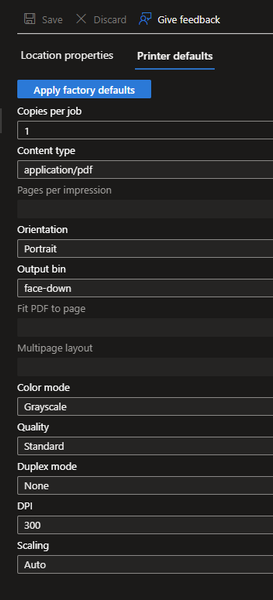
I've set the color mode from our printer from 'Auto' to 'Greyscale': It seems this change doesn't reach the Universal Print Class Driver on the client. The color mode remains 'Color': I'm not able to change this setting via PowerShell, PrintTicket or fancy Registry changes. I just want that our user print in Black/White by default. It woould be good to know if there is a known issue or I do something wrong. Thanks.SchroediMay 19, 2026Copper Contributor19Views0likes0Comments
Removing an old Universal Print printer automatically and printing issues
Hi smart people of the Microsoft Community Hub, I have a requirement to remove a particular old Universal Print printer on all Windows devices automatically (via an MDM solution such as Microsoft Intune). As the printer is mapped via Intune originally, I tried to just simply remove the printer from the Intune configuration policy but the printer stays mapped. I checked for PowerShell cmdlets that would help to automate this process, but the Universal Print PowerShell module has very limited documentation and it does not seem to support unattended removal of a Universal Print printer via PowerShell script. In addition, I have another issue relating to printing where Universal Print print jobs may sometimes print off 20 or more pages of Wingdings characters. The only pattern I've noticed with this is that it is related specifically to PDF files. If Universal Print wasn't involved I'd chalk this up to a printer driver issue or mismatch, but I don't know how to troubleshoot this specifically on Universal Print. The printer models that have had this issue are HP LaserJet MFP H577, LaserJet MFP M578 and LaserJet MFP M633. Please can you assist me with either issue? Thanks!danieldavies997Dec 16, 2025Copper Contributor206Views0likes0Comments
Can't enrol one PC to Win10 ESU
I paid for the ESU program and one of my 5 PC's refuses to enrol. The latest 22H2 and other updates are installed, it's signed in with my MS account as Administrator. location services are on. I tried changing to a local login and then back to the MS account and that did not help. Windows Update reports "Your version of Windows has reached the end of support" and there's no "You have enrolled..." text on the right on the Windows Updates page as there is on my other computers. When I try taking the steps to enrol it in the ESU program I get an error message after entering my Microsoft Account info (which the computer's already using to log on ..) It's not a computer I use often, so there's no huge rush to fix it. But I'm wondering what steps I can take to fix it? I tried doing a chat with MS support but they suggested I try "Microsoft Community Support page for assistance" first: "Microsoft still has a dedicated support team available to assist with ESU enrollment issues. That’s why I’m recommending you reach out to the Windows 10 ESU support team directly—they can help verify your device’s status" .... I assume they mean here?? Thanks for any help. Rrpmtl22Oct 24, 2025Copper Contributor50Views0likes0Comments
Universal Print & Citrix Popup
Recently, when launching Citrix Applications, we have started getting a printer connection message that pops-up in the foreground which overrides any other application being used (which will also override anything you are typing). This message pops-up for each UP printer that is being added to the Citrix session. This occurrence started with the following 64-bit OS versions, and it doesn't matter if the printer is from a Universal Print Connector Server or if the printer is directly registered with Azure. Windows 11 24H2 Windows 11 25H2 Note: Windows 11 24H2 (Cloud Computer) No Popup Windows 11 25H2 (Cloud Computer) No PopupLenNewgenOct 24, 2025Copper Contributor120Views1like0Comments ITSTorgOct 22, 2025Copper Contributor30Views0likes0Comments
To add more printer options in the print printer default settings
Currently Universal Print Printer default settings has very limited options only. So because of that we are not able to configure the required custom print options. It would be better if Microsoft can add all other printer options settings like paper sizes, sources, staple, punch hole, booklet, double side printing, etc. to the default printer settings the Universal Print. And if Microsoft can add additional ways to release print jobs like using a pin, or Authenticator app, etc. will be beneficial to the users.shansadayanOct 20, 2025Copper Contributor62Views1like0CommentsUP registration error 50199 Interactive login required
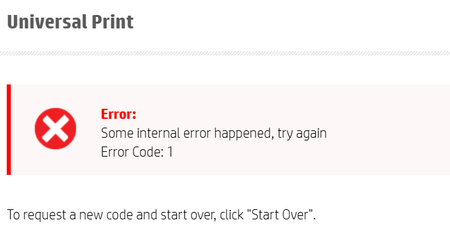
I am getting a UP registration error 50199 Interactive login required, the admin account has an E3 and the printer admin role. I was able to register printers recently. It is a Canon Image Runner, that gives a Devicelogin code then runs through MFA but fails with the Sign-ins logs saying Interactive login required. The login shows a conditional access Success. Can you suggest any trouble shooting steps.gerrymurphy2400Sep 19, 2025Brass Contributor133Views0likes0Comments
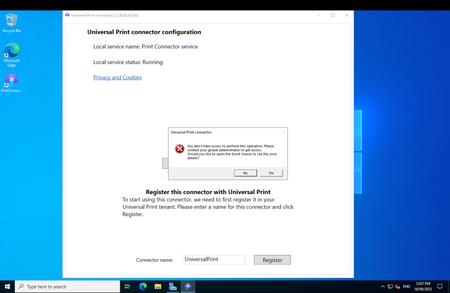
You don't have access to perform this operation when registering a connector
As per below image. I have assigned the user account I signed in with Print Administrator in Entra and the message persists. Is this a bug? I am using Windows Server 2022.willrsSep 17, 2025Copper Contributor65Views0likes0CommentsUniversal Print Connector App browser is not supported in Windows Server 2022
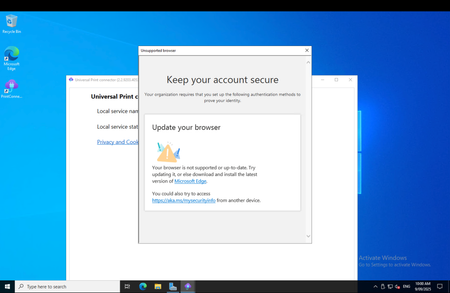
I'm trying to install the Universal Print Connector app on a VM running Windows Server 2022 and am getting the message below. It seems that the app is using IE despite Edge being the default browser. AI recommended using WebView2 Runtime to fix this however I had no success with that. Any solutions would be very much appreciated!willrsSep 08, 2025Copper Contributor131Views0likes0Comments
Universal Print queries
Some simple queries but just wanted some clarification before confirming with the customer. Connector for printers that aren't cloud ready, is it accurate that this is included in the license and there is no additional cost for this? Zebra printers with lots of different label sizes, how user friendly is this set up? Jobs to be very clear if an operator prints a label but wants 99 of that label, this is classified as one job?RJ1982May 23, 2025Copper Contributor126Views0likes0Comments
Tags
- universal print25 Topics
- announcements13 Topics
- Universal Print Connector8 Topics
- UniversalPrint5 Topics
- Cloud Print3 Topics
- question3 Topics
- Universal2 Topics
- Paper Size Mismatch2 Topics
- intune2 Topics
- Ricoh2 Topics