Recent Discussions

Microsoft Edge default browser with Intune
Hello everyone, I am looking for the best way to configure Microsoft Edge as the default browser for Windows devices managed through Microsoft Intune. I have reviewed the available Microsoft Edge settings in the Settings Catalog but have not been able to identify a specific setting that configures Edge as the default browser. Is there a supported and recommended way to enforce Microsoft Edge as the default browser for managed Windows 10/11 devices? If there are multiple approaches available, I would appreciate recommendations on the preferred method for enterprise environments. Thank you.79Views0likes1Comment
Intune Update Ring not applying to co-managed Windows 11 device
Hello. I am troubleshooting a co-managed Windows 11 Enterprise 23H2 device that is not receiving an assigned Intune Update Ring. The Windows Update policies workload is assigned to Intune, and CoManagementHandler.log confirms that the device is MDM-enrolled, provisioned, and reporting the expected co-management workload flags. The Update Ring settings do not appear under Configured update policies, in the managed policy section of the MDM diagnostics report, or under: "HKLM\SOFTWARE\Microsoft\PolicyManager\current\device\Update" The device also cannot check directly with Microsoft Update and reports that it cannot connect to the update service. I have already checked: Intune assignment, exclusions, and filters Co-management workload ownership MDM enrollment and synchronization WSUS, BigFix, GPO, and scan-source conflicts WinHTTP and user proxy settings DNS and outbound TCP 80/443 connectivity Windows Update Client and MDM event logs Local Update CSP and Windows Update registry settings Other Intune MDM policies apply successfully, and no firewall or network issue has been identified. CoManagementHandler.log repeatedly shows: Could not find one of the mandatory rules Failed to merge/resolve rules. Error 0x8000ffff Failed to process GET for assignment Could these rule-processing errors prevent the Update Ring from reaching the device even though Intune appears to own the Windows Update workload? Which event IDs, registry values, WMI classes, or Configuration Manager policy evaluations would best confirm where the process is failing? Also, the Update Ring is not reporting as failed or in error in the Intune admin center, but its settings are not appearing or taking effect on the endpoint. What additional steps can be used to determine why Intune considers the policy healthy, and how can the policy be forced or corrected so it applies successfully to the device?277Views1like11Comments
Keyboard reverting on reboot
I'm having an issue with the keyboard reverting after OOBE. I'm using an English (UK) Windows 11 25H2 base image (deliberately — I want English display language, with Swedish keyboard/regional settings applied without needing to install a Swedish language pack). Deployment is native Windows Autopilot, no third-party tooling involved. Autopilot deployment profile: Language (Region) = Swedish (Sweden), Automatically configure keyboard = No. During OOBE, I manually select Swedish keyboard, and it's correctly applied — it's still Swedish through the first user logon. But after rebooting the keyboard silently reverts to English (UK). This is regardless of if I run pre-provisioning or user-driven. Is this a known/new behaviour, and how can I fix it?117Views0likes2Comments
Issues to install MECM 2509 (setup could not install sql rmo, configmgr installation)
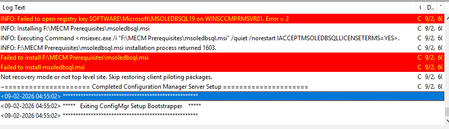
Hello Team! During the install process of MECM 2509 in a Windows Server 2019 Datacenter Edition OS, it stops by getting the following error message: When i tried to manually install msoledbsql.msi to validate what the error message is, I get the following error: Also, I've already installed a version greater than the error is stating (14.51). It, in theory should continue allowing the install. My ODBC Driver 18 version installed is: So, just for test, when I do uninstall the ODBC Driver 18 knowing that the msoledbsql.msi file will be executed by the MECM installer—thereby ensuring the installer doesn't halt at that stage but proceeds with the setup—but if an ODBC driver is not already installed on the server, the MECM installation will not start; it indicates that this component must be installed in order to proceed with the MECM setup. I'm stuck, since I've already installed sqlncli.msi, msodbcsql.msi (18.5), VC_redist.x64 (14.51) , vcredist_64.exe, SharedManagementObjects.msi, VDP48.exe but failing when MEMC Install is trying to install from the Prerequisite downloaded MECM folder the msoledbsql.msi (ODBC Driver 18) again. Installer should ignore the execution of this file since I've already installed and continue with the install. I don't know what else to do. I've reviewed other forums to try to find a solution but nothing. Someone has faced with this issue in the past who can help me or anyone has any knowledge to enlighten me? Thanks in advance, guys.58Views0likes2Comments
Android 12 Sign-In Issue with HP Corporate Accounts via Intune Company Portal
Since yesterday, HP employees using older mobile operating systems (Ex. Android 12) have been unable to access Microsoft Outlook and Microsoft Teams on their smart devices. When launching Outlook or Teams, users are prompted to install the Microsoft Intune Company Portal app for authentication and device compliance. However, the latest version of this app appears to require a newer operating system version and is not supported on older devices. As a result, users with devices running Android 12 or earlier cannot complete the authentication process and are unable to use Outlook or Teams. ■ Please provide additional details 1) The issue started yesterday and affects employees using older Android and iOS versions. 2) On iOS devices, users can typically resolve the issue by upgrading to a newer iOS version. 3) However, some Android devices cannot be upgraded further due to manufacturer limitations. 4) For example, Samsung Galaxy Note 10 officially supports Android 12 as its final OS version and cannot be upgraded to Android 13 or later. 5) Because of this limitation, affected Android users are unable to install or use the required Microsoft Intune Company Portal app, which prevents access to Microsoft Outlook and Microsoft Teams. 6) This issue may impact multiple HP employees who are using Android devices that do not support Android 13 or later. Example affected device: Samsung Galaxy Note 10 (Android 12) Affected applications: Microsoft Outlook, Microsoft Teams, and Microsoft Intune Company Portal Business impact: Users cannot access corporate email, messaging, and collaboration services from their mobile devices. I have already posted this issue on the Microsoft Feedback Portal: https://feedbackportal.microsoft.com/feedback/idea/7bba2697-a2a2-f111-85ce-7c1e529382f4 However, this issue cannot be reproduced when using a personal Microsoft account. It only occurs when using an HP corporate email account because HP requires the use of the Microsoft Intune Company Portal app for authentication and device compliance. Since the problem appears to be related to the Intune Company Portal rather than Outlook or Teams themselves, I would like to post this issue here and seek guidance on resolving the Intune Company Portal authentication and compatibility issue affecting Android 12 devices.267Views0likes2CommentsAccount Protection Policy Unable to Save
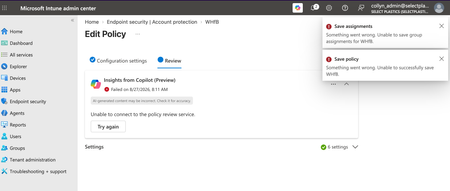
I am trying to configure an Account Protection policy to allow but not enforce Windows Hello for Business in my org's tenant. If I configure any of the device- or user-settings, the policy throws an error when trying to save. Two errors actually, both pretty generic. This has been persisting for the last 24hrs. Does anyone know what may be the culprit here?332Views0likes5CommentsRemoteHelp.exe reports FileVersion 10.4.10008.1000 while the product version is 5.2.1037.0
Problem 1 - File Version Because RemoteHelp.exe reports FileVersion 10.4.10008.1000 while the product version is 5.2.1037.0, this makes Intune detection, packaging, inventory reporting, and supersedence unnecessarily difficult. Remote Help publishes release versions such as 5.2.1037.0, but the primary executable reports a different FileVersion (10.4.10008.1000). This prevents administrators from using standard file-version detection methods in Intune, Configuration Manager, and software inventory solutions. Administrators must instead enumerate uninstall registry entries and distinguish between the Burn bundle and MSI entries. Aligning the executable FileVersion/ProductVersion with the published release version would significantly simplify enterprise application management. Remote Help combines both common enterprise packaging mistakes: The executable version doesn't match the advertised product version. The installer creates two uninstall entries with the same DisplayName. Neither issue is fatal, but together they make what should be a trivial Intune detection rule far more complicated than it needs to be. From an enterprise management perspective, this causes several problems: Application detection scripts become more complicated. Supersedence rules are harder to create. Administrators waste time investigating apparent version mismatches. Software inventory reports show different versions depending on which source is queried. Automated packaging systems cannot simply use file versioning. Documentation has to explicitly state "do not use the EXE version". Problem 2 - Duplicate Uninstall entries The Burn bootstrapper situation makes it even more confusing because there are two uninstall entries, both called Remote Help, both reporting version 5.2.1037.0, but representing two different installer components. This isn't unique to Remote Help unfortunately. Microsoft has a history of doing similar things with: Company Portal Teams (various generations) Edge WebView2 Visual Studio bootstrapper installers Azure VPN Client Some Defender components where the executable version represents the underlying codebase rather than the product release version that administrators actually deploy. The file version should be treated as an API contract with administrators. Once an application is broadly managed by enterprises, changing versioning schemes or exposing an internal build number instead of the published product version makes lifecycle management considerably harder than it needs to be. Problem 3 - Unversioned download URL The URL to download the latest version https://aka.ms/downloadremotehelp is only a redirect link, not a versioned artefact. The download URL itself does not expose any metadata about: The current Remote Help version The release date When the installer was last updated Previous versions A changelog Microsoft's documentation simply points administrators to the download link for installation. When you download the 'latest version' you always receive whatever Microsoft currently considers the latest installer, but the URL itself provides no version information. For enterprise deployment scenarios, the ideal solution would be one of: A "What's New" page with version history. A release notes page containing: Version Release date Changes Versioned download URLs, for example: RemoteHelp-5.2.1037.0.exe RemoteHelp-5.2.1037.0.msi Solution? Please can these three problems be resolved to ease some of the unnecessary burden placed on Intune Administrators?322Views0likes1CommentSCCM Application Model: Which WMI Properties and Classes Correspond to Software Center Tab Fields?
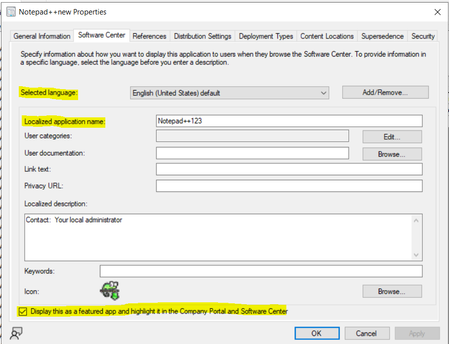
Service: Microsoft Configuration Manager (SCCM / MECM) Scenario: I am working with the Application Model and need to identify the underlying SCCM/WMI property names and associated class names for several fields displayed on the Software Center tab of an Application. Specifically, I am looking for the properties and classes corresponding to the following fields: Selected Language Localized Application Name Display this as a featured app and highlight it in the Company Portal and Software Center Environment: Microsoft Configuration Manager (Current Branch) Application Model What I am looking for: The SCCM/WMI property name associated with each field. The SCCM class name (SMS Provider class) where each property is stored. If applicable, the related SDK object path or SQL view that exposes these values. Troubleshooting Performed: I reviewed the Configuration Manager SDK documentation and application-related classes but could not determine the exact property-to-UI mapping for these Software Center settings. Supporting Material: A screenshot of the Software Center tab highlighting the fields is attached. Could someone help identify the corresponding WMI properties and classes for these settings?60Views0likes0CommentsProblems identifying managed iOS devices when using APP
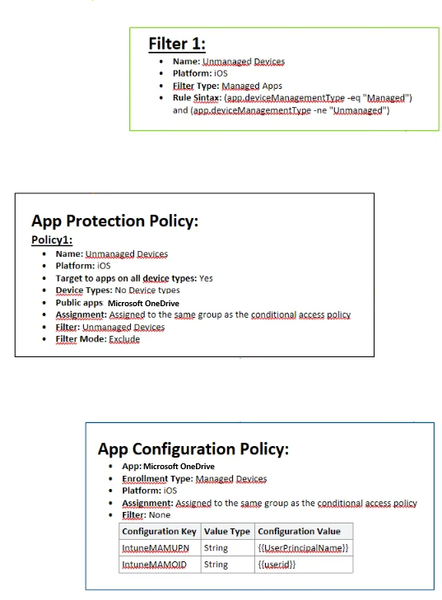
Hello, As the title says i am having a hard time getting this to work. We have been using APP for a long time, but it has not been necessary for us to have different policies for managed (we only use iOS) and unmanaged devices (all mobile device types). Now i want to remove APP from managed devices all together, and only enforce this on unmanaged devices (BYOD) Please see attached image of how it is configured today. I also have an CA policy which requires APP when using MS apps, where i have added and "Filter for devices" exclude with following syntax: device.enrollmentProfileName -contains "iOS standard profile" (which cover our enrollment profiles, both are fully managed) When enrolling a managed device, APP still is enforced. Does anyone have any tips? I wanted to try here before submitting a ticket to MS. As far as i have found out , the app.devicemanagmenttype is the only rule that can be used to filter managed devices when used with APP.333Views0likes1Comment
AD Minimization: How ready are organizations for the journey?
Microsoft's direction around Active Directory minimization is an interesting and important part of the broader cloud transformation journey. Moving more identity and device management toward Microsoft Entra ID can help organizations gradually reduce their dependency on traditional on-premises Active Directory and move towards a more cloud-first environment. What I particularly like about Microsoft's approach is that this is positioned as a journey rather than something that needs to happen overnight. For many organizations, Active Directory has been part of the environment for 20+ years. Over that time, a lot of dependencies may have been built around it, such as: Legacy applications, Group Policies, Domain-joined Windows devices, LDAP, Kerberos or NTLM dependencies, File servers and other infrastructure, Scripts and operational processes linked to AD. Moving new users, applications and devices towards a cloud-first approach is one part of the journey. The more interesting challenge is how organizations modernize the existing environment while minimizing disruption to users and day-to-day operations. This is where I think Microsoft's phased approach makes a lot of sense. Organizations can gradually identify and reduce AD dependencies while continuing to modernize identity, endpoint management and applications at a pace that works for their environment. I would be interested to hear from others who are already working towards AD minimization. Where is your organization in this journey today? Are you already actively reducing your dependency on on-premises AD? And what has been the biggest area to address so far, legacy applications, Group Policy, existing Windows devices, authentication dependencies, or something else? It would also be interesting to hear which Microsoft technologies or approaches have helped you most during this transition.327Views0likes1Comment
Intune and PSADT v4.x
I have a reboot package PSADT and the first dialog give the user the choice to defer the install, and a Scheduled Task is created to run an hour later. I am returning a 1618 (retry) and inside the PSADT, If Intune runs the app again, it will check my reg key for the defer and check that the task is active and hasn't run, and will exit without any interaction to the user and exit with another 1618. I am not an Intune admin and wondered if there are some downsides to trying this type of package in Intune. The defer time is the unknown for me and I am not sure how many times Intune will try to reinstall the reboot package within the deferred hour, and what Intune will do after the 3rd try...which I think is the max retries it might attempt in an hour? Any suggestions for a change in the exit codes or script interaction with Intune? Thanks.317Views0likes2Comments
Intune Enrollment Issues - Error `0x80180014`
Hello Community! We've been occasionally getting this error with some of our machines when trying to manually enroll them in Intune: Error `0x80180014` with the message "does not support this version of Windows" From what I've seen, it typically happens to very specific devices. We have our enrollment setup for Corporate only devices, and they have to have already been synced into Entra form our "on prem" AD. We have found that when removing that restriction, the devices can be enrolled as 'personal' devices. We've made sure the devices are fully updated as well. We've tried doing everything from scratch, including deleting the device from Intune, Entra, and AD before trying to re-enroll it. Here is a dsregmcd output of one of the enrollment attempts: H:\>dsregcmd /status +----------------------------------------------------------------------+ | Device State | +----------------------------------------------------------------------+ AzureAdJoined : YES EnterpriseJoined : NO DomainJoined : YES DomainName : CLEARBROOK Virtual Desktop : NOT SET Device Name : CBROOK13289LP.clearbrook.org +----------------------------------------------------------------------+ | Device Details | +----------------------------------------------------------------------+ DeviceId : 1c9069dc-0079-4c49-b827-227e3a886c6b Thumbprint : D1066B4BCBA9FBFD63F66190741B1BDD32C36C0F DeviceCertificateValidity : [ 2026-07-24 19:46:23.000 UTC -- ] KeyContainerId : e1d94bb2-b3f6-4e6c-93ce-319aeb6e219c KeyProvider : Microsoft Platform Crypto Provider TpmProtected : YES DeviceAuthStatus : SUCCESS +----------------------------------------------------------------------+ | Tenant Details | +----------------------------------------------------------------------+ TenantName : CLEARBROOK TenantId : f3c206ca-21c6-4c72-9ab6-76aa22775cd0 AuthCodeUrl : https://login.microsoftonline.com/f3c206ca-21c6-4c72-9ab6-76aa22775cd0/oauth2/authorize AccessTokenUrl : https://login.microsoftonline.com/f3c206ca-21c6-4c72-9ab6-76aa22775cd0/oauth2/token MdmUrl : MdmTouUrl : MdmComplianceUrl : SettingsUrl : JoinSrvVersion : 2.0 JoinSrvUrl : https://enterpriseregistration.windows.net/EnrollmentServer/device/ JoinSrvId : urn:ms-drs:enterpriseregistration.windows.net KeySrvVersion : 1.0 KeySrvUrl : https://enterpriseregistration.windows.net/EnrollmentServer/key/ KeySrvId : urn:ms-drs:enterpriseregistration.windows.net WebAuthNSrvVersion : 1.0 WebAuthNSrvUrl : https://enterpriseregistration.windows.net/webauthn/f3c206ca-21c6-4c72-9ab6-76aa22775cd0/ WebAuthNSrvId : urn:ms-drs:enterpriseregistration.windows.net DeviceManagementSrvVer : 1.0 DeviceManagementSrvUrl : https://enterpriseregistration.windows.net/manage/f3c206ca-21c6-4c72-9ab6-76aa22775cd0/ DeviceManagementSrvId : urn:ms-drs:enterpriseregistration.windows.net +----------------------------------------------------------------------+ | User State | +----------------------------------------------------------------------+ NgcSet : NO WorkplaceJoined : NO WamDefaultSet : YES WamDefaultAuthority : organizations WamDefaultId : https://login.microsoft.com WamDefaultGUID : {B16898C6-A148-4967-9171-64D755DA8520} (AzureAd) +----------------------------------------------------------------------+ | SSO State | +----------------------------------------------------------------------+ AzureAdPrt : YES AzureAdPrtUpdateTime : 2026-07-24 20:19:05.000 UTC AzureAdPrtExpiryTime : 2026-08-07 20:19:04.000 UTC AzureAdPrtAuthority : https://login.microsoftonline.com/f3c206ca-21c6-4c72-9ab6-76aa22775cd0 EnterprisePrt : NO EnterprisePrtAuthority : OnPremTgt : NO CloudTgt : YES KerbTopLevelNames : .windows.net,.windows.net:1433,.windows.net:3342,.azure.net,.azure.net:1433,.azure.net:3342 +----------------------------------------------------------------------+ | Diagnostic Data | +----------------------------------------------------------------------+ AadRecoveryEnabled : NO Executing Account Name : CLEARBROOK\blopez1, email address removed for privacy reasons KeySignTest : PASSED DisplayNameUpdated : YES OsVersionUpdated : YES HostNameUpdated : YES Last HostName Update : NONE +----------------------------------------------------------------------+ | IE Proxy Config for Current User | +----------------------------------------------------------------------+ Auto Detect Settings : YES Auto-Configuration URL : Proxy Server List : Proxy Bypass List : +----------------------------------------------------------------------+ | WinHttp Default Proxy Config | +----------------------------------------------------------------------+ Access Type : DIRECT +----------------------------------------------------------------------+ | Ngc Prerequisite Check | +----------------------------------------------------------------------+ IsDeviceJoined : YES IsUserAzureAD : YES PolicyEnabled : NO PostLogonEnabled : YES DeviceEligible : YES SessionIsNotRemote : YES CertEnrollment : none PreReqResult : WillNotProvision248Views0likes1CommentPlatform SSO + Secure Enclave: True Passwordless macOS Sign-in with Entra ID?
Hi all, I'm testing macOS DEP/ADE + Intune + Platform SSO with Microsoft Entra ID. I have the Mac successfully enrolling through ADE, becoming Entra joined, and users can authenticate against Entra ID. With Platform SSO configured for Password authentication, users can sign in using their Entra password and everything works as expected. What I'm trying to achieve is a passwordless experience using Secure Enclave, similar to Windows Hello for Business: User enrolls the Mac via ADE Device joins Entra ID Platform SSO is registered Authentication uses Secure Enclave / biometrics (Touch ID) User is no longer prompted for their Entra password during normal sign-in/unlock scenarios Has anyone successfully implemented this with Intune and Platform SSO? Specifically: Is a true Windows Hello-like passwordless experience currently supported on macOS with Entra ID + Platform SSO? If yes, what authentication method and Platform SSO configuration are required? Are there any known limitations where Entra authentication still requires the cloud password even when Secure Enclave is configured? I'm interested in real-world deployments and lessons learned. Thanks!445Views0likes3CommentsWindows 11 + Intune: restrict devices to MDM-managed Wi-Fi profiles only
I was trying to solve a problem for our school exam laptops potentially accessing student phones as hotspots and thought I'd share the results in case it helps someone else. Environment Windows 11 Education 25H2 Microsoft Entra Joined (cloud only) Microsoft Intune Standard users (no local admin) Intune Wi-Fi profiles deployed normally Goal Prevent students from using personal hotspots or home Wi-Fi while still allowing normal Windows logon and access to approved school wireless networks. Most discussions I found concluded that the old "Allow only these SSIDs" WLAN Group Policy isn't available for Entra-only devices. Configuration Custom Intune profile using the Wi-Fi Policy CSP: ./Device/Vendor/MSFT/Policy/Config/Wifi/AllowWiFi = 1 ./Device/Vendor/MSFT/Policy/Config/Wifi/AllowManualWiFiConfiguration = 0 ./Device/Vendor/MSFT/Policy/Config/Wifi/AllowWiFiDirect = 0 ./Device/Vendor/MSFT/Policy/Config/Wifi/AllowAutoConnectToWiFiSenseHotspots = 0 The important setting appears to be: AllowManualWiFiConfiguration = 0 Microsoft describes this as: No Wi-Fi connection outside of MDM provisioned network is allowed. What I observed Before policy: Student Wi-Fi visible Staff Wi-Fi visible Home Wi-Fi visible Phone hotspot visible Neighbour Wi-Fi visible After policy: ✔ Student Wi-Fi (deployed by Intune) visible ✔ Test hotspot profile (also deployed by Intune) visible ❌ Phone hotspot not deployed by Intune hidden ❌ Home Wi-Fi hidden ❌ Neighbour Wi-Fi hidden The device automatically connected to managed Wi-Fi profiles and failed back correctly when one disappeared. Students only saw Wi-Fi profiles that had been deployed through Intune. I have now rolled it out to one of our laptop carts and it has worked flawwlessly for the last week. Unexpected result I originally thought this setting simply prevented users creating new Wi-Fi profiles. Instead it appears (at least in our environment) to hide every unmanaged SSID and only expose MDM-managed Wi-Fi profiles. That effectively solved the hotspot problem without kiosk mode or AppLocker, meaning I can apply it to all school managed student devices now too. Has anyone else seen the same behaviour? I'd be interested to know if this is consistent across: Windows 11 Pro Enterprise Hybrid Entra Join Different Wi-Fi adapters 24H2 vs 25H2280Views0likes1Comment
Intune partner compliance onboarding
Hello, We develop a MDM solution and we would like to become device compliance partner to offer our customers conditionnal access functionality. After filling twice (the first time almost two month ago) the form "Intune partner compliance onboarding request" whose link is available on this page https://learn.microsoft.com/en-us/intune/device-security/compliance/third-party-partners, we didn't get any reply to our request. Would you know if there is any other way to integrate this partnership ? Any contact or anything to get some news about our request ? Thank you for your help. Best regards,351Views0likes2CommentsINTUNE: Problems with the Google address (Managed Google Play)
Hello everyone, Ever since we added our email address under “Managed Google Play” (in the Intune Admin Center), we can no longer use that address to sign in to Google, Google Docs, Google Drive, or similar services... Is this normal? - If not, what settings do I need to adjust, and where, to get it working again? The error message looks something like this: "Error message: We’re sorry, but you don’t have access to Google Docs. Please log in to your Admin Console to enable it" Thanks and best regards Chris330Views0likes3Comments
Advanced Microsoft Intune capabilities - Coming to Education A5?
The Advanced Microsoft Intune capabilities (what was the Intune Suite has now arrived for E5 customers (and some of the features to E3 customers. Can anyone give any clarity as to if/when these features will be coming to A5 customers? I can see we seem to have some of the features (Remote Help, Endpoint Privilege Management) but could really do with knowing if the rest of the features are coming. Can't seem to find any information online about it.255Views0likes2Commentsproblem with Auto-Enrollment for windows devices in Hybrid enviroument
Hi everyone, I am in the process of setting up Intune for automatic enrollment on Windows devices within our hybrid environment. Here are the steps I have taken so far: 1. Configured Entra ID sync to synchronize a selected OU with Entra ID. 2. In the Intune Portal, set the Automatic enrollment MDM user scope to "All." 3. Created a GPO linked to that OU, which includes the settings to "register domain-joined computers as devices" and "Enabled automatic MDM enrollment using default Azure credentials" based on User Credential. 4. Prepared a clean computer, free of any software, and joined it to the Domain (on-prem server). 5. Moved the computer to the appropriate OU for syncing with Entra ID. 6. At this point, I can see the computer listed in the Entra ID portal under devices as Entra Hybrid joined 7. A regular domain user with a Business Premium license logged into the computer.( Only sign-in to windows, we don't have office app or add this account to windows.) 8. I ran GPupdate /force and rebooted the computer several times, but it still does not appear in the Intune portal. 9.Windows client is windows 11 Pro version 25H2 OS build 26200.8893 Dsregcmd output shows: ✅ Device is domain joined ✅ Device is synced to Entra ID ✅ Device authentication is working ✅ User has a valid PRT (Primary Refresh Token) ✅ Hybrid Join is successful On second test computer2, I installed office desktop app, then sign-in with test user to activate it. After few minutes the computer appeared on Intune portal. but on test computer 1 without user's interaction, it doesn't show up. would you be able to help me with this? Does it really need user to attach his/her account manually to "work or school account" or sing-in to any office desktop apps?304Views0likes6CommentsCompliance Policies - Device Health Attestation failing (Syncml 404 / 0x87d10194)
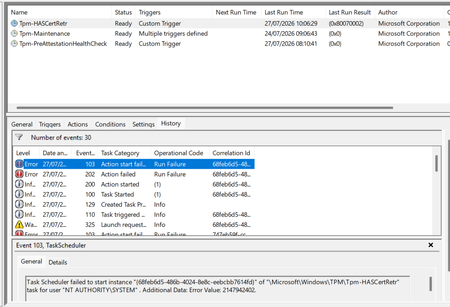
Windows 11 devices are non compliant in Intune against BitLocker, Secure Boot and Code Integrity, all three returning the Syncml 404 error. The settings are genuinely enabled. The real cause is the device can't retrieve a Device Health Attestation certificate, so the health cert status sits at 65535 and the retrieval task fails. What I've found: the TPM is healthy (present, ready, attestation capable, firmware not vulnerable), and the endorsement key cert is valid, chaining to Nuvoton TPM Root CA 2111. But the EK chain check comes back invalid with zero intermediate certificates, because the Nuvoton key is signed straight off the root with no intermediate for the chain walk. A Hyper-V VM on the same build and tenant works fine, but only because it has no manufacturer EK cert, so it skips that chain check entirely. What I've tried: patching TPM firmware (ruled out the older ADV190024 issue), refreshing the local trusted TPM certificate store, and rerunning the retrieval task. None fixed it. This matches Rudy Ooms' well known call4cloud writeup, where he concluded it's a service side trust problem that can't be fixed from the device. It's now appearing on brand new Dell hardware too, so I can't just exclude the old kit and move on. Is this a known issue with the Nuvoton root chain, and is there a supported fix or position from Microsoft? Screenshots below showing the compliance errors and the failure.1.3KViews3likes6Comments
IOS Enrollment Policys - User affinity with modern auth, does not work with Company Portal VPP
IOS Enrollment Policys - User affinity with modern auth, does not work with Company Portal VPP I am trying to test the newer iOS Enrollment Policies using User Affinity with Modern Authentication instead of the older Enrollment Profiles. One thing I've noticed is that the "Install Company Portal with VPP" setting exists in Enrollment Profiles, but I don't see an equivalent setting in the new Enrollment Policies. My test Policy configuration is using: User Affinity with Modern Authentication Company Portal deployed as a VPP app I tested deploying Company Portal as a required VPP app, and it installs successfully. However, when I launch Company Portal and sign in with my Entra ID credentials, it immediately prompts me to set up company access and download a management profile. This doesn't seem correct because the device was already enrolled through ADE. If I select Postpone, Company Portal reports that I can't access company resources, and when I check further, it states that the device must be managed before apps can be installed. this has to be a bug or something right? the microsoft docs on this are very confusing or missing details. I also noticed that the device initially appears in Intune/entra as "iPad". After some time, the name eventually updates in entra and intune, However, within the Company Portal app, I end up seeing two devices: "iPad" (This is the Ipad that you're currently using) "ipad123-testing" ( this is the proper name and matches intune / entra) Under Settings > General > VPN & Device Management, I can see the correct Intune management profile installed. Sync and restart actions from Company Portal also work successfully. It appears that Company Portal is not associating itself with the existing ADE enrollment record. Instead, it seems to be attempting a user-driven enrollment workflow on a device that is already enrolled and managed through ADE. Has anyone else seen this behavior when using the new iOS Enrollment Policies with User Affinity and Modern Authentication? its unusable in this state. i saw a random blog about using an app config to set xml for the company portal app but that cant be right for such a vanilla use case? didnt need to do that with the old profiles.I am trying to test the newer iOS Enrollment Policies using User Affinity with Modern Authentication instead of the older Enrollment Profiles. One thing I've noticed is that the "Install Company Portal with VPP" setting exists in Enrollment Profiles, but I don't see an equivalent setting in the new Enrollment Policies. My test Policy configuration is using: User Affinity with Modern Authentication Company Portal deployed as a VPP app I tested deploying Company Portal as a required VPP app, and it installs successfully. However, when I launch Company Portal and sign in with my Entra ID credentials, it immediately prompts me to set up company access and download a management profile. This doesn't seem correct because the device was already enrolled through ADE. If I select Postpone, Company Portal reports that I can't access company resources, and when I check further, it states that the device must be managed before apps can be installed. this has to be a bug or something right? the microsoft docs on this are very confusing or missing details. I also noticed that the device initially appears in Intune/entra as "iPad". After some time, the name eventually updates in entra and intune, However, within the Company Portal app, I end up seeing two devices: "iPad" (This is the Ipad that you're currently using) "ipad123-testing" ( this is the proper name and matches intune / entra) Under Settings > General > VPN & Device Management, I can see the correct Intune management profile installed. Sync and restart actions from Company Portal also work successfully. It appears that Company Portal is not associating itself with the existing ADE enrollment record. Instead, it seems to be attempting a user-driven enrollment workflow on a device that is already enrolled and managed through ADE. Has anyone else seen this behavior when using the new iOS Enrollment Policies with User Affinity and Modern Authentication? its unusable in this state. i saw a random blog about using an app config to set xml for the company portal app but that cant be right for such a vanilla use case? didnt need to do that with the old profiles.321Views2likes5Comments


Events
Recent Blogs
- By: Per Larsen - Senior Product Manager | Microsoft Intune For many organizations, Group Policy Objects (GPOs) remain an important part of Windows configuration. As device strategies expand to incl...Aug 31, 20265KViews2likes0Comments
- 4 MIN READScale endpoint management with phased deployments, stronger onboarding, compliance insights, and security controls.Aug 27, 202610KViews3likes1Comment