Recent Discussions

Web Speech API stopped working on Edge starting with v.134
Starting with version 134 of the Edge Browser (Windows 10, Edge Stable Version 134.0.3124.51, released March 6, 2025), the functionality of speech recognition (WebSpeechAPI) has been broken. This issue potentially impacts millions of users. Requests to Microsoft servers return a "Network error." For more details, please refer to this ticket: https://github.com/speech-translator-ext/speech-translator-readme/issues/50 An easy way to test speech recognition: https://www.google.com/intl/en/chrome/demos/speech.html About Web Speech API: https://developer.mozilla.org/en-US/docs/Web/API/Web_Speech_API#browser_compatibility PS: It’s also unfortunate that, as a web browser extension developer, the "App Assure" functionality is not available. (App Assure: Facing issues with your business apps or websites on the latest version of Microsoft Edge? Microsoft will help you resolve them at no additional cost.) And in general it's very unclear where to report such issues.Solved17KViews3likes24CommentsVertical bookmark bar
My laptop and my desktop both are widescreen. I have more screen real estate at either side of the screen. To take advantage of that, it would be great to have a vertical bookmarks bar instead of horizontal. Cross post from uservoice: https://wpdev.uservoice.com/forums/257854-microsoft-edge-developer/suggestions/37577041-vertical-bookmarks-bar2KViews5likes3Comments
Onedrive shortcuts in explorer not working (2 accounts)
Hi, yesterday I reinstalled Windows 11. I had 2 onedrive accounts linked to my PC: my personal one and the one from my work. Both onedrives synced fine. All of a sudden, the 2 shortcuts in Windows Explorer no longer work: if you click on them , nothing happens. I found many topics online, I was hoping this bug would be fixed by now. So how can it be fixed, with an official Microsoft solution (preferrably not with any vague registry changes)? I already -reset onedrive -reinstalled onedrive -unlinked both accouts + relinked both accounts: the icons disappear, and reappear, but they still don't work. Thanks.75Views0likes4CommentsPWA shortcuts don't keep asociated with window - Linux
I recently upgraded to version140.0.3485.14 (Official build) beta (64-bit) and noticed that my PWA, even if they open correctly in a independent window, don't show the "running window counter" on the taskbar. So, for example, if a open Outlook, the window open and loads the app, but if a I click the icon again, it opens another window, wich is a little annoying. I tried removing the PWA from Edge, rebooting, and installing again, but didn't work. Because the only change I made is updating Edge, I think is related to this build. (too lazy to go back or install the stable release)2.5KViews10likes11Comments
Favorites Icons
Comcast just did an upgrade in my area and ever since, my "Favorites" icons on AOL and Edge are Globes and not the individual icons they once were. Not sure why it happened, but how do get them back? I've managed to get them back temporarily, but after changing "opening page" settings where they are displayed properly, they disappear.25Views0likes1CommentStop requirement to sign in after screen timeout Windows 11
Every time my screen has a timeout, I have to sign in again. This setting can be found in: Accounts > Sign-In options > Additional settings > "If you've been away, when should Windows require you to sign in again"? This setting is set to "Every time", but the listbox is disabled. How do I enable it? On the "Sign-In options screen" there is a message: Some of these setings are managed by your organisation. I am working in a domain, this is a work computer.27Views0likes1Comment
[Wayland] PWAs no longer appear as separate app windows — all group under main Edge icon
Hi, Since around 2025-09-07 to 2025-09-10, I’ve noticed that on GNOME (Wayland) all installed PWAs (even across different profiles) now appear grouped under the main Edge browser icon in the GNOME Shell dash/taskbar. Previously, each PWA would open in its own window group with its own icon. This is still the behavior in Chromium/Brave/Chrome, and can be restored there by editing the PWA’s .desktop file to set: StartupWMClass=<same value as Icon> However, Edge now seems to ignore StartupWMClass completely on Wayland, breaking workspace separation and making task switching hard. Environment: Ubuntu 25.04 GNOME 48.0 / Mutter (Wayland) Kernel 6.14.0-29 Intel Iris Xe GPU Edge (latest stable, observed post 2025-09-13) Repro steps: Install any PWA (e.g. Outlook, Teams, Spotify) from Edge Launch it (from any profile) Observe that it appears grouped under the main Edge browser icon Expected: PWA shows under its own icon and window group like in Chromium-based browsers Actual: All PWAs are bundled into the main Edge window group Editing StartupWMClass in the .desktop file no longer helps This regression makes PWAs much harder to manage on Wayland. Please route to the Linux/Wayland team if possible. Thanks!3.5KViews12likes19Comments
Favicons for bookmarks broken since Edge v149 update
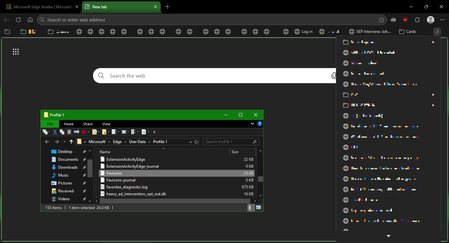
I've recently had Edge update to the v149.0.4022.52 stable-channel releases, and ALL my bookmarks now have no favicons. When I visit any webpage, Edge successfully loads the favicon for the tab of that website. But when I visit a bookmark, the favicon doesn't get updated after it has loaded for the site. And new bookmarks I add also don't show a favicon. If I go into my Edge profile-folder (which can found via edge://profile-internals/ , clicking the heading, then looking next to "Profile Path"), then it is still creating the "Favicon" and "Favicons-journal" files, but I assume isn't populating them with anything? I've tried deleting both files, restarting my PC, but even after Edge recreates them, no bookmarks are gaining any favicons. Is anyone else getting this issue...? OS: Windows 10 Home 22H2 x64 (OS Build: 19045.7291 : May 2026 ESU)2.5KViews4likes25Comments
Edge constantly purges itself
At least twice a month, Edge seems to purge everything. All of my history is gone, all of my accounts are logged out (and do not have username suggestions when logging back in), sites have been reset from dark theme to light, etc. I am the only person with access to this computer and am not wiping the history or anything myself. Why does it keep doing this? How do I stop it?33Views1like1Comment
Why Stability Matters More Than New Features for Many Users
To Microsoft Edge Leadership and Product Management, I am writing as a long time Microsoft user who is seriously considering moving away from Microsoft Edge because of the cumulative frustration caused by frequent updates and the disruption they create. The immediate issue prompting this letter is the recent Edge update that caused website favicons in Favorites to disappear and be replaced with generic globe icons. While this may seem like a minor issue to some, it significantly affects how I use the browser. I maintain a large, organized collection of Favorites, and I rely on visual recognition of icons to quickly locate websites. Removing that functionality has made navigation slower and more frustrating. However, this letter is not really about favicons. My larger concern is the direction that modern software development appears to have taken. Years ago, software updates were less frequent and more deliberate. New versions were released perhaps once a year. Users had time to learn the software, become comfortable with it, and develop confidence that it would continue working in familiar ways. Today, it feels as though major applications are updated continuously. Changes arrive monthly, weekly, and sometimes even more frequently. Features move. Interfaces change. Workflows are altered. Bugs appear in areas that previously worked correctly. Users are expected to adapt constantly. What is most frustrating is the feeling that stability has become secondary to rapid deployment. I understand that no software is perfect. I understand that bugs happen. What concerns me is the impression that organizations increasingly accept a certain level of user disruption as an unavoidable cost of doing business. Perhaps each individual problem affects only a small percentage of users. But over time, those small percentages accumulate. Each issue chips away at customer trust and confidence. Many users do not take the time to complain. They simply become frustrated and eventually leave. History has shown that dominant technology companies can lose their position when they stop listening closely to the user experience. Yahoo once seemed untouchable as a search engine and email provider. Google succeeded because it focused on simplicity, reliability, and making things easier for users. As a customer, I want software that is dependable. I want updates that improve my experience without disrupting established workflows. I want to feel that stability is valued as highly as innovation. Most importantly, I want to feel that the people making decisions about products understand how those decisions affect the people who use them every day. The recent Edge issue may be resolved in a future update. My concern is that the issue reflects a broader trend that many users are experiencing across modern software. I hope Microsoft will place greater emphasis on quality assurance, stability, backward compatibility, and the long term user experience. Those qualities are often what build customer loyalty, and what keep users from looking elsewhere. Sincerely, A frustrated but long time Microsoft customer35Views1like0CommentsEdge not functioning properly after playing games?
After I have played a video game, I noticed Edge has forgotten all my website and cache data? No website icons and logged out of websites. This only happens after I've played a video game, never has it happened from just opening it up.24Views0likes0CommentsPlease, bring back the "Microsoft Edge rounded corners" option
Hello As of today, the "Microsoft Edge rounded corners" flag in edge://flags/ no longer works (the option is disabled to revert to the old appearance). Since Microsoft no longer gives users a choice in appearance, they're trying to force us to switch browsers... ?? No more option to hide the Extensions button in the toolbar, a display bug for over a month regarding the color of the buttons in the title bar (black instead of white like in Windows), etc... Please MS, bring back this option And is there an "flag" (to add to the shortcut, for example) to restore the old appearance ? Thanks546Views6likes1Comment
Regression: Vertical tabs no longer collapse in fullscreen (F11) after latest Edge update
After the latest Microsoft Edge update, the vertical tab sidebar no longer collapses when entering fullscreen mode (F11). Previously, when fullscreen was enabled, the vertical tabs would automatically collapse or hide, allowing the webpage to use the full screen space. Now the vertical tab bar remains visible, reducing usable screen area. Steps to reproduce: Enable Vertical Tabs in Microsoft Edge Open any website Press F11 to enter fullscreen mode Observe that the vertical tab sidebar remains visible Expected behavior: Vertical tabs should collapse or automatically hide in fullscreen mode, as they did in earlier versions. Actual behavior: The vertical tab sidebar stays visible during fullscreen instead of collapsing. Additional testing: Tested in a Guest profile (fresh profile with default settings); issue still occurs Happens across different websites Restarting Edge does not fix the issue Edge version: 145.0.3800.58 (Official build) (64-bit)653Views6likes5Comments






Events
Recent Blogs
- 8 MIN READMicrosoft Edge for Business, the new, dedicated work experience for the Microsoft Edge browser, is now available in Microsoft Edge stable version 116. All customers who sign into Edge using Microsoft...Aug 04, 2023302KViews2likes73Comments
- Microsoft Edge for Business, the new, dedicated work experience for Microsoft Edge, is in preview today! Microsoft Edge for Business is planned to be the standard browser experience for organi...Jul 11, 202310KViews3likes2Comments