Recent Discussions

Critical Edge Sync issue after Win11Pro reinstall – incomplete rehydration
A - ENGLISH VERSION Critical Edge Sync issue after Windows 11 Pro reinstall – incomplete rehydration, Device Info = 5, modules stuck Hello, I am experiencing a major issue with Microsoft Edge synchronization after a full reinstall of Windows 11 Pro. Despite multiple reinstalls, several days of waiting, and all possible local troubleshooting steps, Edge Sync remains incomplete, and none of my historical data is rehydrated. Below is the full context, timeline, symptoms, technical observations, and questions. 1) Full chronological context 1.1 – Full PC reset Clean Windows 11 Pro reinstall Sign‑in with Microsoft personal account Windows Insider Program activated (Beta channel) 1.2 – Edge Beta installed automatically Edge Beta was installed automatically without warning. I suspected it might be the cause of the incomplete sync. 1.3 – Leaving the Insider Program I left Insider only to try restoring full Edge synchronization. 1.4 – New Windows 11 Pro 25H2v2 reinstall Clean install Edge Stable installed Sync enabled Several days of waiting 1.5 – Result: sync still incomplete Even on Edge Stable, historical data never returns. 2) Symptoms 2.1 – Missing data No previous tab groups restored Incomplete history “Other devices” sessions missing Passwords visible in settings but not rehydrated No data from my previous Windows 11 PC 2.2 – Sync modules stuck In edge://sync-internals: Saved Tab Group: frozen for days Passwords: “Running” but no data rehydrated Sessions: incomplete Typed URLs / History: partial 2.3 – Device Info = 5 The cloud still lists 5 devices, including my previous Windows 11 installation. This indicates that historical data should be available. 2.4 – Last Synced active Sync is active, but missing data is never returned. 3) Technical diagnosis Everything points to a “consistent but incomplete” cloud profile state: Client sync works Server reports sync as healthy Historical data is never rehydrated Critical modules remain stuck Issue reproduces across multiple devices (Win10, Win11) This suggests a server‑side Edge Sync profile corruption, or a metadata divergence after: Insider → Stable channel change Windows reinstall Local profile deletion Edge Beta auto‑installation Microsoft account reconnection 4) Key question: Is Edge Beta limited in synchronization? I would like an official clarification: → Does Edge Beta restrict any sync modules? → Are Saved Tab Group, Sessions, or Passwords limited in Edge Beta? → Are there backend differences between Edge Stable and Edge Beta? If Edge Beta is not the cause, I will gladly re‑enable my Insider profile. I left Insider only to attempt restoring full sync. 5) Request I kindly request: → A backend analysis of my Edge Sync profile, to check: metadata integrity module states device list consistency possible corruption ability to rehydrate historical data I can provide: sync‑internals screenshots logs additional details multi‑device testing Thank you very much for your help. B - VERSION FRANÇAISE Problème critique de synchronisation Edge après réinstallation Windows 11 Pro – réhydratation incomplète, Device Info = 5, modules bloqués Bonjour, Je rencontre un problème majeur avec la synchronisation Microsoft Edge, apparu après une réinitialisation complète de mon PC Windows 11 Pro. Malgré plusieurs réinstallations, plusieurs jours d’attente, et toutes les procédures locales possibles, la synchronisation reste incomplète, et mes données antérieures ne sont jamais réhydratées. Je détaille ci‑dessous l’ensemble du contexte, les étapes, les symptômes, les observations techniques et les questions. 1) Contexte chronologique complet 1.1 – Réinitialisation complète du PC Réinstallation Windows 11 Pro “vierge” Connexion au compte Microsoft personnel Activation du programme Windows Insider (canal Bêta) 1.2 – Edge Bêta installé automatiquement Sans avertissement ni information, Edge Bêta a été installé automatiquement sur mon système Insider. Pensant que Edge Bêta pouvait être la cause d’une synchronisation incomplète, j’ai tenté de revenir à Edge Stable. 1.3 – Sortie du programme Insider J’ai quitté le programme Insider uniquement pour tenter de retrouver une synchronisation Edge stable et complète. 1.4 – Nouvelle réinstallation Windows 11 Pro 25H2v2 Installation propre Edge Stable installé automatiquement Synchronisation activée Plusieurs jours d’attente pour réhydratation 1.5 – Résultat : synchronisation toujours incomplète Même après retour à Edge Stable, les données antérieures ne reviennent pas. 2) Symptômes observés 2.1 – Données manquantes Aucun groupe d’onglets antérieur n’est restauré Historique incomplet Sessions “Autres appareils” très partielles Mots de passe visibles dans les paramètres mais non réhydratés dans l’interface Données provenant de mon ancien PC Windows 11 absentes 2.2 – Modules Edge Sync bloqués Dans edge://sync-internals : Saved Tab Group : valeur figée depuis plusieurs jours Passwords : module “Running” mais aucune donnée réhydratée Sessions : incomplètes Typed URLs / History : partiels 2.3 – Device Info = 5 Le cloud conserve encore les identifiants de 5 appareils : PC Windows 10 Smartphone PC Windows 11 actuel PC Windows 11 avant réinstallation PC Windows 11 Insider (Edge Bêta) Cela prouve que les données de l’ancien appareil devraient être disponibles, mais ne sont pas renvoyées au client. 2.4 – Last Synced actif La synchronisation est active, mais ne renvoie pas les données manquantes. 3) Diagnostic technique Tout indique un état “cohérent mais incomplet” du profil cloud Edge : Le client synchronise correctement Le serveur considère la synchronisation comme valide Mais les données historiques ne sont jamais renvoyées Les modules critiques (Saved Tab Group, Passwords, Sessions) restent bloqués Le problème est identique sur plusieurs appareils (Win10, Win11) Cela suggère une corruption du profil Edge Sync côté serveur, ou une divergence entre métadonnées locales et cloud après : changement de canal (Insider → Stable) réinstallation Windows suppression du profil local Edge Bêta imposé réactivation du compte Microsoft 4) Question cruciale : Edge Bêta est‑il bridé dans la synchronisation ? Je souhaite obtenir une réponse officielle : → Edge Bêta limite‑t‑il certaines fonctions de synchronisation ? → Certains modules (Saved Tab Group, Sessions, Passwords) sont‑ils restreints dans Edge Bêta ? → Existe‑t‑il des différences de backend entre Edge Stable et Edge Bêta ? Si Edge Bêta n’est pas en cause, je serai heureux de réactiver mon profil Insider. J’ai quitté Insider uniquement dans l’espoir de retrouver une synchronisation complète. 5) Demande Je sollicite : → Une analyse backend de mon profil de synchronisation Edge pour vérifier : l’intégrité des métadonnées l’état des modules la cohérence des appareils la présence ou non d’une corruption la possibilité de réhydrater les données historiques Je suis prêt à fournir : captures edge://sync-internals journaux détails supplémentaires tests sur plusieurs appareils Merci d’avance pour votre aide.18Views0likes0Comments
Why new design of MS Edge shows less items on the Workspaces selection list?
I have some 9 frequently used workspaces. When I want to open one of them only 6 are listed so I often must catch the narrow scrollbar to spot and select the right one. When trying to point to the scrollbar I often miss-click one of them. I'd prefer the list to be longer and the blank space between items smaller. Also it is very handy that icons there are respectively colored but it is just narrow lines. If the color appeared at a bigger surface it would be easier to spot the right one (like e.g. if one of the 3 sheets of the icon was filled). Mabye, making the list size parametrizable (6/12/24) or making the second line with tab count just optional (detailed/compact list layout) would solve this inconvenience. Thanks. (Sorry, my company blocked posting feedback from MS Edge directly. That's why I am asking here.)27Views0likes0CommentsEdge Dev Version 149.0.3984.0 (Official build) dev (64-bit) Update
Got this update on Edge Dev today, immediately thereafter its locked up my pc after it applied and i went to open a new tab (had to ctrl+alt+del and end task it) its something specific here as edge stable and beta still work. unsure what's changed or if others have the same issue? diving into logs in just a sec...59Views0likes0Comments
Bookmarks are being forced into the active Tab Group (New behavior)
Hi there, I’ve noticed a very frustrating change in the latest Edge update. When I open a bookmark from the Favorites bar, it is now automatically forced into the currently active Tab Group. This behavior is counter-intuitive. For example, if I am browsing in a "Social" group and click a bookmark for "Gmail," I want it to open as a standalone tab, not as a part of the "Social" group. Currently, I have to manually drag every new tab out of the group, which is a major workflow killer. Disabling experimental flags doesn't fix this anymore. Please provide a toggle in the Settings menu to disable "Tab Group Inheritance" for bookmarks or revert this change. It should be the user's choice whether to add a new tab to a group or not.57Views0likes0Comments
CPU usages on Start Up - Same in Chrome
I'm having the same issue both in Edge and now Chrome. I'm trying to figure out how to solve it so I can switch back to Edge. When I startup the browser it uses a lot of CPU to load 10 to 15%. It stays like that for a couple minutes at least. I couldn't figure out what it was in Edge and now Chome is starting to do the same thing. The longer I use it the longer it uses high CPU. So I figure both of them are doing something similarly. Anyone have any idea what it is and how to fix it?39Views0likes0Comments
Incident critique : Edge Sync “Uninitialized”, appareils disparus, identité WAM/MSAL corrompue
Bonjour, Je rencontre un incident critique affectant directement mon identité Microsoft (MSA). Il ne s’agit pas d’un problème local mais d’un dysfonctionnement côté serveur. Voici les éléments techniques constatés : - Le conteneur Edge Sync de mon compte est en état “Uninitialized”. - Tous mes appareils ont disparu de mon compte Microsoft (Device Registration cassé). - Les services d’identité WAM / MSAL / OneAuth ne se réinitialisent plus correctement. - Impossible de créer de nouveaux passkeys ou d’utiliser les services dépendants de l’identité cloud. On dirait que ça nécéssite une intervention côté serveur : réinitialisation des identités WAM/MSAL, du conteneur Edge Sync, et du Device Registration. Je reste à l'écoute de toute aide en vous remerciant par avance.26Views0likes0Comments
Samsung S20 FE suddenly stops connecting to Windows PC via bluetooth
I have seen posts about this issue and it has just happened to me. My Samsung S20 FE was connecting to my Windows PC Bluetooth fine. All of sudden my phone will not connect. I have tried to delete, restart on both pc and phone and then pair then connect and it fails. As a result I can no longer use Windows/Phone Link which stinks. Other posts have discussed this issue and they also claim that it just happens and there is no current fix which is absurd since it was working and now it does not?????? Please get fixed.....sounds like this is happening to a lot of users!16Views0likes0Comments
Android MS Edge Autofill verification and android/PWA apps.
Hi guys, An issue I have with edge on android autofill is that when biometric checks are enabled for autofill and using non-edge or an installed PWA app, you are teleported from the PWA/android app to Microsoft edge and are not teleported back to the app being autofilled. This means that having biometric autofill checks and edge password manager as the primary autofill for android means that on some apps it is unfeasible to autofill as the log in request times out or resets after the app is no longer in view. This and the inability to save passkeys natively in the edge android browser is a big for drawback for me using edge password management over googles in built system. Happy Easter!45Views0likes0Comments
Zoom with Scroll + Modifier Key Not Working in Edge on macOS
Hello, I am using Microsoft Edge on macOS and I would like to zoom in and out of web pages using a modifier key (Command, Option, or Control) together with scroll Currently, Command + Scroll does not zoom the page. I understand that macOS may override this behavior through accessibility settings, but I would like to enable this functionality specifically in Edge without affecting system-wide behavior. Could you please advise: Is it possible to enable zoom using Scroll + Modifier Key in Edge on macOS? If not, are there any recommended workarounds or planned features for this? Thank you for your help DanceLens!25Views0likes0Comments
Unable to open any websites
Haven't been able to use Edge Canary for the past couple of days. Just get the message: This page is having a problem. Have tried repair, uninstall and reinstall, all to no avail. Works ok on my other PC. Edition Windows 11 Pro Version 25H2 Installed on 02/02/2025 OS build 26200.8039 Experience Windows Feature Experience Pack 1000.26100.300.055Views0likes0CommentsWe no longer have control
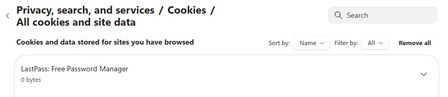
So, now with the latest updates for Canary Version 148.0.3940.0 (Official build) canary (64-bit) we no longer have site permission control as to what any particular website has permission to do/use. Our choices are greyed out and unselectable.... See in these 2 screen shots, this is for LastPass, but it is the same for Norton Safe Web. Notice; greyed out and unselectable/unchangeable. The only option is to turn the extension "OFF" as I did with Norton Safe Web extension. With all the hacking and websites being hacked into, why would I allow "Automatic Downloads"? Dennis5mile48Views0likes0CommentsFavorites keep imported folders indefinitely.
I've gone through and removed imported folder and reorganized my various folders. But when I close out Edge and reboot all the imported folders reappear. So I am unable to organize my Favorites like I should be able too. So I"ve been forces to use Google Chrome.12Views0likes0Comments
Feature request
I switched from using Chrome to edge as it seems to run smoother on desktop and Android. One thing that I miss the most is the grouped tabs view at the bottom of the screen, I used that all the time when on chrome to go from one tab to another in that specific group easily if I open a bunch of links when looking for something. Should be easy enough to implement since it's already in other chromium browsers.22Views0likes0CommentsMultiple Tabs Added to Incorrect Workspace
I have 4 workspaces, reserved for different projects. Several have pinned tabs that I frequently use. When I open the Edge icon on my taskbar, only the first workspace opens, and, without me requesting it, it has added about 20 tabs that I don't want, probably from another workspace. Also, Edge is not my default browser. How can I prevent these tabs from opening? John37Views0likes0CommentsEdge with Bing - "Microsoft Bing trending suggestions in the address bar"
I would like to remove the suggestions from the search bar however when this setting has been disabled, instead of completely removing the news suggestions it has shifted to the right, taking up half the space and the other half on the left is my previous searches. Anyone know how to completely remove any news trending suggestions and not simply have it appear despite being disabled ? If not, I'll just swap to google and block Bing for myself / other users. Thank you114Views0likes0Comments
Question: Windows Enterprise / EDU Version - End of Life (EOL) Notification
Hello Microsoft Community - Enterprise, i have a general question about the Windows Enterprise / EDU Version and the End of Life (EOL) notification . I have a general question about End of Life (EOL) and the notification process. Could someone please explain and tell me exactly how is the notification process for Windows EOL in the Enterprise/EDU version? My understanding is this: For the Windows Home version, the notification is given 30 days in advance, see below. But what about the Enterprise/EDU version? Is it 36 months in advance? For products and services governed by the https://learn.microsoft.com/en-us/lifecycle/policies/modern, unless otherwise noted, Microsoft's policy is to provide a minimum 30 days' notification when customers are required to take action in order to avoid significant degradation to the normal use of the product or service. I would appreciate your help.34Views0likes0Comments



Events
Recent Blogs
- 8 MIN READMicrosoft Edge for Business, the new, dedicated work experience for the Microsoft Edge browser, is now available in Microsoft Edge stable version 116. All customers who sign into Edge using Microsoft...Aug 04, 2023301KViews2likes73Comments
- Microsoft Edge for Business, the new, dedicated work experience for Microsoft Edge, is in preview today! Microsoft Edge for Business is planned to be the standard browser experience for organi...Jul 11, 202310KViews3likes2Comments