Recent Discussions

Can't redeem Microsoft Cashback
If you know of a better place to post this, let me know. Needless to say, the regular Microsoft Support has been worse than useless. Until last month, Microsoft Cashback (within Microsoft Edge) worked well for me. But early in August, Microsoft Cashback announced that three amounts, $7.00 and $1.25 twice, were "Ready to redeem". However, the amount reflected in the "Current balance" and "Redeem your earnings" was only $1.25. I submitted a trouble report. After receiving no initial help, I tried performing a redemption anyway. Microsoft Cashback sent $1.25 to my PP acount, but then falsely marked all three amounts as "Redeemed"! Week after week, Microsoft Support assured me that my case was still open, but without a solution. Recently, I myself noticed that the missing amounts were now again marked "Ready to redeem", but still with no way to actually get the money! Just today, Microsoft Support now announces that my case is closed--without ever solving the problem! Moreover, the passage of time has brought another $1.25 into "Ready to redeem" status, so Microsoft now owes me $9.00 that it is unwilling to give me. Does anyone know whether Microsoft is even working on this Cashback problem? Or has Microsoft simply abandoned its Cashback program?57Views0likes5Comments
HEVC/H265 Hardware Decoding Fails in Edge on Intel Graphics
Environment Operating System: Windows 11 24H2, Build 26100.3194. Microsoft Edge Version: 152.0.4191.66. GPU: Intel(R) Graphics, PCI Device ID 0xA7AB. Intel Graphics Driver Version: 32.0.101.7088. Hardware acceleration is enabled in Microsoft Edge. Issue Description Microsoft Edge fails to play an MP4 video encoded with HEVC/H.265 Main Profile at 1920 × 1080 resolution. The video source itself is accessible, and HTTP Range requests are supported normally. Microsoft Edge can successfully detect the video stream as HEVC Main Profile. However, playback fails when Edge attempts to initialize the hardware video decoder. GPU Capability Reported by Microsoft Edge According to edge://gpu, hardware video decoding is enabled. The Intel GPU is correctly detected and active. Microsoft Edge also reports hardware decoding support for HEVC Main and HEVC Main10. The relevant capabilities shown in edge://gpu include: Decode hevc main Decode hevc main 10 This indicates that the GPU and graphics driver expose HEVC hardware decoding capability to Microsoft Edge. Media Pipeline Failure According to edge://media-internals, Microsoft Edge successfully recognizes and creates the HEVC video stream. The media pipeline then attempts to use MediaFoundationVideoDecoder with DXVA hardware acceleration. The decoder initialization process uses a D3D11 device for DXVA. The following messages are recorded: Use MediaFoundationVideoDecoder for DXVA Starting Initialization of DXVAVDA Using D3D11 device for DXVA Cannot select VDAVideoDecoder status = DecoderStatus::Codes::kFailed After VDAVideoDecoder initialization fails, the other decoder candidates are also unable to handle the HEVC video stream. The decoder initialization eventually fails with: video decoder initialization failed DecoderStatus::Codes::kUnsupportedConfig The playback pipeline finally reports: PipelineStatus::DECODER_ERROR_NOT_SUPPORTED Error code: 15 Control Test I performed a control test on the same computer using the same Windows installation, GPU, graphics driver, network environment, website, and HEVC video file. The same HEVC video can be played normally in Quark Browser. Quark Browser reports that its Apollo media player pipeline is being used. The video plays normally through the Apollo media pipeline without the HEVC decoder initialization failure seen in Microsoft Edge. This indicates that the HEVC video file itself is valid. It also indicates that the same computer is capable of decoding and playing the video when another browser media pipeline is used. Expected Behavior Microsoft Edge should successfully initialize the HEVC hardware decoder when edge://gpu reports that HEVC Main hardware decoding is supported. The HEVC MP4 video should play normally without returning DECODER_ERROR_NOT_SUPPORTED. Actual Behavior Microsoft Edge successfully recognizes the HEVC video stream and reports HEVC hardware decoding support. However, the D3D11/DXVA VDAVideoDecoder initialization fails during actual playback. As a result, no available decoder is selected and the video playback pipeline stops. Preliminary Analysis Based on the current evidence, this issue does not appear to be caused by the Intel GPU lacking HEVC hardware decoding capability. Microsoft Edge itself reports HEVC Main and HEVC Main10 decoding capability in edge://gpu. The same HEVC video also plays successfully on the same computer using Quark Browser. The failure therefore appears to occur during the interaction between the Microsoft Edge/Chromium media pipeline, Media Foundation, DXVA/D3D11, and the Intel graphics driver. In particular, Microsoft Edge detects HEVC decoding capability successfully, but VDAVideoDecoder cannot be initialized during actual HEVC playback. Request for Investigation Could the Microsoft Edge media team please investigate why VDAVideoDecoder fails to initialize for HEVC playback on this Intel graphics configuration? Could you also verify whether there is a compatibility issue between the Microsoft Edge Chromium media pipeline, Media Foundation, DXVA/D3D11, and Intel Graphics driver version 32.0.101.7088? Since edge://gpu already reports HEVC Main/Main10 hardware decoding support, I would also like to understand why this capability cannot be successfully used by the actual video decoder during playback. If additional logs, GPU diagnostic information, Media Internals data, or a reproducible HEVC sample video are required, I can provide them for further investigation.22Views0likes0Comments
How do you handle sensitive PDF files in Edge without third-party cloud uploads?
Hi everyone, When working with sensitive PDF documents (like financial or personal files), most online PDF editors require uploading files to third-party cloud servers. This raises obvious privacy and security concerns for many users. The most reliable way to maintain data privacy today is using Client-Side Browser Processing (WebAssembly & JavaScript), where operations run entirely inside the local browser memory without transmitting any data over the internet. Key advantages of pure client-side processing: Total Privacy: Zero file transfers or external server logs. Instant Speed: Processing relies on your local CPU, bypassing slow upload/download waiting times. No Software Installation: Works directly inside browsers like Microsoft Edge. For those looking for a practical example of this architecture, https://pdfdocflow.com is a free tool offering 24 browser-based tools (merging, splitting, compressing, watermarking, and signing) operating 100% locally with zero server uploads. How do you usually handle sensitive PDFs while browsing, and do you prefer client-side web tools over installing dedicated software?27Views0likes0Comments
Edge 152 made Magnify significantly got worse
In Edge 151, Magnify worked very well with a mouse: Double ctrl to Open Magnify Move the pointer over the Popup Use the mouse wheel to zoom in and out After updating to Edge 152, mouse-wheel zoom no longer works. The only way to change magnification is to click the + / - buttons. There is also a new UI bug: once I click one of those buttons, the Magnify controls sometimes remain visible even after I move the mouse pointer away from the controls. So the new behavior introduces two regressions at once: A fast and convenient mouse-wheel interaction was removed. The replacement controls have broken hover/visibility behavior and can remain stuck on screen. The Magnify feature itself still works, and zooming is still possible using the buttons. The regression is specifically the removal of mouse-wheel zoom and the broken control overlay behavior. Please restore mouse-wheel zoom in Magnify and fix the controls so they reliably disappear when the pointer leaves the UI.18Views0likes0Comments
TargetVersionPrefix and Extended Stable
With the changes to the release cycle, I would expect more companies will be opting into the extended stable channel. A major feature release every month is difficult enough, and now that it's every other week makes it even more challenging. Which raises two questions…. First, we need TargetVersionPrefix to actually do what the name suggests. We should be able to use that to actually target the major releases, while continuing to receive the security updates. There no logical reason why this doesn't work today. Chrome has had this from early on, and Edge's update mechanism is based directly on Chrome's updater. Second, can we get a direct link to the latest extended stable MSI? Currently it's only accessible from the main download page, and you're forced to pick the even numbered version. It's not labeled as such, nor is there a way to query the update API to get the version. Which means that there is currently no way to automate an evergreen installer specifically for the extended channel.102Views0likes1CommentPossible to disable profile locking?
After restarting my machine without first closing the Edge browser, it is no longer possible to start it from the desktop shortcut. Attempting from the command line gives this error: [37244:37244:0826/131736.409175:ERROR:chrome/browser/process_singleton_posix.cc:378] This profile appears to be in use by another Microsoft Edge process (4185043) on another computer (fedora). Microsoft Edge has locked this profile to prevent corruption. If you're sure no other processes are using this profile, you can unlock it and relaunch Microsoft Edge. [37244:37244:0826/131736.409233:ERROR:chrome/browser/ui/views/message_box_dialog.cc:201] Unable to show message box: Microsoft Edge - This profile appears to be in use by another Microsoft Edge process (4185043) on another computer (fedora). Microsoft Edge has locked this profile to prevent corruption. If you're sure no other processes are using this profile, you can unlock it and relaunch Microsoft Edge. Notice that the message gives no information about how to unlock my profile. It is additionally not possible to use features of Edge to unlock the profile, because Edge refuses to open any windows (thinking the profile ought to be locked). Since this feature has not been adequately designed and is unable to serve its most basic purpose, is there a way to configure Edge so that it never locks the profile?195Views0likes0Comments
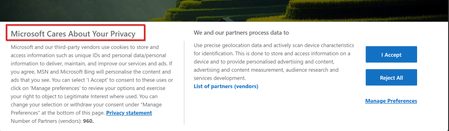
Misleading title "Microsoft Cares About Your Privacy" in Edge
Hello, I want to report error in title of main page that user see after opening Edge. It says "Microsoft Cares About Your Privacy" but content says that you must consent constant web surveillance by Microsoft, State services and its 960 partners of web history, device used, other device in network, tracking location and do other private life intrusive things. Please consider correcting title to reflect the content, i.e. "Consent for surveillance" or any other matching content title. Also, im not sure that it's allowed in EU,202Views0likes0Comments
How to type on a PDF?
Hi everyone, I need to type directly on a PDF, but the document does not contain fillable form fields. I can open it in Microsoft Edge, but I’m not sure whether there is a reliable way to add text anywhere on the page and save the changes without affecting the original layout. Is there a built-in or free way to do this, especially if I need to change the font size and move the text into the correct position? I’d prefer not to convert the PDF to Word first, as that may change the formatting. Any suggestions would be appreciated. Thanks!166Views0likes1CommentFeature Request: Per-profile default account selection in Microsoft Edge
Summary Allow the default account and external-link account-selection behavior to be configured independently for each Microsoft Edge profile. Description Microsoft Edge supports multiple profiles, which are commonly used to work with different Microsoft Entra ID / Microsoft 365 tenants and accounts. Currently, settings such as “Default profile for external links” and related account-selection behavior are shared across Edge profiles. This can cause one profile's account-selection preferences to affect the behavior of other profiles. We would like these settings to be profile-specific. For example: Profile A → user work account Profile B → admin (onmicrosoft.com) account When a user opens an external link while working in Profile B, Edge should consistently use the account/profile configured for Profile B, without inheriting or being affected by the preferences configured for Profile A. Expected behavior Each Edge profile should have its own configurable default account/profile for external links and related account-selection behavior. Changing the setting in one Edge profile should not change or override the corresponding setting in another profile. Use case This is particularly useful for administrators, consultants, developers, and users who regularly work across multiple organizations or Microsoft 365 tenants. Having profile-specific account selection would make multi-tenant workflows more predictable and reduce the risk of opening links with the wrong organizational account. Requested functionality Please make the relevant default-account and external-link account-selection settings profile-scoped rather than globally shared across Edge profiles.96Views0likes0CommentsDefault Search Engine Automatic Change
Why's does my default search engine on Edge keeps getting restored to Bing? A couple of years ago I decided to switch my default browser to Edge, but lately I'm regretting it. Everytime the app updates it automatically resets the default search engine, which is tiring to keep changing it back to what I want. Is there any way to overcome this issue or I simply have to switch back to Chrome?293Views0likes1Comment
Edge PDF editor text dissapearing
When i add text to my PDF in Edge, just to add notes to it, once i click outside of my current text box to add text elsewhere, the text i just added disappears, but i can still see the text if i go into the print preview section. I have tried a bunch of stuff to resolve the issue that i have found online but nothing has worked so far. Any help would be appreciated.79Views0likes0Comments
Feature Request: Native Multi-Container Tabs (Session Isolation) for Edge Workspaces and Tab Groups
Microsoft Edge developer team, As a developer who regularly tests complex web applications locally and on staging environments, I rely heavily on Microsoft Edge's Tab Groups and Workspaces to keep my projects organized. However, testing multi-role workflows—such as simultaneously testing Admin, Manager, and Standard User accounts on localhost—is currently very frustrating. When logging into a secondary account in another tab within the same Edge window, the newly created authentication token overwrites the existing cookies, localStorage, and session context across all open tabs for that domain. This causes the first tab to automatically switch sessions upon refresh or navigation, breaking side-by-side workflow testing. Mozilla Firefox solves this problem cleanly with Multi-Account and Temporary Containers, allowing tabs inside the same window to maintain fully isolated storage contexts. Bringing native container tabs or tab-level session isolation to Microsoft Edge, especially tightly integrated with Tab Groups, would eliminate the need to run multiple heavy browser profiles or separate windows. It would make Edge the absolute premier browser for developers, QA engineers, and power users who manage multiple user roles daily. Please consider adding tab-level container isolation to the Edge product roadmap.104Views0likes0CommentsCSS layout broken on Edge Mobile (Android/iOS) — fine on other mobile browsers Mobile
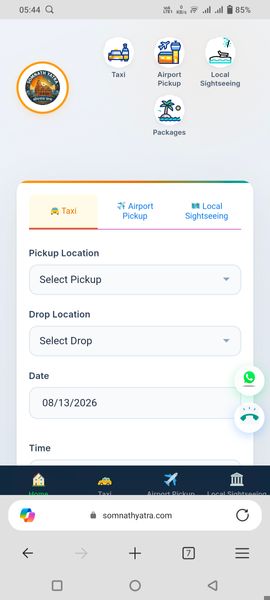
Our website rendering is severely broken on Edge Mobile, while displaying correctly across all other major mobile browsers like Google Chrome and Mozilla Firefox. The visual layout and styling degrade in Edge Mobile, making key components distorted or misaligned. Target Website: https://somnathyatra.com | Tested on Android / iOS using the latest version of Microsoft Edge Mobile compared against Chrome and Firefox. Steps to reproduce: Open https://somnathyatra.com on a mobile device using Microsoft Edge Mobile, then compare the layout, font alignment, and container structure against Chrome or Firefox on the same device to observe the layout breakage. Could this be related to a specific WebKit/Blink engine rendering difference in Edge Mobile, or a missing CSS vendor prefix / CSS Grid bug specific to the Edge mobile app? Any guidance on CSS overrides or specific Edge Mobile browser compatibility fixes would be greatly appreciated!113Views0likes0Commentsandroid links
I use edge on my desktop and would like to use it on my android phone. I use Opera on my android because it allows me to save a website link to the home screen with the correct icon for that page. If I try to do the same thing with edge it simply produces a plain icon with a single character (probably the first letter of the link), which means there are several such links all with the same character, which are indistinguishable from each other. Is there a workaround?129Views0likes1CommentEdge Color Limitations for Workspaces
Earlier today, I installed the latest Edge updated and noticed that my color options for themes has been severely limited, with very poor choices. I am a heavy user of Workspaces in Edge and rely on colors to quickly identify each workspace that I use for different projects. Previously, I had a mixture of dark and light colors assigned to different workspaces that were a quick visual identifier. To get any sort of color separation, I now need to go with the light color theme to identify my workspaces. These colors are not as distinctive for me and the dark therme colors are so close together in the color palette, there is absolutely no distinction. Additionally, the new light theme even makes the tabs within the brwser harder to differentiate or distinguish. The tab icons are too softened and difficult to discern. While I don't mind suggestions or options for my personal settings, I do not appreciate being artificially limited to what the Microsoft design team has determined to be aesthetically pleasing. This should be a matter of choice. No one is a better expert on what works best for me than myself. Lately, I'm noticing in multiple Microsoft applications, visual design changes are being made arbitraily that negatively impact my daily workflow, with no added benefit.107Views0likes0Comments
Webview2 exe missing after edge update
After the recent edge update, the webview2 exe is not updated together. C:\Program Files (x86)\Microsoft\Edge\Application\151.0.4129.59\msedgewebview2.exe is missing. This breaks webview2 apps on Windows. Is there some change to location of webview2? Any new API to get the location of the new webview2, or this is a genuine bug that need to be resolved by Microsoft?291Views0likes1CommentDutch grammar option disabled in Edge Writing Assistance
I am testing Microsoft Edge Writing Assistance with Microsoft Editor enabled. On both a clean unmanaged Windows 11 device and a managed Windows 11 device, Dutch shows Enhanced spell check as available, but the Grammar toggle remains disabled. When hovering over the Grammar toggle, Edge shows a not-allowed icon. This does not seem to be caused by enterprise policy, because the same behavior happens on a clean device without corporate policies. Dutch is listed by Microsoft as supporting spell check, grammar check and writing refinements in Microsoft Editor. Can someone confirm whether Dutch grammar is currently supported in the built-in Edge Writing Assistance experience? If it is supported, is there an additional Edge setting, policy, account requirement or language component needed to enable the Dutch Grammar toggle? Thanks.120Views0likes2Comments


Events
Recent Blogs
- 8 MIN READMicrosoft Edge for Business, the new, dedicated work experience for the Microsoft Edge browser, is now available in Microsoft Edge stable version 116. All customers who sign into Edge using Microsoft...Aug 04, 2023302KViews2likes73Comments
- Microsoft Edge for Business, the new, dedicated work experience for Microsoft Edge, is in preview today! Microsoft Edge for Business is planned to be the standard browser experience for organi...Jul 11, 202310KViews3likes2Comments