Forum Widgets
Latest Discussions

Offboarding mailboxes fails with “PropTagToPropertyDefinitionConversionException.”
Hybrid M365 setup, just recently upgraded the on-prem server from Exchange 2019 to Exchange SE. After doing so, migrations from Exchange Online back to Exchange On-prem fail at 10% with the error “PropTagToPropertyDefinitionConversionException.” I opened a case with M365 exchange support, and after some time, they came back to tell me that the Exchange Online portion of the process is not at fault, and that I have to engage the on-premise support team (this seems a little nuts to me, as its all connected and all supported, but I've been in this business for 30 years now, and it's not the first time I've seen buck-passing), and/or ask this community for help. Hence, this post. That error appears exactly two places on the internet, as far as I can tell: a blog (in German) from an Exchange expert doing cross-tenant migrations, and a page at https://west.jcteams.info/bhit11/docs/EX1232513.html that seems to describe my exact issue. Neither had useful suggestions - mostly, they say this: Set-MoveRequest -Identity "<UserPrincipalName>" -SkipMoving FolderRestrictions Resume-MoveRequest -Identity "<UserPrincipalName>" That didn't actually work, but when I tried the same parameters with Set-MigrationBatch, they worked as long as I ignored the message "The SkipMoving parameter is deprecated. Use the MoveOptions parameter instead. If you have any scripts that use the SkipMoving parameter, update them to use the MoveOptions parameter." So what was a simple process is now a more cumbersome workaround. Does anyone have an idea on how to troubleshoot "PropTagToPropertyDefinitionConversionException?"ba50992May 12, 2026Copper Contributor163Views0likes0Comments
Cross Tenant Migration licensing
Hello, I'm planning a native cross-tenant migration for several shared mailboxes that have archives enabled. I’m looking to confirm if it is necessary to temporarily convert these to user mailboxes in the source to ensure the archive data migrates successfully. Also, what specific licenses should I assign to the target objects specifically, do I need to provide an Exchange Online Plan 2 plus the Cross-Tenant User Data Migration add-on for each shared mailbox? If anyone has handled archived shared mailboxes recently, I’d appreciate a quick confirmation on the cleanest licensing and conversion steps. Thank you in advance ! :)IT_BeeMay 01, 2026Copper Contributor80Views0likes0CommentsExchange Online to Deprecate Legacy TLS for POP3 and IMAP4
Microsoft will start to refuse inbound IMAP4 and POP3 client connections using legacy TLS versions (1.0 and 1.1) in July 2026. The move is consistent with other projects to remove obsolete or insecure email protocols from Exchange Online to increase the overall security of the online email service. In this article, we examine some methods to understand the POP3 and IMAP4 usage within a tenant. https://office365itpros.com/2026/04/29/legacy-tls-removal/80Views1like0CommentsPermission activesync on smartphone
Hi everyone, when you grant the permissions in question to manage company email from a smartphone, do these permissions, in addition to Remote Wipe, Password Enforcement and Device Encryption (I remember these as the main ones), somehow give the Exchange administrator access to my personal data? For example, photos, any documents saved on the SD card or on the smartphone itself? Thanks in advanced!AnonymousForeverApr 26, 2026Copper Contributor19Views0likes0CommentsHigh Volume Email is Generally Available and Ready to Charge
On April 1, Microsoft announced the general availability for the High-Volume Email (HVE) solution together with details of the PAYG charges incurred to send email to internal recipients, which is all that HVE can do. Microsoft will enable HVE charging on June 1, 2026, Before then, you’ll need to create a billing policy and link it to a valid Azure subscription if you want to continue to use HVE. https://office365itpros.com/2026/04/23/hve-ga-charging/201Views0likes0CommentsMicrosoft Limits App Access to Sensitive Message Properties
Microsoft has announced details of a change to app permissions to restrict updates to sensitive message properties (like recipients) without consent for a new advanced mail access permission. If tenants have apps that interact with message properties, including apps developed by third parties, they should check whether the apps are updating sensitive properties. If so, the new permission must be assigned or the apps will stop working. https://office365itpros.com/2026/03/26/sensitive-message-properties-graph/65Views1like0CommentsCan we hide default address lists in Outlook Address Book and show only custom ones?
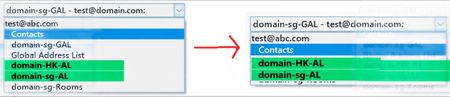
There are existing Custom Address Lists. When users use the MS Outlook App (Office 2019) and open the Address Book, is it possible to hide the other address lists (including domain-sg-GAL, Global Address List, and domain-sg-Rooms), and only display the Custom Address Lists (domain-HK-AL and domain-sg-AL) — the ones shown in green in the photo?Como_LMar 25, 2026Copper Contributor57Views0likes0CommentsMicrosoft Rushes High-Volume Email to General Availability
Almost two years after it first previewed, Microsoft is making the High-Volume Email (HVE) solution generally available in March 2026. HVE runs on a pay-as-you-go basis, but Microsoft won’t start charging tenants for sending email until May 2026. Two months should be enough for people to decide if they want to use HVE for internal communications as it has no ability to send external email. https://office365itpros.com/2026/03/09/hve-ga/236Views1like0CommentsMeasuring KPIs like Response Times for Shared Mailboxes
Shared mailboxes are not CRM systems. However, many Microsoft 365 tenants use shared mailboxes to handle customer queries and then want to measure KPIs such as agent responsiveness to customer queries or the number of queries handled per agent in a month. As explored in this article, it’s possible to use the Microsoft Graph and PowerShell to extract some KPI-like data from shared mailboxes. https://office365itpros.com/2026/03/05/shared-mailbox-kpi/114Views1like0Comments
Proper whitelisting of microsoft.com on dnswl.org
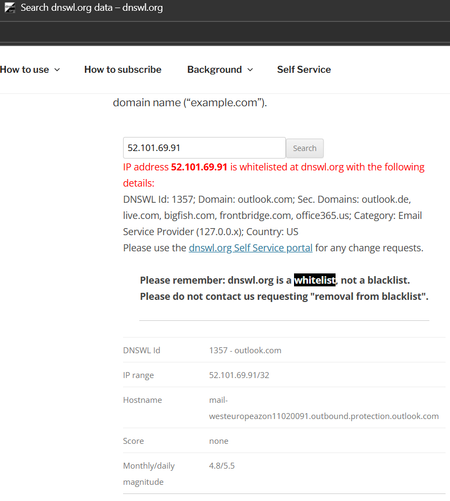
I keep having the issue that system-generated e-mails, e.g. on Trace Reports get classified as spam by the receiving e-mail provider. The sender address is email address removed for privacy reasons and the e-mails go to my M365 mailbox and are redirected to my external monitoring mailbox with that e-mail provider. The e-mail provider calculates a score that includes checking the sender's IP address 52.101.69.91 with dnswl.org . Unfortunately, that address is only whitelisted for outlook.com and some secondary domains, but not for microsoft.com. Of course, the issue also occurs with mailto:email address removed for privacy reasons and other IP addresses, so this is an example. It started to occur around two weeks ago, not sure if the provider changed policies or Microsoft changed the whitelisting; of course the provider refuses to overrun dnswl.org it, e.g. by own whitelisting. Who at Microsoft could I ask to fix that kind of issues? I don't find any appropriate category in their support menues, M365 support says the cannot help (TrackingID#2603031420001611). Thanks in advance for any hints, this is my first posting here, so please forgive me, if this is a dumb question.VolkerMMar 04, 2026Copper Contributor70Views0likes0Comments

Tags
- exchange online2,619 Topics
- Exchange Server2,378 Topics
- office 3651,262 Topics
- hybrid920 Topics
- outlook790 Topics
- 2016764 Topics
- admin706 Topics
- 2013281 Topics
- 2010162 Topics
- 201983 Topics