wvd
119 Topics
Uninstalling Remote Desktop client closes users' Windows App connections
We have our users working from Windows App now to meet the 3/27 out of support date. We are beginning to uninstall the Remote Desktop from their laptops and are finding it closes active Windows App connections on uninstall (of Remote Desktop). That is less than ideal. Looking to see if any way around that, but wondered if others had seen the same?387Views0likes2Comments
Mouse Click Offset Issue in Azure Virtual Desktop App on Windows 11 with Dual Monitors
We are experiencing a recurring mouse misalignment issue when using the Azure Virtual Desktop (AVD) Windows App on several Windows 11 clients. The problem occurs on devices with two external monitors and affects multiple users. Environment Windows version: 10.0.26200.6899 (Windows 11, 25H2) AVD Windows App: mainly version 2.0.757.0, some clients are on slightly different versions Hardware: Windows 11 PCs with two external monitors Display settings: both monitors at 1920x1080, 100% scaling Mac users (using the AVD app) report no issues Issue description The visual mouse pointer and the actual click position become misaligned inside the AVD RemoteApp session. For example, clicking on one item may select the item below it. This appears to be a rendering or coordinate-mapping issue within AVD when running inside the Windows App. Temporary workaround Minimizing the AVD window and then maximizing it immediately resolves the issue. This refresh/redraw action realigns the pointer and click coordinates. Questions Has anyone else seen mouse click offset issues in the AVD Windows App on Windows 11 25H2 with dual-monitor configurations? Are there known fixes, configuration adjustments, or recommended workarounds beyond the minimize/maximize redraw?1.2KViews0likes3Comments
Lag on NV24 Session Host in WVD
We have a WVD Host pool Windows 10 Multiuser with FSLOGIX as the profile provider. Current Environment is 7 x NV24 VM, limited to 20 users per host in USW2 Standard Microsoft 365 Apps (Word, Excel, Outlook). Teams for Chat. Not integrating voice. OneDrive. IBM Access Client Solutions (5250 Emulation) UDP Shortpath disabled. 10 Locations, Fiber 10MB Connection to Internet. HQ is 100MB Fiber and has same issue. 120 users. We have users across the board that experience lag throughout the day between 5 and 30 seconds. When it occurs, we hear from multiple users that are connected to the same session host. When it occurs, CPU/Memory is below 30%. Servers are updated monthly, FSL and GPU Drivers are current. Remote Desktop Client is current. We have opened a ticket with MS several months ago, and are still fighting to get someone to own it. We have heard the standard "it is bandwidth, we don't see anything, not our group", etc. We have captured logs during a user lag and sent them. But they can find anything. They keep pointing to client, network even though we have told them when it happens it happens to multiple users on same server who are in different office locations. We migrated from RDS in Azure using NV12 VM's and could get 30-35 users per server with no lag. We did have other issues where a server would randomly reboot in RDS, but I would take that compared to this. Open to any suggestions from other NV Series WVD users who have experienced same. Thanks.. James1.8KViews0likes3CommentsSession host not taking on any users, other session hosts are fine
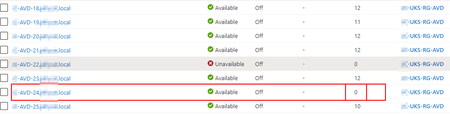
Hi All, We have a fair few AVD's and in general all is working OK. However today we noticed one of the session hosts is just not getting any users. We are using breadth load balancing - and this one session host has 0 users, the other all have 10-15 I've rebooted the VM, logged into it manually - cannot see any problem - so looking for any ideas of what to troubleshoot as to why one session host is just not taking on usersSolved4.1KViews0likes4Comments
Would like to get fslogix profile disk space utilization in Azure dashboard.
Hi, I am creating a small dashboard for the first line support including some metrics about the connection, VM performance metrics & any errors/warnings from fslogix. would like to also include a bit more on fslogix profile disk. how much disk is utilized? whats the available space? I tried in Event logs> with source> MS-FSLogix-Apps & Perf > with source logical disk no luck 😞 any leads on this? would be great help for me. Regards, Naveen. S1.2KViews0likes0Comments
How to calculate concurrent users count in Azure Virtual Desktop
Hi, We are using AVD and used Log Analytics to monitor the sessions host and complete AVD environment. Recently we had a requirement to see the Concurrent users count for the respective workspace. I don't see such option available out of the box, Can you guys help me how to get the same. Thank you in Advance!12KViews0likes2Comments
Add multiple users to assignment in Azure Virtual Desktop
How do you add multiple users to AVD? I am using stupid method to add it one by one from the portal. Have you guys use Add-RdsAppGroupUser to loop the user in the list by WindowsVirtualDesktopPowershell? Or there are other place to add multiple users to AVD?3.1KViews0likes1Comment