word online
144 Topics
File for transcribing only loads up to 94%.
I would like to transcribe an audio file. Unfortunately, I have not been able to upload any more files since yesterday, as it stops uploading every time from 94%. However, I have been able to use this function several times over the last few days without any problems. I have already chatted with the support team and it is not due to my equipment or account. However, they could not help me any further.16KViews4likes20Comments
How to add a 'Go to Top of Document' link to each page of a Word doc
Hi All, I am trying to add a 'Go to Top of Document' link to each page of a very large Word document. Preferably I would like it in the footer area. When I add a link to a bookmark in the footer area you can see the link but it is not clickable. The word document will mostly be read from different mobile devices like iPhone's and Android mobile phones so there needs to be a link on each page at the bottom. I am using the latest version of MS Office (Office 365 ProPlus desktop application). MS Word is basically the same as Word 2016. I hope you can help Alan120KViews3likes6Comments
Word Online is the worst program I have ever used.
I understand that this is a free software, but the fact that I can't align two images next to each other at the same height is so bafflingly moronic it almost brings me to tears. Can you please remove this software offering and strop tricking people in to believing that this is a useable product. Microsoft sucks. We'll see how long this post lasts on the forum.2KViews2likes2CommentsOutline View and Master Documents
When I click on Insert under Show Document on the Outline View ribbon, nothing happens. My investigation and testing revealed that WORD will not insert a file that is stored in OneDrive for Business or SharePoint Online. It will, however, work if I save the file into C:\Users\[username]\Documents which is NOT synced to or saved in OneDrive or SharePoint. I had to do some significant troubleshooting to figure out how I could find a 'spot' that is not synced/interfacing with ODB or SPO so, clearly, it's not an easy, viable option for the majority of users. Are my findings are accurate? Is it true that Master Document and subdocuments DO NOT WORK IN M365 with files stored in its apps? And, if this is true, is there any plan to fix it so that it does? If it should be workiing, then why am I unable to insert a file, stored in my ODB libary or in a SPO library, as a subdocument?5KViews2likes5Comments
Excel link does not work in a word document saved at onedrive
Hello, I have a word document with some links to excel workbooks. The update process between excel and word was working properly until I started do save these files in One-Drive. I've checked the excel links in the word document and they appear ok. But when I try do update (forced, because the automatic process does not work) I receive a message of server authorization problem. Could someone help me with what to do?6.5KViews1like7CommentsSession Expired - Please refresh error message
Another user and I are working on the same word document online. When he works in a table entering data, we both receive the "Sorry your session expired. Please refresh the page to continue". This only happens when he is entering data in the table. He can copy and paste tables in the document and he can enter text in other places without issue. It is only when working inside the table. I receive the same error when he does even if I'm not doing anything in the document. I could just be watching what he is typing and I get the error. Any suggestions?15KViews1like2Comments
How to separate non-indented number points from indented number points?
I'll explain. I have a document that's about fifty pages in length, with about 500 numbered points in total. The list randomly is dispersed going down, with some numbered points having no indentation while some have it (text down and to the right, down to the right and so on). It looks like this: Example 1 (Actual Layout): This Is An Example How The Document Is Listed Trying to sift through it all and sort the list manually is proving to be too time consuming. Trying to sort the lists alphabetically left all the indented text out of order with no way to figure out what numbered point it belonged to what. It looked something like this: Example 2 (Alphabetized Layout): An Document Example How Is Is Listed Of The This Is there any way to have it so word can separate Example 1's points, 1, 4, 5, 6, and 7 and points 2 and 3 away from each other, creating two separate lists with all the indented numbered points all corresponding to the correct main indented point? Like this: Example Three (Desired Layout): This Is The Document Is Listed Is An Example How Thanks. Sorry for the length.191Views1like4CommentsSpellcheck problem
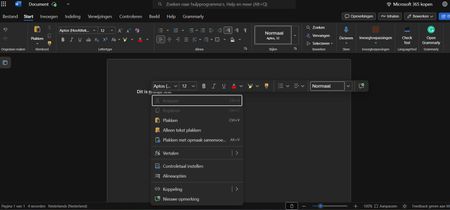
Since a few days, my Word Online refuses to give suggestions for spellchecking. I already contacted support, but they cant help me. I will add a screenshot for clarity. Can anyone please help me out? I've tried all standard things already and it always used to work.Solved848Views1like18CommentsHyperlinks no longer copying out of Word
Within the last month or so I have found that embedded hyperlinks in a Word document (on desktop PC) are being lost when I copy text into another program. The links revert to text only in WordPress and between the desktop Word document and pasting into Word Online. The only way I have found to get round this is to open the document in Word Online - in which case the hyperlinks stay intact - and then copy from there into WordPress (or anything else). This is not ideal and I wondered if this was a known issue or there is a setting in Word which is causing this to happen. It feels like the copy function in Word is set to only copy text and not the links (or formatting for that matter). I wondered if I had triggered a setting that has caused this to happen but when searching in settings and tabs (or forums) I have not found anything obvious. Does anyone have the same issue?1.2KViews1like2Comments