windows insider
114 Topics
A Vision for Windows 12: Familiar Power Meets Modern Innovation
Dear Microsoft Windows Development Team and Community Hub, With the inevitable speculation around Windows 12, I wanted to share a comprehensive vision for the next iteration of Windows. The goal is to blend the best elements of past versions with modern needs, creating a truly powerful and personalizable operating system. Here’s what many users like myself are hoping to see: 1. A Revitalized Start Menu & Screen Fresh, Resizable Layout: A clearly divided Start Menu with dedicated zones: Account Area (top-left), Shortcut Area (far left for common folders), List Area (pinned, most-used, and suggested apps), and a Pinned Tiles Area (right side, four-column layout). It should be resizable by dragging its edges. Full-Screen Start Screen Option: A return of the full-screen Start that combines the easy-to-browse list from Windows 7 with the dynamic Windows 8.1-style Live Tiles, supporting both horizontal and vertical arrangements. Enhanced Tile Flexibility: Tiles in five sizes (small, medium, long, wide, large, tall) with smooth resizing animations. New customization options should include colorful, gradient, light, dark, transparent, and semi-transparent tones. Migration Friendly: When upgrading from Windows 7, 8.1, 10, or 11, all pinned apps and websites should automatically migrate. Copilot Integration: A dedicated, prominent Copilot Tile to highlight the AI assistant's role, perhaps with a new rainbow effect for visual flair. 2. A More Functional Taskbar & Search Comprehensive Taskbar: Featuring the Cortana icon, mobile devices, Start, Search, Task View, Chat, applications, and the system tray. Prominent Search Box: The search box should be more prominent, changing from a circle to a rectangular shape, serving as a stronger entry point. Flexible Search Menu: The search interface should be highly adjustable and consistent with the new Start menu's style. 3. Personalized User Experience Lock Screen Customization: Options for left or center-aligned date and time. New photo effects that highlight the main subject, allowing it to overlay the time. Windows Hello: Facial recognition that works while wearing a mask. Enhanced Widgets: Desktop Pinning: Widgets should be pinnable anywhere on the desktop, not just in a sidebar. Full-Screen Widgets Board: A full-screen mode with a widget panel on the left and news/feeds on the right, supporting up to six columns. New Widgets: Introduction of a 'Calendar', 'People', 'Microsoft Edge', 'Cortana Suggestions', and a dedicated 'Microsoft Store' widget. 4. Peak Productivity & Multitasking Task View & Virtual Desktops: A return to the mature Windows 10 experience, allowing windows to be dragged directly to other desktops in Task View. Timeline Returns: The Timeline feature should come back, including cross-device history. Classic Alt+Tab: The Windows 10 Alt+Tab window switcher experience should be restored. Supercharged Snap Assist: Enhanced Snap Layouts supporting up to 8 segments for large screens, with specific, intelligent layouts for ultrawide (21:9, 32:9) monitors. 5. Application & Ecosystem Evolution App Updates: New versions of Mail, Calendar, and People. The new Outlook app should fully support popular third-party email services like QQ, 163, and 126. A New Cortana: Multilingual support with the return of consumer skills (music control, smart home, third-party skills). It could be offered in two visual forms and power the 'Cortana Suggestions' widget. Screenshot Tool Upgrade: Should support full-screen recording. Media Player: The return of an appearance selector and support for live tiles. Microsoft Store Revamp: UWP Return: High-quality UWP and classic Metro apps should return to the store, with PWAs transitioning to UWP. Gaming Expansion: Addition of dedicated PlayStation and Nintendo Switch apps, including a Nintendo game section. 6. Visual & Nostalgic Enhancements Refined Aesthetics: Improved window transparency with a new glass effect, rounded rectangle system avatars, and a new top bar (weather, system tray, time). Dynamic wallpaper effects would be a welcome addition. Keep the Win11 Sound: The Windows 11 startup sound is great and should be retained. The "Bold Strategy" – Legacy Feature Return: To satisfy power users and nostalgia, consider the large-scale return of beloved features like MSN apps, Windows 7 Desktop Gadgets, Windows Media Center, Groove Music, HomeGroup, a significantly enhanced Tablet Mode, and Windows Ink Workspace. 7. Hardware, Compatibility & Core System Broad Controller Support: Native compatibility with DualShock 4/5, Joy-Con, and others. Android Subsystem (WSA) Return: WSA should return with a focus on fixing previous pain points, especially full-screen landscape app support. Separated Notification Center: The Notification Center and Calendar quick actions should be separated for a cleaner interface. "Next-Gen PC" Promise: Windows 12 should deliver on larger storage, longer battery life, more power, and enhanced security/stability. Enhanced Backup & Transfer: Windows Backup should expand to more regions and add support for backing up personal files and apps to external drives, including migration from old PCs or to new hard drives. 8. Core Versioning & Hardware Requirements A Fresh Start: Version 26H1, with an internal OS version reset to 12.0.0.0. Tiered Editions: Windows 12e (for education, 2GB RAM), Windows 12 (mainstream, 4GB RAM, removing strict TPM restrictions), and Windows 12 Ultra (flagship, 8GB RAM, unlocking all AI and performance features). Extensive Free Upgrade Path: A critical strategy, offering free upgrades from Windows 11 (including SE), Windows 10 (including S), Windows 8/8.1 (including RT), and Windows 7. Doubled Support Lifecycle: Home/Pro/Workstation: 24 months → 48 months. Enterprise/Education/IoT: 36 months → 72 months. In summary, we envision a Windows 12 that isn't afraid to learn from its rich history while pushing forward with modern innovation. It should be a system that respects user choice, empowers productivity, and welcomes everyone from legacy users to those with the latest hardware. If you like this vision and want to support it, you can upvote it here: https://aka.ms/AAylqhw Thank you for considering this feedback. Sincerely, A Passionate Windows User8.8KViews1like10Comments
MyASUS settings issue
hi, I got a message when I went to MyASUS. The message is: MyASUS AiSense camera option is grayed out This function is not available now. Make sure that your camera is working properly and has allowed MyASUS access to it. I reinstalled Windows and the option was not grayed out. Yet, after installing the Windows Insider build, the issue came back. Anyone facing the issue?93Views0likes2Comments
my pc wont let me use insider program while being in a preview from another pc
so installed all of this on my desktop this device from my laptop my laptop uses this preview version so when i took the backup from my laptop i didnt need to type in a product key or anything it automatically but up in this state theres multiple windows 11 installed one here its personal pc it should be but it says its being run by an organization even through its not connect to a work nor school nor it ever had bin i looked at that on settings and im using windows 11 pro for workstation132Views0likes2Comments
Improve Voice Access Accuracy for Atypical Speech
Improve Voice Access Accuracy For Users With Atypical Speech Greetings, First, I would like to say that I appreciate Microsoft's continued investment in accessibility and speech-based computer control. Voice Access has the potential to be an extremely important accessibility tool for people who cannot reliably use a mouse, keyboard, or touchscreen. However, when i have test it on Windows 11 Pro 25h2 last public version update, Voice Access misunderstands a large portion of what I say even when using a good microphone in a silent room. So I recently joined the Windows Insider Program specifically to test the latest improvements to Windows Voice Access, especially the new Voice Isolation feature. I tested the new Voice Isolation feature and successfully completed the voice enrollment process. Voice Access was able to record my voice and create the voice profile without problems. However, after testing Voice Isolation, speech recognition accuracy remained very low, making me be sure to believe there is still an important accessibility gap for users with atypical speech. I have atypical speech due to a health condition and I use a breathing machine. The machine itself is very quiet, but it produces a small amount of airflow while I speak. My voice is also relatively low in volume and does not always follow the speech characteristics that modern speech recognition systems appear to expect. Even when I am in a quiet room with very little background noise, Voice Access misunderstands a large portion of what I say. This suggests that the primary problem in my situation is not simply environmental noise or interference from other speakers. The difficulty appears to be that the speech recognition model itself does not interpret my speech characteristics accurately. I have also noticed an interesting difference between languages. The English version of Voice Access generally understands me better than the Brazilian Portuguese version, despite Brazilian Portuguese being my native language. This suggests that recognition quality may also vary significantly between language models for users whose speech differs from the typical speech patterns represented in the training data. Voice Isolation is useful, but it is not speech training. I believe this distinction is extremely important. Voice Isolation appears to identify the user's voice and separate it from background noise, environmental sounds, or other people speaking nearby. That is valuable. However, identifying which voice belongs to the user is different from teaching the speech recognition system how that user speaks. Generally for someone with typical speech, improving the signal quality may significantly improve recognition. In the other hand for someone with atypical speech, however, the audio can be perfectly clean and still be interpreted incorrectly by the speech recognition model. This means that Voice Isolation can help the system hear my voice instead of the environment, but it does not necessarily help the speech recognizer understand my individual pronunciation and speech patterns. This is why I believe Voice Access would benefit enormously from an optional personalized speech recognition training system. Older Speech Recognition Systems Already Solved Part Of This Problem The application that has worked best for me so far is an accessibility program called Motrix, developed by UFRJ (Federal University of Rio de Janeiro): https://intervox.nce.ufrj.br/motrix/ Motrix is a very old application that uses Microsoft's SAPI 4 speech recognition technology. Despite being based on technology from the Windows XP/Vista era, it provides significantly better results for my speech than many modern recognition systems. One major reason is that it includes a built-in voice training process. The user reads predefined text, and the speech recognition system uses this material to adapt itself to the way that individual user speaks. After training, the system becomes better at interpreting that person's speech. This type of personalization was also available in older speech recognition products such as: * IBM ViaVoice * Dragon NaturallySpeaking * older speech recognition systems based on Microsoft SAPI These systems recognized that one universal speech model would not work equally well for every person. Modern speech recognition models are much more powerful overall, but many modern systems seem to have moved away from explicit per-user acoustic training. For most users, that may be acceptable. For accessibility users with atypical speech, however, personalized training can be essential. Why This Matters For Accessibility For someone using speech recognition primarily for convenience, a recognition error may only be an annoyance. For someone who depends on Voice Access to operate the computer, recognition accuracy can determine whether the computer is independently usable at all. Commands such as: "click" "scroll" "move" "open" "close" or application names must be recognized reliably. If a user has to repeat a command five or ten times, or if Voice Access consistently interprets the same pronunciation incorrectly, speech control becomes exhausting and unreliable. This problem becomes even more significant for users who use Voice Access precisely because conventional input devices are difficult or impossible for them to use. Accessibility software therefore needs to consider not only users with typical speech, but also users with: * atypical speech patterns * dysarthric speech * reduced speech volume * altered articulation * respiratory support * speech affected by physical disabilities *other speech characteristics that differ from the speech patterns commonly represented in large speech recognition datasets Not every user in these groups will have the same needs, and that is exactly why optional personalization would be so valuable. Suggested Feature: Personalized Speech Training I would strongly suggest adding an optional feature such as a personalized speech training and voice adaptation that could work similarly to older speech recognition training systems. For example, a Voice Access personalized speech training would ask the user to read a medium size text (5.000~7.500 character lenght) from a example text list so the system could then build a personalized speech profile that adapts recognition to the user's pronunciation and acoustic characteristics. Training could happen gradually. A basic training session might take only a few minutes, while users who need additional adaptation could optionally provide more speech samples over time. Personalized speech training seems to be the first priority to be implement in a future update. Ideally, this personalization would be stored locally on the device so it can work without internet connection and it could be reset, retrained, exported, or backed up by the user. Voice Isolation And Personalized Training Could Complement Each Other I do not believe Voice Isolation should be replaced. I believe it could become the first stage of a much more powerful accessibility system. For example: Microphone → Voice Isolation → Personalized Speech Model → Voice Access Recognition * Voice Isolation could remove unwanted audio and identify the correct speakers; * Personalized speech training could then adapt the recognition system to the way that specific person speaks. These are two different problems, and solving both would potentially make Voice Access dramatically more accessible. Command-specific Training Could Also Help Even if full personalized speech recognition is technically difficult to implement, a smaller first step could be personalized training for Voice Access commands. A user could record commands several times, such as: "click" "scroll down" "move left" "open Start" "show numbers" and so on. Voice Access could learn how that particular user pronounces those commands. For users who mainly depend on Voice Access for computer control rather than long-form dictation, even this limited form of personalization could make a major difference. Microsoft and Nuance Microsoft now owns Nuance, a company with decades of experience in speech recognition and voice accessibility technologies. Dragon NaturallySpeaking and related technologies demonstrated many years ago that speaker adaptation and personalized voice profiles can significantly improve recognition for individual users. Modern machine learning technologies should make it possible to revisit this concept in a much more advanced way. I hope Microsoft can combine the strengths of modern speech recognition with the personalization capabilities that older systems provided. Why I Am Submitting This Through The Insider Program I joined the Windows Insider Program specifically because I wanted to test these new Voice Access improvements and provide meaningful accessibility feedback before features become widely deployed. Voice Isolation is an interesting and potentially useful improvement, but my testing suggests that voice isolation alone does not address the main recognition problem experienced by some users with atypical speech. The speech recognizer needs a way to adapt to the user, rather than requiring every user to adapt their speech to the recognizer. That distinction is extremely important. Conclusion Please consider adding optional personalized speech recognition training to Voice Access. It could make Voice Access usable for people who are currently poorly understood by generic speech recognition systems. For users with atypical speech, this is not merely a request for slightly better recognition accuracy. It can determine whether voice control is a practical accessibility solution at all. Voice Access already provides an excellent foundation for hands-free Windows control. Adding genuine per-user speech adaptation could make it accessible to a much broader group of people. If other users have similar experiences, please consider supporting or upvoting this feedback so Microsoft can better understand the demand for personalized speech recognition. Please also keep the discussion respectful and constructive. Accessibility needs vary greatly between individuals. A feature that may appear unnecessary to one user can be essential for another. Thank you for considering this feedback and for continuing to improve accessibility in Windows.143Views0likes2CommentsWindows 11 Insider Build 26220.9223 fails with 0xC1900101
Hi, I am using Windows 11 Insider Preview and I cannot install Feature Update 26220.9223. The update downloads and starts installing. After the PC restarts, the installation fails and Windows rolls back to the previous build. Windows Update then shows the same update with a Retry option. Error code: 0xC1900101 Failed date: 23-08-2026 I have already restarted the PC and reset Windows Update components. The Windows Update and BITS services are running normally. Could anyone help me identify what is causing this error? Is there a known issue with build 26220.9223, or could a driver be causing the installation to roll back? Thank you.289Views0likes3Comments
Windows 12 as far as i know?
As per this thread created, i got some information about Windows 12, which is: Windows 12 is coming about late 2024 or early 2025. Windows 12 is possibly already show up on Canary Channel although it is not officially confirmed. Several news sources say that HP give a hint if around October 2024, the Windows 11 version 24H2 (or Windows 11 2024 Update) is released, while HP is keep silent about Windows 12, which is possibly Windows 12 will be delayed a bit later after Windows 11 24H2 released. System requirements for Windows 12 is definitely higher than Windows 11. Windows 12 still require TPM 2, Secure Boot support, and processor that capable to use hardware accelerated VBS properly, such as processor that released on 2018 and later. Windows 12 require minimum 8 GB of ram and possibly still same 64 GB disk space, while SSD is becoming a mandatory. Actually, Windows 12 require special hardware named NPU (Neural Processing Unit) for all features in Windows 12 is working properly, but since the NPU is still very expensive to acquire (or basically you need an Intel Core Ultra 5 125U at least), so these requirements should be optional. Information about whether Windows 12 will be a subscription based operating system or not is still unclear, but most speculation says that Windows 12 is not required to subscribe to use. That's it from me. If you got any more further information about Windows 12, you can share here. Thanks to XDA that give me a big overview about Windows 12.1MViews7likes91Comments
Notice that my version of Windows 11 Pro Insiders Edition going away keeps appearing
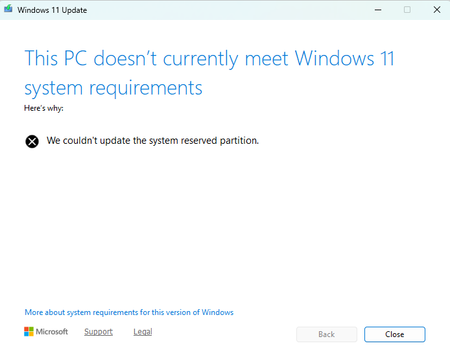
I started getting the notice that my version of Windows will expire on August 11 three or four weeks ago. I would go to the Windows update under Settings/System and it would say NO updates are available. About a week ago It finally stated that update 25H2 was available. I would do the update numerous times since and each time I get an error code of 0xc1900101. looking that error code up on the internet said my EFI partition may need to be enlarged. When trying there sequence of steps, my system would not allow for the increasing of the partition. I Chatted with an individual today Aug 6, and she tried to run a couple of diagnostics and neither produced any meaningful results. She then gave a link to this site where she assured me the issue would be resolved. Oh and also she tried to download a new OS but it stopped before the entire MSI file downloaded. Any help/suggestions?176Views1like3Comments