windows 10
705 Topics
There is problem with file history logging after the recent Windows updates (KB5101684 / KB5121003)
Hi everyone, This is not spam, I did not spam the site. It appeared after the update. I hope Microsoft can resolve this issue, and I also hope other users experiencing the same problem can reply to me. Please, please. Ever since the latest Windows updates (specifically around KB5101684 / KB5120249 on Windows 11 Build 26200/Windows 10 Build 19045), The File History feature is almost unusable for me; although it works, the problem only occurs after an update. Symptoms: The "Last Backup" time in File History is not updating correctly. Newly created or saved Word documents, images, videos, etc., still show "No previous version available" in "Content → Previous Versions". The Correct folder's date is automatically changed. System details: OS: Windows 11 25H2 (Build 26200.9278) OS: Windows 10 22H2 (Build 19045.7663) Recent Updates Installed: KB5120998, KB5120249, KB5101684. Has anyone else experienced this issue with recent Windows updates? Currently, the only solution is to go to Control Panel → All Console Items → File History → Select Drive → Select D: drive again. After completing this step, File History will return to normal. This is a post I made. Other users who have experienced the same thing left comments below. KB5101684/KB5120249 caused File History errors, but Microsoft has not acknowledged them. | Microsoft Community Hub Welcome to comment if KB5101684 or KB5120249 caused the same File History issue. | Microsoft Community Hub I want to ask Microsoft, why are there abnormal in the file history logs after these two updates? | Microsoft Community Hub Win 10/11 file history is malfunctioning after an update why hasn't Microsoft fixed this issue yet? | Microsoft Community Hub https://learn.microsoft.com/en-nz/answers/questions/5972265/windows-11-file-history-not-updating-correctly-aft https://learn.microsoft.com/en-nz/answers/questions/5978256/win-11-25h2kb5101684-os-builds-26200-8973-and-2610 https://www.reddit.com/r/computerhelp/comments/1vituh0/comment/p6dxvs4/?context=1&screen_view_count=2&ext-referrer=DIRECT https://www.reddit.com/r/WindowsHelp/comments/1w6zlem/comment/p8bbu3j/?context=1&screen_view_count=2&ext-referrer=DIRECT15Views0likes0CommentsI've tried the methods but they still don't work. I don't know what to do.
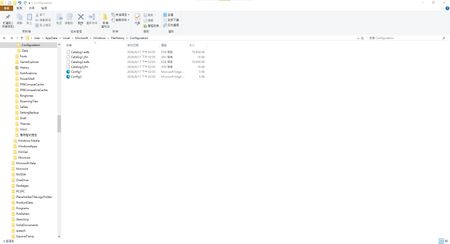
This past month has been very frustrating for me. It's not that I like to ramble, but I've genuinely encountered problems after updating. I want to ask Microsoft: after updating my laptop and desktop to KB5101684 and KB5120249, I'm experiencing issues with file history: Files can still be backed up to the D drive normally. The "Last Backup" time in "File History" is not updating correctly. Newly created or saved Word documents, images, videos, etc., still show "No previous version available" in "Content → Previous Versions". I haven't modified some folders; please change the modification dates yourself. Both updates state, "This update fixes an issue that affects File History automatic backups to network shares using Server Message Block (SMB). Backups did not work because Windows showed a false 'invalid credentials' error when connecting to SMB shares." I didn't expect the update to cause this problem; dozens of users have reported the same issue. Microsoft, please investigate and fix this. When will it be fixed? If you have the same problem as me, please leave a comment below. I want to ask Microsoft, why are there abnormal in the file history logs after these two updates? | Microsoft Community Hub According to methods suggested by online users: Open File Explorer, navigate to C:\Users\[Your Username]\AppData\Local\Microsoft\Windows\FileHistory, and delete all contents in the Configuration folder. Next, go to Settings > System > Storage, turn off File History, and then re-add drive D as the backup destination. This method still did not work. Both updates state, "This update fixes an issue that affects File History automatic backups to network shares using Server Message Block (SMB). Backups did not work because Windows showed a false 'invalid credentials' error when connecting to SMB shares." I didn't expect the update to cause this problem; dozens of users have reported the same issue. Microsoft, please investigate and fix this. When will it be fixed? If you have the same problem as me, please leave a comment below.76Views0likes2Comments
Can't Remove Microsoft Account After Windows 10 ESU Enrollment
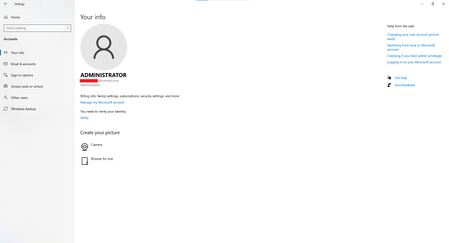
Hi, I enrolled my Windows 10 PC in the Extended Security Updates (ESU) program using my Microsoft account so I could continue receiving security updates after Windows 10 reached end of support. The update installed successfully, but now I can't remove my Microsoft account from Windows. Here's my situation: I sign in with a local Administrator account, not a Microsoft account. netplwiz confirms my account is local. However, Settings → Accounts → Your info shows my Microsoft email address. Under Settings → Accounts → Email & accounts, my Microsoft account appears under Accounts used by other apps with "All apps can sign me in." There is no Remove, Disconnect, or Sign out option. I've already tried: Removing all Microsoft-related entries from Credential Manager. Restarting the PC. Removing the device from my Microsoft account online. None of these removed the account from Windows. Is this expected behavior after enrolling in Windows 10 ESU? Is there any supported way to disconnect the Microsoft account? Thanks in advance.149Views0likes4CommentsI want to ask Microsoft, why are there abnormal in the file history logs after these two updates?
This past month has been very frustrating for me. It's not that I like to ramble, but I've genuinely encountered problems after updating. I want to ask Microsoft: after updating my laptop and desktop to KB5101684 and KB5120249, I'm experiencing issues with file history: Files can still be backed up to the D drive normally. The "Last Backup" time in "File History" is not updating correctly. Newly created or saved Word documents, images, videos, etc., still show "No previous version available" in "Content → Previous Versions". I haven't modified some folders; please change the modification dates yourself. Both updates state, "This update fixes an issue that affects File History automatic backups to network shares using Server Message Block (SMB). Backups did not work because Windows showed a false 'invalid credentials' error when connecting to SMB shares." I didn't expect the update to cause this problem; dozens of users have reported the same issue. Microsoft, please investigate and fix this. When will it be fixed? If you have the same problem as me, please leave a comment below.114Views0likes3CommentsBroken File History after July/August Updates (KB5101684 on Win11 25H2 / KB5120249 on Win10 22H2)
Hi everyone, I am writing to report a major regression bug with File History that was introduced in the recent Windows updates. This is happening across two entirely different machines with no settings changed, no system files modified, and no registry tweaks applied. The Issue: Windows 11 25H2 > after installing KB5101684 (July 29, 2026) Windows 10 22H2 > after installing KB5120249 (August 12, 2026) On both PCs backing up to a local drive (D:), the underlying files are actually being written to the drive, but the File History interface is completely broken: TheLast Backup time stamp in Control Panel frozen and fails to update automatically. In File Explorer, right-clicking new files > Properties> Previous Versions shows There are no previous versions available, making daily time-travel restoration impossible. Temporary Workaround: The only way to force it to sync is to go to Control Panel > File History > Select Drive, and re-select the D: drive again. This proves the backup engine works, but the automatic scheduling and catalog syncing are completely frozen by these updates. Please Help Upvote on Feedback Hub: I have already submitted this issue via the Feedback Hub but have received no official response yet. Since File History is critical for users who prefer local offline backups over OneDrive, we need to bring this to Microsoft’s attention immediately so they can patch it in the next cumulative update. If you are experiencing the same issue, please upvote my feedback link below:[Post your Feedback Hub sharing screenshot]85Views2likes0Commentswin 11 25H2 KB5101684 Preview and win 10 22H2 KB5120249 issue
Hi everyone, I’m wondering if anyone else is experiencing the same File History problems on Windows 10 or Windows 11. My laptop is running Windows 11 25H2. Before installing KB5101684, File History worked normally. After installing the update, I started noticing several strange problems: The Last backup time does not update correctly. Previous Versions still shows no new versions. Files are still being written to D:\FileHistory\..., but File History does not properly update its backup information. Folders such as Desktop and Favorites can have their modification dates changed even when I did not actually change their contents. I did not manually change File History settings, registry settings, or delete Event Viewer entries. I also experienced a similar problem on my Windows 10 22H2 desktop after installing KB5120249. So my situation is: Windows 11 25H2 → KB5101684 → File History problem Windows 10 22H2 → KB5120249 → File History problem At this point, I have to ask: Could these Windows updates have introduced a File History regression? I have already reported this to Microsoft This is the part that is really frustrating. I have already reported the problem through the Feedback Hub, and I also contacted Microsoft Support and chatted online with a support professional. I was told that the issue would be handled and looked into. But now several days have passed, and I still have not received any meaningful follow-up or explanation. So honestly, I have to ask: What exactly is Microsoft doing with this report? If Microsoft tells users that the issue will be handled, then users should at least receive some kind of follow-up. Instead, it feels like the report disappears into a black hole. I have already spent a lot of time checking File History settings, services, the backup drive, and the actual files being written to the FileHistory folder. I have also provided detailed information about when the problem started and which Windows updates were installed. At this point, simply telling users to reset File History or reselect the backup drive is not good enough. Those may be temporary workarounds, but they do not answer the fundamental question: Why did File History start behaving incorrectly after the Windows update? If File History worked correctly before the update and then started showing incorrect backup timestamps, missing Previous Versions, and other abnormal behavior afterward, Microsoft should investigate the update itself. Microsoft needs to take this seriously A backup system is not something users can afford to treat casually. If File History is still copying files into the backup folder while the File History interface and Previous Versions do not correctly reflect the actual backup state, users can easily be misled into thinking their backups are working properly when they are not. That is a serious reliability issue. Microsoft should investigate whether KB5101684 and KB5120249 introduced a regression affecting File History, including: Incorrect backup timestamps Missing Previous Versions Incorrect modification dates File History database/catalog problems Unexpected or repeated backup behavior I am not asking Microsoft to magically fix my computer without investigation. I am asking Microsoft to actually investigate the Windows update and determine whether it caused the regression. I have already used the Feedback Hub. I have already contacted Microsoft Support. I have already spoken with a support professional online. I was told that the issue would be handled. win 10/11 C:\Users\User\AppData\Local\Microsoft\Windows\FileHistory\Configuration、D:\FileHistory\User\D:\FileHistory\User\202108ACERPC\Configuration\Configuration Not destroyed But several days later, there is still no meaningful response. This is extremely frustrating. Microsoft cannot keep telling users to troubleshoot the same thing over and over again while providing no explanation of what is actually happening. If this is a Windows bug, Microsoft should acknowledge it. If it is not a Windows bug, Microsoft should explain what is causing it. What users should NOT get is silence. If other Windows 10/11 users are experiencing the same issue, please share your Windows version, KB number, when the problem started, and whether files are still being written to the FileHistory folder. The more users report the same behavior, the harder it will be to dismiss this as an isolated configuration problem. Microsoft, please stop leaving users to figure this out on their own. Investigate the problem, explain what is happening, and provide an actual fix. We need answers, not silence. The following are the problems that users and I encountered.415Views0likes3CommentsWindows 11 to KB5101684 File History bug
Hello everyone, I have a question about Windows 11 File History. After updating my laptop to KB5101684, I modified a file today and confirmed that it was successfully saved. However, after enabling "File History" and clicking "Execute Now," the backup time still shows yesterday's date (2026/7/28), not today's. I have confirmed the following: The backup drive D is properly connected. File History is enabled. The File History Service is started and running normally. The backup location is set to drive D. The modified files and images were indeed backed up to:D:\FileHistory\user\LAPTOP-GJTRIQFJ\Data\C\Users\user However, in the "Restore Profile" section of File History, I don't see the new version date after today's modification. Additionally, I found that if I go to: Control Panel → All Console Items → File History → Select Drive → Select D drive again Newly created or saved Word documents, images, videos, etc., will still show "No previous version available" in "Content → Previous Versions". and then re-specify the same backup drive, then perform the backup, the update works normally; unlike before the update, where simply clicking "Execute Now" would create a new backup version. Furthermore, before this problem occurred, I did not change any File History settings, nor did I delete any related files or system folders, so I suspect the problem only started appearing after installing KB5101684. I would like to ask everyone: Is this a normal phenomenon? Could it be related to the Windows 11 update KB5101684? Does this indicate a possible anomaly in the File History database, settings, or related services? Has anyone else encountered the same situation after updating KB5101684? Currently, the original files can be opened, modified, and saved normally, and the backup drive is connected normally. I'm just worried that the File History isn't creating a new version correctly, so I want to confirm if further action is needed. Do you have any suggested troubleshooting methods, such as re-establishing the file history settings, checking related services, or other repair methods? Thank you for your assistance!521Views0likes4CommentsA Vision for Windows 12: Familiar Power Meets Modern Innovation
Dear Microsoft Windows Development Team and Community Hub, With the inevitable speculation around Windows 12, I wanted to share a comprehensive vision for the next iteration of Windows. The goal is to blend the best elements of past versions with modern needs, creating a truly powerful and personalizable operating system. Here’s what many users like myself are hoping to see: 1. A Revitalized Start Menu & Screen Fresh, Resizable Layout: A clearly divided Start Menu with dedicated zones: Account Area (top-left), Shortcut Area (far left for common folders), List Area (pinned, most-used, and suggested apps), and a Pinned Tiles Area (right side, four-column layout). It should be resizable by dragging its edges. Full-Screen Start Screen Option: A return of the full-screen Start that combines the easy-to-browse list from Windows 7 with the dynamic Windows 8.1-style Live Tiles, supporting both horizontal and vertical arrangements. Enhanced Tile Flexibility: Tiles in five sizes (small, medium, long, wide, large, tall) with smooth resizing animations. New customization options should include colorful, gradient, light, dark, transparent, and semi-transparent tones. Migration Friendly: When upgrading from Windows 7, 8.1, 10, or 11, all pinned apps and websites should automatically migrate. Copilot Integration: A dedicated, prominent Copilot Tile to highlight the AI assistant's role, perhaps with a new rainbow effect for visual flair. 2. A More Functional Taskbar & Search Comprehensive Taskbar: Featuring the Cortana icon, mobile devices, Start, Search, Task View, Chat, applications, and the system tray. Prominent Search Box: The search box should be more prominent, changing from a circle to a rectangular shape, serving as a stronger entry point. Flexible Search Menu: The search interface should be highly adjustable and consistent with the new Start menu's style. 3. Personalized User Experience Lock Screen Customization: Options for left or center-aligned date and time. New photo effects that highlight the main subject, allowing it to overlay the time. Windows Hello: Facial recognition that works while wearing a mask. Enhanced Widgets: Desktop Pinning: Widgets should be pinnable anywhere on the desktop, not just in a sidebar. Full-Screen Widgets Board: A full-screen mode with a widget panel on the left and news/feeds on the right, supporting up to six columns. New Widgets: Introduction of a 'Calendar', 'People', 'Microsoft Edge', 'Cortana Suggestions', and a dedicated 'Microsoft Store' widget. 4. Peak Productivity & Multitasking Task View & Virtual Desktops: A return to the mature Windows 10 experience, allowing windows to be dragged directly to other desktops in Task View. Timeline Returns: The Timeline feature should come back, including cross-device history. Classic Alt+Tab: The Windows 10 Alt+Tab window switcher experience should be restored. Supercharged Snap Assist: Enhanced Snap Layouts supporting up to 8 segments for large screens, with specific, intelligent layouts for ultrawide (21:9, 32:9) monitors. 5. Application & Ecosystem Evolution App Updates: New versions of Mail, Calendar, and People. The new Outlook app should fully support popular third-party email services like QQ, 163, and 126. A New Cortana: Multilingual support with the return of consumer skills (music control, smart home, third-party skills). It could be offered in two visual forms and power the 'Cortana Suggestions' widget. Screenshot Tool Upgrade: Should support full-screen recording. Media Player: The return of an appearance selector and support for live tiles. Microsoft Store Revamp: UWP Return: High-quality UWP and classic Metro apps should return to the store, with PWAs transitioning to UWP. Gaming Expansion: Addition of dedicated PlayStation and Nintendo Switch apps, including a Nintendo game section. 6. Visual & Nostalgic Enhancements Refined Aesthetics: Improved window transparency with a new glass effect, rounded rectangle system avatars, and a new top bar (weather, system tray, time). Dynamic wallpaper effects would be a welcome addition. Keep the Win11 Sound: The Windows 11 startup sound is great and should be retained. The "Bold Strategy" – Legacy Feature Return: To satisfy power users and nostalgia, consider the large-scale return of beloved features like MSN apps, Windows 7 Desktop Gadgets, Windows Media Center, Groove Music, HomeGroup, a significantly enhanced Tablet Mode, and Windows Ink Workspace. 7. Hardware, Compatibility & Core System Broad Controller Support: Native compatibility with DualShock 4/5, Joy-Con, and others. Android Subsystem (WSA) Return: WSA should return with a focus on fixing previous pain points, especially full-screen landscape app support. Separated Notification Center: The Notification Center and Calendar quick actions should be separated for a cleaner interface. "Next-Gen PC" Promise: Windows 12 should deliver on larger storage, longer battery life, more power, and enhanced security/stability. Enhanced Backup & Transfer: Windows Backup should expand to more regions and add support for backing up personal files and apps to external drives, including migration from old PCs or to new hard drives. 8. Core Versioning & Hardware Requirements A Fresh Start: Version 26H1, with an internal OS version reset to 12.0.0.0. Tiered Editions: Windows 12e (for education, 2GB RAM), Windows 12 (mainstream, 4GB RAM, removing strict TPM restrictions), and Windows 12 Ultra (flagship, 8GB RAM, unlocking all AI and performance features). Extensive Free Upgrade Path: A critical strategy, offering free upgrades from Windows 11 (including SE), Windows 10 (including S), Windows 8/8.1 (including RT), and Windows 7. Doubled Support Lifecycle: Home/Pro/Workstation: 24 months → 48 months. Enterprise/Education/IoT: 36 months → 72 months. In summary, we envision a Windows 12 that isn't afraid to learn from its rich history while pushing forward with modern innovation. It should be a system that respects user choice, empowers productivity, and welcomes everyone from legacy users to those with the latest hardware. If you like this vision and want to support it, you can upvote it here: https://aka.ms/AAylqhw Thank you for considering this feedback. Sincerely, A Passionate Windows User8KViews0likes7Comments
Secure Time Seeding / W32Time Large Time Correction Issue
Hello everyone, I’m investigating an unusual time synchronization issue with Windows 10 IoT Enterprise LTSC involving W32Time and Secure Time Seeding (STS) in a closed network, and I’d appreciate any guidance or insights from the community. In our environment, time.windows.com resolves to our internal IP/NTP server. The server receives NTP requests and returns a valid response with the correct time. Network monitoring confirms that both the request and response are working correctly. However, we observed an unusual behavior: If the system clock is set to 2035 or earlier, W32Time successfully corrects the time. If the system clock is set to a much later date, such as 2056, W32Time receives the correct NTP response but does not update the system clock. This behavior has been observed in both open and closed networks. We have already tried: Configuring MaxPosPhaseCorrection and MaxNegPhaseCorrection to 0xFFFFFFFF. Enabling UtilizeSslTimeData = 1. Unregistering/registering W32Time. Stopping/starting the Windows Time Service. Reconfiguring the NTP peer. Running w32tm /resync. Verifying NTP traffic and responses using network monitoring. We are also trying to understand how Secure Time Seeding (STS) works in this scenario. On an open network, STS appears to obtain and cache trusted time, which may help Windows recover time while offline. However, in our closed network, where time.windows.com resolves to our internal NTP server, STS does not appear to establish trusted time in the same way. Questions: Is there a W32Time or Secure Time Seeding limitation that prevents very large time corrections, even when MaxPosPhaseCorrection and MaxNegPhaseCorrection allow them? Why does synchronization work at 2035 or earlier but fail around 2056? Is the 2035/2056 behavior related to timestamp validation, NTP, STS, certificates, or another Windows limitation? Does STS require Microsoft's actual time infrastructure, or can an internal NTP server participate? Does resolving time.windows.com to an internal IP prevent STS from establishing a trusted timestamp? Is there a supported configuration on Windows 10 IoT Enterprise LTSC to treat an internal NTP server as a trusted time source? Are there specific W32Time event logs, registry settings, Group Policies, or diagnostics we should check when an NTP response is received but not applied? Accurate and trustworthy time is critical because timestamps are used for offline operations. Any guidance on whether this is caused by W32Time large-offset handling, Secure Time Seeding, timestamp validation, or an interaction between these components would be greatly appreciated.222Views0likes4Comments