visio
456 Topics
Microsoft 365 Subscriptions
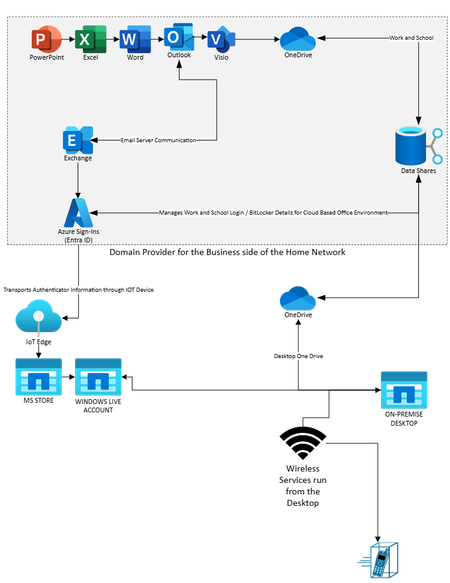
In fourth quarter of 2024, I decided to upgrade my machine and tried out a web only version (freeware) of Microsoft 365. After some time, I found out that I was not getting the qualities I needed for documentation to be presentable as Microsoft Word and Excel were not usable for print formats. I decided to buy a Microsoft 365 Business subscription (bought through my domain provider) which allowed me to use my email address attached to me and my website domain. This allowed me to also download desktop copies of Word and Excel. However, I ran into problems with old accounts colliding with my new ones..., for example, Skype for Business, Microsoft Store, and Microsoft Live would constantly appear in my installation admins. If I attempted to install them, the installation would fail and get stuck i.e, I could not remove them. Microsoft message pop-ups would state, "You cannot install this on a 'work' account." I thought to myself, "Okay, I installed my Windows OS as a "Work Account on my new machine." This made sense, because I could go to my browser on my new machine and I could go to my old laptop that had absolutely no Microsoft 365 on it and access my Office from my browser profile. My old laptop is the only machine that accepts the Windows Live email address i.e., it acts as a Windows Live access service via the 'free' outlook account to which it is attached. However, now that all these items are separated by Work or Home classification, I keep getting messages that state, "We cannot renew your Microsoft 365 account." But my Work account should not be attached to Microsoft Live accounts...should it? After all, it uses Entra ID for access and the subscription is bought through my domain vendor. Why is Microsoft Support sending me these emails? My original setup accessed Microsoft Live accounts via the web through my old laptop using my free Outlook email and looked something like the graphic below:382Views0likes1Comment
Visio Plan - Strange Issues
Hello All, This is a bit convoluted so I'll try and keep this as succinct as possible. Ask away if you need more info. I have created a network rack elevation diagram in Visio I used Visio stencils from several different manufacturers I needed to edit some of the Visio shapes that I used. I did this by Right-clicking the shape Under Group, clicking on "Open stencil name" Clicking the shape and ungrouping it Making my changes as needed Ctrl-A to select every part of the shape Grouping everything back together Closing the shape I save my work frequently, including immediately before closing the drawing or the application To this point, everything works and looks as expected But then: If I close the file or close Visio, and reopen my drawing, Every shape I edited is messed up in one way or another If I save the file as a DWG or DXF and open it in CAD Entire shapes are missing, or Elements or parts of shapes are missing If I save the file as a PDF 8 out of 10 times it's perfect, but 2 out of 10 times it exhibits some of the issues described above This is work-related and a few of us are mystified as to what is going on here. My employer is an O365 shop and all of our software is licensed. I am running all of the latest O365 updates. I'm happy to provide additional info, screenshots, etc. so please just ask. Thanks in advance for any assistance. BG149Views0likes1Comment