verification
209 TopicsAZ-500: Microsoft Azure Security Technologies Study Guide
The AZ-500 certification provides professionals with the skills and knowledge needed to secure Azure infrastructure, services, and data. The exam covers identity and access management, data protection, platform security, and governance in Azure. Learners can prepare for the exam with Microsoft's self-paced curriculum, instructor-led course, and documentation. The certification measures the learner’s knowledge of managing, monitoring, and implementing security for resources in Azure, multi-cloud, and hybrid environments. Azure Firewall, Key Vault, and Azure Active Directory are some of the topics covered in the exam.23KViews4likes3Comments
Cannot verify identity when logging into Teams account
Dear community, I am not sure if this is the right place to ask, but I don't know where to go. Microsoft support has not been of any help. The current situation is as follows: when I log in with my work account on Teams (or the Office platform) I need to verify my identity by either picking up a call or filling in a verification code I receive via SMS. Previously I accidentally hit '1' when I received this verification call, which (I think) blocked my account. Now when I try to log in I either get the error message: "We did not receive the expected response" when I select phone call, or I don't receive anything when I select SMS. I asked the administrator to reset my account, which he did, but this only changed my password. I still cannot verify my Teams account. What can I do?14KViews0likes1Comment
Microsoft Partner Center Account Verification Issues - Steps Unresponsive
Hello fellow members, I am currently facing an issue with the Microsoft Partner Center's account verification process, and I'm reaching out to see if anyone else has encountered a similar problem or if there's a workaround that I might have missed. I have been trying to verify my account as guided by their official documentation (https://learn.microsoft.com/en-us/partner-center/verification-responses). Here are the steps I followed: I went to Account Settings and clicked on the Legal Info, then clicked on the "Fix now" button as instructed. The next step mentions "In Account Verification, from Select document type to upload, select the type of document you want to upload for verification". This is where the problem lies. After Step 1, the "Account Verification" tab or option simply doesn't appear for me. It feels as though the process just halts there. I tried to find a way around it, assuming maybe it's a browser issue or some temporary glitch, but multiple attempts yielded the same result. Through different browsers, different computers at different times. I also raised support tickets regarding this matter, but unfortunately, I haven't received any concrete responses yet. They only keep directing me back to the same steps that are unresponsive. And this has been over a month now and I kinda get stuck. Has anyone here faced a similar challenge or has any insights on how I can proceed with this? I appreciate all the help and suggestions I can get. Thanks in advance!14KViews2likes17Comments
CSP Verification Issues Continue
Can someone please decipher the below and tell me what the verification team is actually asking for or what they mean by "the domain provided in your submission is insufficient for the requirements of our program"? Thank you for your Document Apologies for the inconvenience, However, the domain provided in your submission is insufficient for the requirements of our program. Can you send us a recent additional document that contains the domain and company name or a contact name as they appear on your account? we need additional document in which Domain and Entity Name or Partner Name is available, and the Documents submitted must have been issued within the previous 12 months. The fact that they're asking for additional documents showing the domain and entity name after saying the domain is insufficient for the requirements of the program is confusing. I've provided them with endless documents containing the information they ask for. Yet, they come back with the same generic response without explaining what else could be provided. At this stage, I'm deleting my organisation from the Microsoft Partner portal.Solved11KViews0likes26Comments
Microsoft Teams verification code does work
Hi, I'm trying to set up the free version of MS Teams on my desktop so I can join a meeting at 13:00 Eastern Australian Standard Time 11 June 2021 (tomorrow!). I sign in with my password then it asks for my phone number to send me a code. I enter my phone number and click next. I get a four digit number which I type into the verification box. It tells me the number is incorrect. I've tried this numerous times and all the numbers I have received fail to verify. They are all four digits. This is uncommon, other programs use six digit verification codes. Are the codes I'm receiving truncated? I need this fixed so I can attend my meeting.7.7KViews1like10Comments
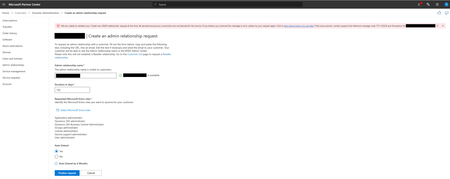
Error message: unable to validate your 'Create new GDAP relationship'
In Partner Center I want to create an admin relationship request for a certain customer. As you can see below I receive an error message when I clicked on 'finalize request'. The details of the error message: We are unable to validate your 'Create new GDAP relationship' request at this time. Be advised anonymous connections are not allowed for this service. If you believe you received this message in error, please try your request again. Click to https://learn.microsoft.com/en-us/partner-center/gdap-faq?branch=main#what-action-must-a-partner-perform-for-a-715-123220-error-or-anonymous-connections-are-not-allowed-for-this-service. If the issue persists, contact support and reference message code 715-123220 and Transaction ID: xxxxxxxxxxx-xxxx-xxxx-xxxx-xxxxxxxxxxxx. I tried to create a request on different times of the day and even my colleague doesn't managed to finalize the request because she also receives the same message. Does anyone here has a solution for this because I need to create this request as soon as possible. Thanks in advance!Solved6.6KViews1like9CommentsOngoing Issue with Employment Verification in Microsoft Partner Program
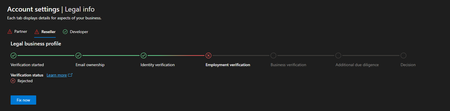
Hello I am experiencing a persistent issue with the Employment Verification process in the Microsoft Partner and Reseller programs. When attempting to resolve the issue by clicking “Fix Now” after a rejected verification, I am continuously redirected back to the Identity Verification step. Even after completing the identity verification, I am sent back to Employment Verification, only to be rejected again. This creates a loop, and every time I click “Fix Now,” I am not given the option to upload any documents, but instead, I am redirected to the previous step, making it impossible to proceed. This issue has been ongoing for 50 days, and I have contacted Microsoft Support many times. Unfortunately, I continue to receive the same generic responses, asking for the same documents to be uploaded. After submitting them, there is no further follow-up, and the issue remains unresolved. It seems as though I am receiving automated responses without any real resolution. What adds to the frustration is the contradiction in the process: The exact same documents I submitted for Developer Verification, which were successfully processed and authorized, are being rejected for the Partner and Reseller programs, despite being identical in every way. Given the significant impact this issue is having on my business, I am reaching out to the community for assistance. Has anyone else encountered a similar problem, or is there any guidance on how to resolve this? Any insights or advice would be greatly appreciated. Thank you for your time and support.4.9KViews6likes55CommentsAccount verification
Hi I applied for a partner last week. but I received the following message and was rejected. 'Hello, Please provide additional documentation dated within the past 12 months to verify your domain information. Examples of verification documents are as follows: Domain registration/invoice or renewal that lists entity/username and domain as they are stated in your Profile. Thank you.' Accordingly, I submitted my domain registration card, but I received the same rejection. How can we solve this problem?4.3KViews0likes7CommentsIssues with Account Verification and Revoked Partner Status
Hello everyone, Since July 30th, I have been struggling to resolve an issue with account verification in Microsoft Partner Center and to restore my partner status. Here's a summary of the problem: In April, I successfully completed the verification process by submitting all the required documents to confirm my domain ownership. The documents met all the criteria, including the 12-month validity requirement. On July 30th, my developer status was revoked without any explanation. I have requested clarification several times, but each time I only received requests to resubmit the same documents I had already provided. I resubmitted the documents on August 8th, but I still haven't received any constructive response, just automated messages. Recently, I received a message saying that several attempts to verify my information were unsuccessful, and the process was closed. This could result in my relationship with Microsoft being terminated within 30 days. My team has spent a year learning the Graph API and developing our Outlook application, and now it seems we won’t be able to publish it due to unclear verification issues. Could someone please advise if there is a way to expedite the resolution of this problem? I have submitted all the required documents and met the necessary criteria, yet I continue to face rejections. Here are my support ticket numbers for reference: 2404250040003907 2409030040003632 2408210040001904 2409060040005012 I would greatly appreciate any help or advice on how to proceed. Thank you!Solved3.9KViews4likes26Comments