upload
22 Topics
Copilot Sign In On Edge Browser Not Working
The sign In button on the copilot toolbar on the edge browser does not work at all. I ask it to generate an image, or I try to upload multiple files, then it pops up the sign in, but clicking the sign in doesn't work. I've tried Microsoft support and they tried some things, but they ended up referring me to here.307Views0likes1Comment
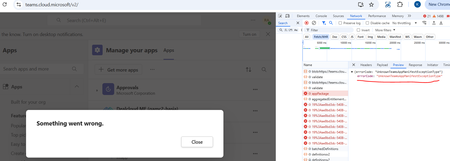
Cannot upload Team custom App. Shows constantly shows UnknownTeamsAppManifestExceptionType error
Hello, Could please someone advise. Cannot upload a custom App. The same app was successfully uploaded in December 2024. Now UnknownTeamsAppManifestExceptionType is shown. Thanks!356Views0likes5Comments
OneDrive Mac App stuck on "Preparing to upload" or "Processing Changes
Hi! I hope someone can help me, since I've been dealing with this issue for 2 weeks now and not even Global Support at Microsoft as an FTE could help me. I'm using a MacBook Pro M1 (2021), MacOS Ventura 13.4.1 and downloading/uploading multiple image, video and audio files between co-workers by also using Adobe Suite. Suddenly, it stopped syncing properly and the OneDrive icon just shows "Preparing to upload" or "Processing Changes" for eternity, even if I connect to Ethernet (I also don't have any invalid symbols on my file names). Nothing has updated since July 11 for my coworkers, and the alternative of using the OneDrive Web is something I already do, but it's not practical at all since I need to download and upload my Adobe projects AND assets each time, making it more frustrating. It should be an easy experience along Finder and MacOS. I've tried reinstalling several times, even using the script inside the Contents folder of the app, and in the end it syncs with the user OneDrive, but not the Team one. This is not just a minor issue, this is costing the company weeks of work and money because we're not able to work async as a Global Team. And it's just on my Mac, since I have a Surface and everything works well there (but the machine is not powerful enough to handle the work). Please, help me. I'm very frustrated! It just feels MacOS support for OneDrive has been dropped, it feels like a alpha/beta version of the app. PD: I'm updating to MacOS 15.0 today, that an update was released, so hopefully that will help? Let's see.Solved21KViews1like4Comments
Upload and add a video to a channel via MS (on SP)
Hello, I have created a company wide channel, however when I upload a video using the new Stream on SharePoint option, the video uploads fine but there is no "add to channel" option. Checking videos uploaded to Stream Classic, they have a different interface and the 3 dots with an option to add to a channel. I also don't have the option to upload a new video to Classic which allows the channel option. I am stuck and appreciate any advice. thanks.2.5KViews0likes6Comments
Why is upload to Sharepoint so flakey? And is there a workaround?
I've been asked to upload a load of files to a sharepoint site in our comapny. I've tried a couple of times now, and the process starts OK, but seems to hit a timeout error or something and the webpage crashes. There doesn't seem to be any of the usual functionality for a service like this - there appears to be no way of quickly determining what has and what hasn't copied across - the (simple) file structure seems to have be replicated, but many folders are empty and don't contain the files that were i the original data. ALso, there doesn't seem to be any means of "resuming" the process. I just have to start all over again. These seem like 2 of the most basic functionalities you would expect this feature to have. Is there any sort of solution or workaround? Thanks for any help.5.9KViews0likes5CommentsAssignments - There was a problem when attaching this file. Please remove and try again
We've seen this error occur repeatedly for 3 students over the past few weeks since Christmas. It's occuring on the windows app and via Chrome, both are running the latest version. It's at the point of submitting an assignment. We've tried creating a brand new word document with only one sentence in it, thinking it was the file with the issue. The issue appears to follow the student, no matter what device they use to upload the assignment. Any thoughts? Thanks, Phil7.4KViews0likes1Commentadd a way to limit x MB/s in upload speed (in the style of opera)
Suggestion (SS): xxx Classification: SPEED CONTROL PRIORITY IN MY OPINION: 2-3 in a scala 1 (low) - 10 (high) same as title You can find this suggestion on Chromium too: https://bugs.chromium.org/p/chromium/issues/detail?id=1143080 --------------- All my other suggestions are here: https://link.ws/edgesuggestions Suggestions I liked from other user here: https://link.ws/othersuggestions Chromium suggestions list 1: https://link.ws/chrome1 and 2: https://link.ws/chrome2 From end 2020-10 all suggestions are written on both Edge and Chrome at the same time, suggestions before 2020-10 are available only on Chrome. *to avoid a ban from Google, I submit only limited post pro week.1.1KViews0likes0CommentsShow the upload status of our feedbacks when sending using feedback tool on Edge
My upload speed is not that high and when I add multiple big pictures along with video recording using "recreate my problem" feature in Edge feedback tool, all the data add up and make a big chunk to be uploaded. I Need to know when Edge finishes uploading data so I can keep Edge window open to do its job and don't interrupt it by closing it, shutting down my PC, putting PC to sleep etc etc. Deleted2.9KViews3likes9Comments