universal print
65 Topics
Secure release QR code from iPad
We have successfully configure universal print and have secure release setup. This is working fine from an android phone and iPhone using the M365 app which needs to be installed. Scan the QR code, finds the printer and job is released. However when scanning the QR code from an iPad using the same version of the M365 app this doesn't work. The QR scan opens the M365 app but doesn't find the printers as it does on the mobile versions. It just lands on the co-pilot page. If you scan the QR code from the iPad and get safari to open the link, rather than M365 Co pilot app, but I get the message "Currently secure release of print jobs is not supported on this device" Can I confirm that this is not supported from an iPad as it works from an iPhone on the same software version. Will support be added to the M365 Copilot for iPad release. IOS says it is supported but not clear if this is only Phones that are supported? Many thanks387Views0likes2CommentsDeploy Universal Print printers to users through PowerShell?
Hi all, we're currently using PrinterLogic to manage printers for users and we're hoping to move to Universal Print. Ideally, we'd like a seamless one-to-one transition, meaning that each PrinterLogic printer is silently replaced with the equivalent Universal Print (UP) printer. My instinct was to use a PowerShell script deployed through Intune as it can foreach through the user's printers, remove them, look up the relevant UP printer's details, and install it. The problem I've run into is that there doesn't seem to be a way to install available UP printers through PowerShell. I've tried adding the entries manually to the registry, sending arguments to the UPPrinterInstaller executable directly, and even attempted to feed the raw SyncML XML payload straight into the OMADM local execution engine. None of these things have worked, so I'm reaching out to the community to see if any of you have a solution.206Views0likes1Comment
Unversal print & Azure virtual desktop (pooled/multisession)
Hello all, We have Univeral print(UP) setup, and i want to introduce it into our AVD setup that is running 24h2-multisession. Now normally a UP printer is mapped via Intune or GPO as i understood. But in multisession OS the Intune user configuration is not applicable to the multisession OS... and GPO is not a option here. so i was thinking of creating a scripted action to map the univeral printer(s) but i cant find any way to map a univeral printer via scripting(thinking to run it as-user) Redirection of printer from local device is not a option here https://learn.microsoft.com/en-us/universal-print/fundamentals/universal-print-avd any help is much appreated328Views2likes2Comments
Slow Printing HP Futuresmart 5.9.0.2
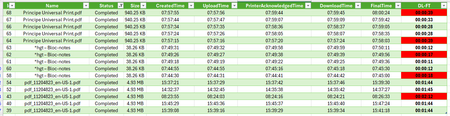
Hello everyone, I am testing Universal Print with an HP MFP running Futuresmart 5.9.0.2, and overall I find it quite interesting 😀 However, it is extremely difficult to get support from printer manufacturers, and there is very little feedback or shared experience available 😢 During my tests, I noticed internal processing delays (=DownloadTime–FinalTime) on the HP MFP that vary without any apparent Reason (printing PDF from W11/EDGE and content-type is Application/PDF). In addition, I observed significant differences in internal processing time for certain documents (such as plans) between Universal Print Cloud printing and direct TCP/IP 9100 printing. The delay increases from 2 minutes of processing to 3 minutes. I contacted HP support, but it is very complicated to get assistance regarding Universal Print. Do you have any insights? How should I proceed? Thank you in advance, and have a great day ☀️872Views0likes11Comments