troubleshooting
10 TopicsMS Teams Logs Reader
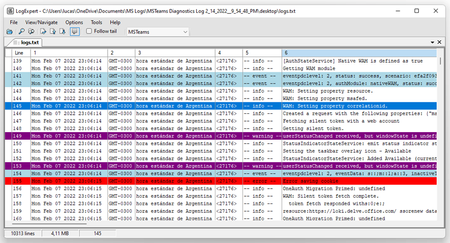
Hello, The goal of this post is to simplify the reading of the MS Teams Logs with a tool to make them more readable by the human eye For example, reading the logs generated by MS Teams using the notepad is very difficult here is when I recommend to use the open-source tool called LogExpert to follow this tutorial we need to have already installed a Log Reader Software called LogExpert, you can find the installation instructions in this link https://github.com/zarunbal/LogExpert Inside LogExpert we need to configure it to recognize the ms teams log information as separated columns and also style it with your favourite colours Columns configuration Options -> Columnizer Choose a Columnizer (Choose one of the RegexX default profiles) Click on Config Inside the Regex text field insert the following regular expression: UPDATE 1.0: Simple Regex ([Sun|Mon|Tue|Wed|Thu|Fri|Sat]{3,}[\s][Jan|Feb|Mar|Apr|May|Jun|Jul|Aug|Sep|Oct|Nov|Dec]{3,}[\s][0-9]{2,}[\s][0-9]{4,}[\s][0-9]{2,}(?::[0-9]{2,}(?::[0-9]{2,})[\s]))(GMT[\+|-][0-1][0-9]{3})?[\s]\((.*)\)[\s](<[0-9]+>[\s])(--\s[a-z]+\s--[\s])(.*) UPDATE 1.1: The same but enhanced and with headers. (?<Date>[Sun|Mon|Tue|Wed|Thu|Fri|Sat]{3,}[\s][Jan|Feb|Mar|Apr|May|Jun|Jul|Aug|Sep|Oct|Nov|Dec]{3,}[\s][0-9]{2,}[\s][0-9]{4,})[\s](?<Time>[0-9]{2,}(?::[0-9]{2,}(?::[0-9]{2,})))[\s](?<Timezone>GMT[\+|-][0-1][0-9]{3}?[\s]\(.*\))[\s](?<Thread><[0-9]+>)[\s](?<Level>--\s[a-z]+\s--[\s])(?<Message>.*) UPDATE 2.0: German Fix (?<Date>[Sun|Mon|Tue|Wed|Thu|Fri|Sat]{3,}[\s][Jan|Feb|Mar|Apr|May|Jun|Jul|Aug|Sep|Oct|Nov|Dec]{3,}[\s][0-9]{2,}[\s][0-9]{4,})[\s](?<Time>[0-9]{2,}(?::[0-9]{2,}(?::[0-9]{2,})))[\s](?<Timezone>GMT[\+|-][0-1][0-9]{3}?[\s]\(.*\))[\s](?<Thread><[0-9]+>)[\s](?<Level>--\s[a-z]+\s--[\s])(?<Message>.*) Highlights configuration Options -> Highlighting and triggers Click on New to create the group of Highlights Click on Add to generate new Highlights rules here you can choose your favourite colours List of MS Teams Log Levels -- error -- -- info -- -- warning -- -- event -- * I say this because of what I have seen in the log files, this list could be updated LogExpert Documentation: https://documentation.help/LogExpert/documentation.pdf12KViews3likes0Comments
Microsoft Teams & Excel Hanging/Freezing
Greetings All, After using MS Teams daily now for better part of the year, As of lately our core team has been experiencing issues where Excel will Hang/Freeze specifically during Screen Share Sessions. What is interesting is that although Excel seems to become unresponsive, the software will continue to function. The only caveat to the problem is that Excel GUI will stop updating. The software will remain in a frozen state where no actions will update the GUI and the software will remain this way until restarted. If multiple Excel Workbooks / instances are open, all open instances will suffer the same symptoms. Using short cuts like CTRL-S will continue to save any changes made but not physically update anything on the screen. Symptoms: Not an isolated case to my development box. We are seeing these issues on multiple employee pc's throughout the day. Only replicable when using Screen Share on a specific Software (Excel). Sharing the entire screen will not reproduce this error. I have browsed the forums and have seen that some people are experiencing similar issues with PowerPoint. I have recently reinstalled teams and cleared my local cache.12KViews3likes1Comment