troubleshooting
235 Topics
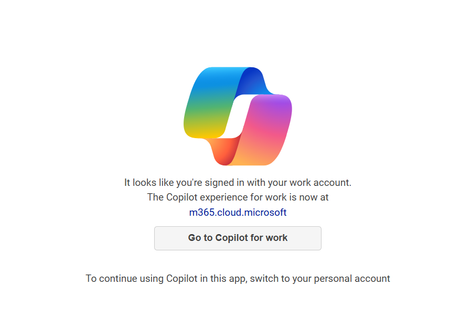
New copilot app can't switch from work to personal account
I installed the app from the Windows 11 store yesterday, and it was working fine just like it did on my mobile app. I made sure I signed in with my personal Microsoft account on both. Today, when I attempted to use it again on my Windows 11 PC, it seems like it signed in with my work account and no matter how many times I sign out and back in with my personal account it keeps displaying "It looks like you're signed in with your work account". I've terminated the app, uninstalled it, not sure what else to do? It is signed in with my personal account now but still not working.Solved33KViews17likes47Comments
M365 disconnects my Dropbox account every single day
I have been working from an iPad on a Word document stored in my Dropbox account for several years now. A few months ago, out of the blue Office started disconnecting my Dropbox account literally every single day. I tap Open in Word to open the doc, Dropbox opens up Word, and then nothing happens. I go into Settings->Files and Storage->Storage Accounts, and Dropbox is just gone. I have to manually reconnect my Dropbox account literally every single day of my life. I have reported this issue over and over and over through Help->Tell Us What Can Be Better in Word iOS. Numerous app updates have been released since this problem started happening and absolutely nothing has been done to fix it.2.1KViews14likes24Comments
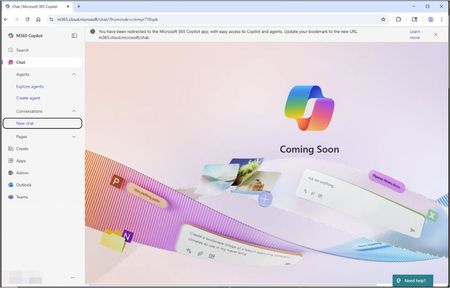
Copilot Chat page displays "Coming Soon" message
Over the past couple of days, I've had several people in my org report that they see a "Coming Soon" page when attempting to use Microsoft 365 Copilot Chat (see included image). The two people reporting the issue to me this week both have Microsoft 365 E3 licenses with standard Copilot Chat included, and they were not seeing this page last week. I tested with an account that has that same licensing as well as an account that has Microsoft 365 Copilot license, but I could not recreate the issue. For the people impacted, here is what I've noticed: It occurs in both Chrome and Edge. It occurs when the URLs in the address bar are m365.cloud.microsoft or copilot.cloud.microsoft The Edge sidebar app for Copilot seems to work, but when the popout button is used, it displays the "Coming Soon" message. If anyone has some insight on this or additional troubleshooting guidance, I'd greatly appreciate it! Thanks!Solved8KViews13likes15CommentsCoPilot "An external link was removed to protect your privacy"
Scenario: I am signed in to corporate CoPilot for M365. I'm asking CoPilot app on desktop in "WORK" mode to generate an excel file with some fictitious data & make it available in an Excel file. CoPilot generates the table, then removes the link to the file 😑 I can use it in "WEB" mode to do the same, and it generates a BING URL that then results in a 404. <sigh> I can SIGN OUT and use generic CoPilot. That will generate a file, then prompt me for corporate credentials, and then it gives me the file. The question: How do I get file generation working while logged in to my corporate account? Do we have a security permission causing issues?12KViews12likes17CommentsUpdated Copilot app doesn't work with Work account
There was an update to the Copilot app on Oct 3, 2024 (1.0.4.0), and now the app is acting weird on my Copilot+PC work laptop. I press the dedicated Copilot button and expect to have Copilot open from the right. Instead I get a centered screen (which by the way is this address: https://copilot.microsoft.com/?dpwa=1 ) telling me "It looks like you're signed in with your work account. The Copilot experience for work is now at copilot.cloud.microsoft." There is also a button "Go to Copilot for work" which goes to this address https://copilot.cloud.microsoft/?fromCode=pwa, but funny enough, it doesn't redirect within the window but instead opens the address in the Edge browser!? 🤷♂️ In comparison opening https://copilot.microsoft.com/ in the browser navigates directly to the new address for the Copilot experience for work, no issues. Why doesn't the app just redirect directly to the new address for work accounts so I can use the Copilot button as intended? Thanks!18KViews9likes11Commentsmissing co-pilot conversation history after update:
I have updated Co-pilot this morning. when co-pilot restarted my chat history/ conversations were uploaded... except for one. the affected conversation started in January 2026 and is significantly larger than your other chats (a project based sparring exchange). I refreshed, but that did not work out: error message ("Unable to load"/white screen. other smaller conversation did up-load correct. I use Copilot app version macOS Tahoe 26.6.2 version. support could not help me and send me to this platform....284Views7likes3CommentsGetting a popup while using copilot365
Hello, I am getting a popup every 20 seconds or so while using copilot365 which is identical to the popup in this edge help thread; https://answers.microsoft.com/en-us/microsoftedge/forum/all/pop-up-in-browser-potentially-caused-by-copilot/21345cf9-6904-4eaf-a7c0-0538724b2eaa I am also having copilot tell me my organisation has turned off web search when I simply have not. I have tried reinstalling both copilot365 and edge, as well as clearing caches, but none of it has helped. Any ideas?2.2KViews7likes15Comments
Copilot won't allow me to copy and paste HTML code into prompt
Yesterday I started observing an issue where I'm unable to copy and paste html into the prompt. I'm using Copilot for business. I've been able to replicate the issue across multiple browsers and restarted for good measure. Originally posted this in the MS Office community and a moderator suggested I post here too: https://answers.microsoft.com/en-us/msoffice/forum/all/copilot-wont-allow-me-to-copy-and-paste-html-code/68336ee7-4bf8-47e5-848a-77d8cb22504f Anyone found a fix for this? How can we highlight this issue to Microsoft?2.8KViews7likes7Comments
Copilot Chat. Disable Agent Creation, Allow Agent use
Hi all First time posting here. I would like to manage agent creation centrally via fully licensed Copilot studio, and disable the end users ability to create Agents for themselves. It seems as though there is not a configuration option for this scenario and Agents can either be enabled or disabled. Can anyone suggest a solution? Many thanks RemSolved10KViews6likes16Comments