transactable apps
224 TopicsAgentic Marketplace publishing expands with broader product coverage and generally available APIs
When we introduced Marketplace Ingestion Model Context Protocol (MCP), the idea was simple: help developers start with what they want to accomplish, rather than with an API payload. Now, that workflow can go further. Marketplace Ingestion MCP and APIs have reached 100% product coverage for Microsoft Marketplace offers, giving publishers more ways to bring Microsoft Marketplace publishing into the development processes and tools they already use. We’ve also reached another important milestone: the Product Ingestion APIs for SaaS and virtual machine offers are now generally available (GA). Together, these updates give development teams more flexibility in how they build Marketplace publishing into their workflows, whether they work with an AI agent through Marketplace Ingestion MCP, integrate directly with APIs, or combine both approaches. From agentic publishing to broader product coverage In my previous post, I shared how Marketplace Ingestion MCP connects natural-language intent with Microsoft Marketplace publishing actions. That experience now supports a broader range of Marketplace products. With 100% product coverage across our MCPs and APIs, publishers can apply the same outcome-first approach across their Marketplace publishing workflows. Marketplace Ingestion MCP connects supported agentic experiences with Partner Center APIs. Instead of manually constructing API payloads, you can describe the publishing outcome you want. Your agent can then help retrieve the right schema, build and validate the payload, and perform supported publishing actions. For development teams, that means publishing can become part of the workflow rather than a separate activity after development is complete. SaaS and virtual machine APIs are now generally available Publishers that prefer to integrate directly with Marketplace publishing APIs also have an important update: Product Ingestion APIs for SaaS and virtual machine offers are now generally available. These APIs give development teams a programmatic way to create, publish, and manage their offers in Microsoft Marketplace. With these APIs now generally available, publishers have another way to build Marketplace publishing into their development and release processes. For teams already using the APIs, there is no need to immediately rework integrations built with older preview versions. Existing preview API versions continue to work. You can continue using those versions in your current integrations while adopting to the GA versions. If you're starting a new integration, we encourage you to use the latest generally available API versions for SaaS and virtual machine offers. Choose the workflow that works for your team There isn't one way every publisher needs to work. Some teams may want an agent-assisted experience, using natural language and Marketplace Ingestion MCP to handle more of the translation between publishing intent and API structures. Other teams may work directly with the Product Ingestion APIs to build publishing into automated processes. And some teams may combine both. The opportunity is to make Marketplace publishing fit more naturally into how your team develops and ships software. You can: Start with intent. Use Marketplace Ingestion MCP to describe the publishing outcome you want and let your agent help translate it into supported actions. Build repeatable workflows. Bring common offer creation and update tasks into development workflows, including CI/CD processes where appropriate. Integrate directly with APIs. Use the generally available Product Ingestion APIs for SaaS and virtual machine offers to build programmatic publishing experiences. Move forward at your own pace. Existing integrations using older preview API versions continue to work, giving teams flexibility in when they adopt the latest GA versions. What this means for publishers The goal is straightforward: give developers more flexibility in how they bring their cloud and AI solutions to customers through Microsoft Marketplace. Marketplace Ingestion MCP brings publishing closer to the tools and agentic workflows developers already use. The Product Ingestion APIs provide the foundation for teams that want direct programmatic integration. With expanded product coverage and GA APIs for SaaS and virtual machine offers, publishers have more options for building Marketplace publishing into the way they already develop and operate their products. If you've been exploring agent-assisted publishing, now is a good time to take another look. And if you're building directly with the Product Ingestion APIs, consider using the latest generally available SaaS and virtual machine API versions as you create new integrations. Get started Marketplace Ingestion MCP is included with access to Microsoft Marketplace submission APIs. To get started, you'll need: A Partner Center account with the required role Access to Microsoft Marketplace submission APIs An MCP-compatible client, such as Visual Studio Code or GitHub Copilot CLI, if you want to use Marketplace Ingestion MCP Learn more: Marketplace Ingestion MCP server | Microsoft Learn Product Ingestion API for Microsoft Marketplace | Microsoft Learn Product Ingestion API for SaaS | Microsoft Learn Product Ingestion API for virtual machines | Microsoft Learn Marketplace Ingestion MCP server - Marketplace publisher Publishing doesn't need to sit at the end of development. With agent-assisted workflows, broader product coverage, and generally available APIs, teams have more ways to make publishing a natural part of how they build and bring solutions to market.65Views1like0CommentsBuild your SaaS offer with the modernized SaaS Accelerator to sell on Marketplace
Build your SaaS offer for Microsoft Marketplace with coding agent guidance and the modernized SaaS Accelerator. Explore resources that help simplify Marketplace integration and move from development to publishing faster.135Views4likes0CommentsHeaviside AI, OneTrust, and NKUSI-IT deliver transactable partner offers in Microsoft Marketplace
Microsoft partners like Heaviside AI, OneTrust, and NKUSI-IT deliver transact-capable offers, which allow you to purchase directly from Microsoft Marketplace. Learn about these offers in this post.126Views2likes0CommentsWork IQ Cost and Pricing Model for Agents published in Marketplace
I would very much like to ask for assistance and input in regards of "Consumption, cost forecasting, break-even analysis and recommended customer pricing. " I believe a bit of context is required. We are about to publish two Work IQ MCP Agent in Marketplace. Both agents will be integrated to our existing Apps that are published in Marketplace. 1. iGlobe CRM for Teams and 2. iPlanner Pro for Outlook and Teams. Both Apps are multitenant Apps running on customers own tenant. The Apps can only be deployed from Marketplace. Lets use iPlanner Pro Agent as an example. In short, iPlanner Pro Agent uses Work IQ and MCP tools to understand emails, meetings and Microsoft 365 context, while iPlanner Pro turns that intelligence into structured Planner execution, including the appropriate plan, bucket, assignment, priority and supporting email context. Including saving the email or attachments on the task. A prompt could look like this "Find the latest email from email address removed for privacy reasons. Create a task for in Planner, put it in the correct Plan and bucket, assign it to the appropriate owner, set a due date for next week and save the email on the Planner Task" Work IQ and MCP provide context and intelligence, iPlanner Pro executes the structured actions, and Microsoft Planner remains the source of truth. To my understanding Work IQ API usage is billed through Copilot Credits rather than a separate per-user Work IQ license. Microsoft 365 Copilot includes Work IQ functionality within native Microsoft Copilot experiences, but third-party solutions such as iPlanner Pro consume Copilot Credits when they call Work IQ APIs. Work IQ does not require a separate API subscription, SKU or per-user licence. API usage is consumption-based and is measured in Copilot Credits. Work IQ operation Credit consumption Planning note Chat API Variable Depends on grounding, retrieval and reasoning complexity. Context API Variable Depends on the scenario and the sources used. Tool API 0.1 credit per API call Static component: $0.001 per call at $0.01 per credit. Example: 1,000 Tool API calls consume 100 credits, equivalent to $1.00 at the planning rate. Now here comes my confusion. 1. How do we know how many credits we are using with a prompt like the example I showed? the consumption is 0.1 credit per API call. 2. If I understand the above correct, the total consumption is calculated on the customer tenant. That consumption includes much more than just iPlanner Pro. Is that correct? 3. OR, will the sum of all customer using iPlanner Pro Agent be direct to us and we will be billed based on the total consumption of all our customers? If that is the case ( I don't think it is) then how do we know how much each customer consumed? 4. If consumption and billing is on the customer, how can the customer see what iPlanner Pro cost in consumed credits? This is important in regards of giving a cost forecast for customers. I am sure they would want that before start using the Agent. It is also important in regards of the question of if we should charge or offer it as a free agent? If we are billed then we will need to change for it. If the customer is billed then we probably will not be able to charge for it. I hope I have been able to explain my confusion. I tried asking contacts I have at Microsoft, but unfortunately haven't heard anything. That is why I am asking in the community. Have any one else the same challenge? what have you done? Can Microsoft assist here? I will be happy to take a Teams call and others are welcome to join. Thank you163Views0likes0Comments
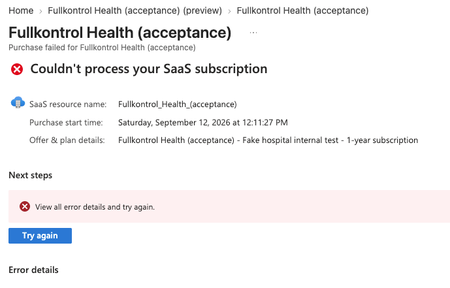
Preview SaaS offer purchase fails at subscription creation
I'm publishing a transactable SaaS offer and testing the purchase flow in preview. Test purchases used to work, and then stopped working with no change on our side that would explain it. The purchase now fails at the final step: "Couldn't process your SaaS subscription" Earlier attempts also returned "400 Bad Request" from the marketplace SaaS service during checkout. Important: this offer previously accepted preview test purchases successfully. Several went through and created subscriptions. The same flow now fails every time, for no apparent reason and with no configuration change on our part. Setup: - Transactable SaaS offer, tested via the Azure portal preview link at the Publisher signoff stage. - Private test plan priced at $0, 1-year term, restricted to my own tenant. What I have already verified and ruled out: - The plan resolves and is selectable. The failure page even shows the correct plan name, so the preview audience and private-plan tenant restriction are working. The failure is at subscription creation, not plan visibility. - Buying subscription is Pay-As-You-Go, spending limit off, Enabled. - Microsoft.SaaS, Microsoft.Marketplace, and Microsoft.MarketplaceOrdering resource providers are all registered. - A valid payment method (credit card) is on the billing profile. - The buyer's market (country) is included in the plan's markets. - Azure Private Marketplace store exists but is disabled, so it is not blocking. - I republished the offer to regenerate a fresh preview link. Preview creation completed successfully. - It fails identically for the Azure account owner, not just a delegated tester. So purchases worked before, every setting I can find is still correct, and it now fails at Microsoft's subscription-creation step. Questions: 1. Has anyone had preview test purchases work and then suddenly start failing with "Couldn't process your SaaS subscription," and found the cause? 2. Is this a known platform-side issue? The republish-with-a-small-edit workaround did not help.Close more custom deals on Marketplace with private offers and App Advisor guidance
This is part of a series where we look at improvements to negotiated deals in Microsoft Marketplace and how App Advisor helps you choose the right negotiated deal types for your business. Marketplace customers don’t just buy according to the pricing, terms, billing, and procurement structure of a standard public offer. Sometimes, they need a more customized option. A to-customer private offer gives you more flexibility to meet those requirements, negotiate directly with a specific customer, and keep the transaction in Microsoft Marketplace. Let's look at questions that businesses like you may be asking. Why would I use a to-customer private offer? Private offers give flexibility to particular customers. A private offer can be a good fit when a specific customer: Requires customer-specific terms, Wants to negotiate custom pricing, Needs a billing structure aligned with its budgeting or procurement process. They also give you, the seller, some flexibility because you can: Negotiate directly with my customer without involving a channel partner, Include supported professional services as part of the Marketplace transaction, Keep the negotiated transaction completely in Marketplace (while gaining benefits). For eligible offers, the purchase can also count toward the customer’s Azure cloud consumption commitment, while the sale can contribute toward unlocking benefits after publishing, Certified Software Designations, and Azure IP co-sell. To see more about the benefits of to-customer private offers, go to this deep dive in App Advisor Who can I sell to with a private offer? To-customer private offers support a broad range of Marketplace opportunities. Private offers are: Available globally, Available to all Microsoft partners, Available to MOSA, Enterprise Agreement (EA), and Microsoft Customer Agreement (MCA) customers. How can I find more customers for private offers? Your existing sales pipeline is one place to start. But Marketplace now also helps customers signal when they’re interested in a negotiated deal. With the new Request private offer enabled on an eligible Marketplace listing, customers can initiate a conversation about customized pricing and terms directly from your product page. On your "Offer setup" page, toggle the "Would you like to enable private offer requests from customers?" ON to have a button appear on your listing that interested viewers can initiate a conversation with you. You still own the sales conversation and create the private offer. The difference is that interested customers now have another way to raise their hand. For software companies asking how to generate more app leads, this creates a clearer path: Marketplace discovery → customer interest → negotiated deal → purchase. How do I create a to-customer private offer? Once you have an interested customer, the basic process starts in Partner Center: Gather the customer’s billing information and identify who can accept and purchase the offer. Create a new private offer using your published Marketplace offer as a base. Define the customer, terms, contacts, negotiated pricing, and other deal requirements. Review and submit the private offer. Share the private-offer link so your customer can accept and purchase. Want all the details to consider (from customer permissions and prerequisites to offer setup and acceptance)? That’s where App Advisor can help. Use App Advisor to move your Marketplace deal forward App Advisor brings the detailed, curated guidance together in one place. You can use it to understand: When to use a negotiated deal, Which type of negotiated deal to choose, What you need to know about your customer to start, How to move through the process with customer checklists, walkthroughs, and supporting resources. Ready to customize and close your next deal? Use App Advisor to learn how to create a to-customer private offer and turn customer interest into a Marketplace sale. Next, we’ll look at resale enabled offers (REO) and how they can help you expand your Marketplace sales motion through channel partners.266Views4likes0CommentsCould Marketplace Become an AI Discovery Agent?
Today, customers still find apps in Marketplace by searching keywords or browsing categories. In a large catalog like the Marketplace, that often feels like guesswork. Publishers describe similar solutions differently, and customers rarely know the exact keywords to use. Many customers end up scrolling through listings, getting tired, and leaving. When that happens, we as publishers never get the chance to connect with them. What if Marketplace used AI to change that? Instead of searching, customers could simply describe what they need: “I need a time-tracking app that works natively in Microsoft 365 and Microsoft Teams, has light project management, follows our security policies, and keeps all company data inside our tenant in line with General Data Protection Regulation (GDPR).” An AI agent could instantly suggest the best matching apps and guide the customer directly to Get it now. And maybe the next step is even bigger: What if Marketplace became an agent or coworker for Microsoft Copilot, helping users discover and install the right apps simply by asking? Curious what others think—could this be the future of Marketplace discovery?