task
6 Topics
returnng icons to task bar after each reboot
Hi for some reason icons are coming back to the task after each reboot though i unpinned them, couldnt find any reasonable problem. i have a company PC image with and in appdata i have local, locallow and roaming folders but i couldnt find anything relevant... please advise.1.3KViews0likes1Comment
Shared ToDo deleted tasks > how to restore?
Hello everyone, We share a ToDo with my colleagues and I deleted some tasks by mistake. I tried to restore them but whitout success. I cannot find any place where those deleted items went. I tried a lot a of solutions found on the net but none of them worked. I also point out that those tasks were not mine. So I am looking for some help. Does anyone have an idea or even a solution about that?211Views0likes0CommentsAdd "Show Windows push notification" as a selectable action to Task Schedular
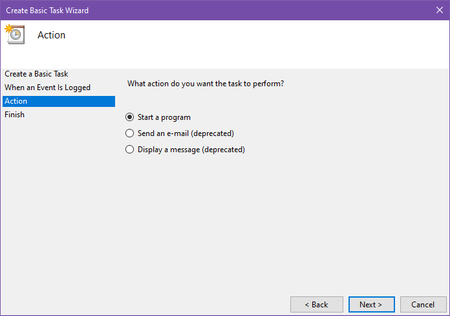
*the options for email and displaying message are unusable since they are deprecated, you get error if you try to use them. I need to create tasks in Windows Task Scheduler and see Windows push notifications in action center when that task's criteria is met or triggered. another one is that I need to attach a Task to Windows Event Viewer and once an event entry is created in the custom logs, I get notified by a notification in Windows. please upvote in feedback hub: https://aka.ms/AAbzrjw966Views1like0Comments
Overdue task reminder workflow error
Dear All. First of all, sorry for the long post. :-) I would like to ask for your help regarding SharePoint overdue task reminder. I’d like to use the build-in task app for assign monthly tasks with important due date. Requirements: Send a mail to assigned person, 2 days before overdue date. Do not send mail at the moment of the task assign, because we would like to assign monthly tasks for a year ahead and I do not want to send 12 mails within 2 minutes. Do not send the mail at midnight because it could be annoying for clients. I tried to solve the problem in many various way, but each of them seemed wrong. I do not know where is the problem exactly (in SharePoint Designer Workflow algorithm or SharePoint site settings?) My (wrong) solving method: WORKFLOW If Current Item:Task Status not equals Completed Add -2 days to Current Item:Due Date (Output to Variable:RightDate) then Pause until Variable:RightDate then Email Carl, Johnson Type: List Workflow Associated List: Tasks Platform type: SharePoint 2010 Workflow Start Options Allow this workflow to be manually started Start workflow automatically when an item is created SHAREPOINT SITE Columns: Task Name, Due Date (Date and Time type, Date + Time edition (with hours…)) Assigned To, Information Management Policy Settings: Enabled Retention with the following settings: This stage is based off a date property on the item Time Period: Due Date + 0 days Action: When this stage is triggered, perform the following action: Start a workflow Start this workflow {Name of the workflow} My overdue reminder workflow does not work in order (vid. requirements). I would be pleased if somebody could help me. Thank you very much in advance, AdamSolved7KViews0likes5Comments