sync
57 TopicsRestoring extensions and the invenient experience.
Hello Everyone! How are you? You've all gone through or will go through the experience of launching a Chromium-based browser at some point (especially Edge in this case) And see that when you reinstall your extensions through the automatic process (importing from your browser or your account) You're faced with THOUSANDS of extensions in your browser, with settings for extensions or welcome or anything like that! This isn't really a problem, but it can be really inconvenient sometimes when you're typing a text or looking for something and suddenly you're moved to a new tab or something. The question is: Why not just put a floating bubble under the extensions icon warning you that "Hey you have new extensions, click here and configure it!" This could be a great idea and would aid in a smoother and smoother experience that is less invasive and clearer! But let me know, what do you think of it?417Views0likes0Comments
Sync Favorites in Edge Chromium
Hello There was a problem syncing favorites in Edge (105.0.1343.42): There are 4 devices using the same Microsoft account to sync. For some time now, synchronization between devices has partially stopped working. It is noticed that one part of the favorites is synchronized between one pair of devices, another part is synchronized between the second pair. It seems that somewhere there is a setting, what should be synchronized between what. Profile settings in Edge are set to the same settings.531Views0likes0CommentsAdd 1-way sync to Edge browser
Let us enable one-way sync in browser, this is specially and extremely useful when testing Canary and Dev channels, as they are rather unstable. for example, I want 2-way (regular) sync on Edge stable but 1-way sync for Edge canary (only download changes on canary and don't upload anything back to the cloud to prevent any possible sync issue or data loss).1.1KViews4likes1CommentEdge sync across laptops
I have a new laptop and want to sync my open browser tabs, bookmarks, etc. I am logged in and sync is on in Edge on my current laptop. I am logged in and sync is on in Edge on my new laptop. But I am not seeing my open tabs, bookmarks, etc on Edge on my new laptop. What could I be doing wrong? I have all the boxes ticked in the sync settings to indicate all the items that I want synced. Thanks.3.3KViews1like7Comments
edge sync cxxxh@fxxxs.com, DISABLED_BY_ADMIN, STOP_SYNC_FOR_DISABLED_ACCOUNT, Microsoft Information
hello community, i have a problem with microsoft edge sync. with exxxa@fxxxs.com the edge sync works under mac. Edge sync does not work on mac with cxxxh@fxxxs.com. it's the same mac. both users have the same license: microsoft 365 business premium. Azure Information Protection (AIP) + Azure AD Enterprise State Roaming (ESR) are enabled. I also performed Enable-AipService via powershell and checked it with Get-AipService. I also checked Get-AipServiceOnboardingControlPolicy + found no problems. I looked through https://docs.microsoft.com/en-us/deployedge/microsoft-edge-troubleshoot-enterprise-sync. restarting and setting up the edge, including a new profile, were unsuccessful. on iOS + windows 10 it is also not possible to sync with cxxxh@fxxxs.com + edge. Thank you ################## edge error log: Thu Jul 29 2021 15:50:08 GMT+0200 (Mitteleuropäische Sommerzeit) ====== Status ====== { "actionable_error": [ { "stat_name": "Error Type", "stat_status": "", "stat_value": "DISABLED_BY_ADMIN" }, { "stat_name": "Action", "stat_status": "", "stat_value": "STOP_SYNC_FOR_DISABLED_ACCOUNT" }, { "stat_name": "Error Description", "stat_status": "", "stat_value": "Microsoft Information Protection service is disabled" } ], "actionable_error_detected": true, "details": [ { "data": [ { "stat_name": "Transport State", "stat_status": "", "stat_value": "Disabled" }, { "stat_name": "Disable Reasons", "stat_status": "", "stat_value": "Feature not supported" }, { "stat_name": "Sync Feature Enabled", "stat_status": "", "stat_value": false }, { "stat_name": "Setup In Progress", "stat_status": "", "stat_value": false }, { "stat_name": "Auth Error", "stat_status": "", "stat_value": "OK since browser startup" }, { "stat_name": "Sync Account Type", "stat_status": "", "stat_value": "AAD" } ], "is_sensitive": false, "title": "Summary" }, { "data": [ { "stat_name": "Client Version", "stat_status": "", "stat_value": "Microsoft Edge Mac OS X 92.0.902.55 (2f31ea24c029d582f5472682b25153751b8021b3)" } ], "is_sensitive": false, "title": "Version Info" }, { "data": [ { "stat_name": "Server URL", "stat_status": "", "stat_value": "https://edge-enterprise.activity.windows.com/v1/feeds/me/syncEntities/" }, { "stat_name": "Server Environment", "stat_status": "", "stat_value": "edge-enterprise.activity-v1" }, { "stat_name": "Fetch Result", "stat_status": "", "stat_value": "SUCCESS" }, { "stat_name": "Fetch Message", "stat_status": "", "stat_value": "" } ], "is_sensitive": false, "title": "Environment Info" }, { "data": [ { "stat_name": "Requested Token", "stat_status": "", "stat_value": "n/a" }, { "stat_name": "Received Token Response", "stat_status": "", "stat_value": "n/a" }, { "stat_name": "Last Token Request Result", "stat_status": "", "stat_value": "OK" }, { "stat_name": "Has Token", "stat_status": "", "stat_value": false }, { "stat_name": "Next Token Request", "stat_status": "", "stat_value": "not scheduled" }, { "stat_name": "Last Token Error", "stat_status": "", "stat_value": "None" } ], "is_sensitive": false, "title": "Credentials" }, { "data": [ { "stat_name": "Requested Token", "stat_status": "", "stat_value": "n/a" }, { "stat_name": "Received Token Response", "stat_status": "", "stat_value": "n/a" }, { "stat_name": "Last Token Request Result", "stat_status": "", "stat_value": "OK" }, { "stat_name": "Has Token", "stat_status": "", "stat_value": false }, { "stat_name": "Next Token Request", "stat_status": "", "stat_value": "not scheduled" }, { "stat_name": "Last Token Error", "stat_status": "", "stat_value": "None" } ], "is_sensitive": false, "title": "Credentials for Key" }, { "data": [ { "stat_name": "Download Key Result", "stat_status": "", "stat_value": "Uninitialized" }, { "stat_name": "Net Error Code", "stat_status": "", "stat_value": "Uninitialized" }, { "stat_name": "HTTP Response Code", "stat_status": "", "stat_value": "Uninitialized" }, { "stat_name": "Process Key Result", "stat_status": "", "stat_value": "Uninitialized" }, { "stat_name": "Set Key Result", "stat_status": "", "stat_value": "Uninitialized" }, { "stat_name": "Fetched Key Count", "stat_status": "", "stat_value": 0 } ], "is_sensitive": false, "title": "MSA Account Key Status" }, { "data": [ { "stat_name": "Pack/Unpack Key Result", "stat_status": "", "stat_value": "Uninitialized" }, { "stat_name": "Last MIP Result", "stat_status": "", "stat_value": "Uninitialized" }, { "stat_name": "Last Key Status", "stat_status": "", "stat_value": "Uninitialized" }, { "stat_name": "New Key State", "stat_status": "", "stat_value": "Uninitialized" }, { "stat_name": "Key Commit Response", "stat_status": "", "stat_value": "Uninitialized" }, { "stat_name": "Set Key Result", "stat_status": "", "stat_value": "Uninitialized" }, { "stat_name": "Packed/Unpacked Key Count", "stat_status": "", "stat_value": 0 } ], "is_sensitive": false, "title": "AAD Account Key Status" }, { "data": [ { "stat_name": "Server Connection", "stat_status": "", "stat_value": "not attempted" }, { "stat_name": "Last Synced", "stat_status": "", "stat_value": "Never" }, { "stat_name": "Sync First-Time Setup Complete", "stat_status": "", "stat_value": true }, { "stat_name": "Sync Cycle Ongoing", "stat_status": "uninitialized", "stat_value": false }, { "stat_name": "Local Sync Backend Enabled", "stat_status": "", "stat_value": false }, { "stat_name": "Local Backend Path", "stat_status": "uninitialized", "stat_value": "Uninitialized" }, { "stat_name": "Last Successful Sync Time", "stat_status": "", "stat_value": "2021-07-29 15:49:28 +02" }, { "stat_name": "Last Audited", "stat_status": "", "stat_value": "Just now" } ], "is_sensitive": false, "title": "Local State" }, { "data": [ { "stat_name": "Throttled or Backoff", "stat_status": "uninitialized", "stat_value": false }, { "stat_name": "Retry Time", "stat_status": "uninitialized", "stat_value": "Uninitialized" }, { "stat_name": "Notifications Enabled", "stat_status": "uninitialized", "stat_value": false } ], "is_sensitive": false, "title": "Network" }, { "data": [ { "stat_name": "Explicit Passphrase", "stat_status": "uninitialized", "stat_value": false }, { "stat_name": "Passphrase Required", "stat_status": "uninitialized", "stat_value": false }, { "stat_name": "Cryptographer Ready To Encrypt", "stat_status": "uninitialized", "stat_value": false }, { "stat_name": "Cryptographer Has Pending Keys", "stat_status": "uninitialized", "stat_value": false }, { "stat_name": "Encrypted Types", "stat_status": "uninitialized", "stat_value": "Uninitialized" }, { "stat_name": "Has Keystore Key", "stat_status": "uninitialized", "stat_value": false }, { "stat_name": "Next Key Request Time", "stat_status": "uninitialized", "stat_value": "Uninitialized" }, { "stat_name": "Keystore Migration Time", "stat_status": "uninitialized", "stat_value": "Uninitialized" }, { "stat_name": "Passphrase Type", "stat_status": "uninitialized", "stat_value": "Uninitialized" }, { "stat_name": "Explicit passphrase Time", "stat_status": "uninitialized", "stat_value": "Uninitialized" }, { "stat_name": "Trusted Vault Migration Time", "stat_status": "uninitialized", "stat_value": "Uninitialized" }, { "stat_name": "Trusted Vault Version/Epoch", "stat_status": "uninitialized", "stat_value": 0 } ], "is_sensitive": false, "title": "Encryption" }, { "data": [ { "stat_name": "Sync Source", "stat_status": "uninitialized", "stat_value": "Uninitialized" }, { "stat_name": "GetKey Step Result", "stat_status": "uninitialized", "stat_value": "Uninitialized" }, { "stat_name": "Download Step Result", "stat_status": "uninitialized", "stat_value": "Uninitialized" }, { "stat_name": "Commit Step Result", "stat_status": "uninitialized", "stat_value": "Uninitialized" } ], "is_sensitive": false, "title": "Status from Last Completed Session" }, { "data": [ { "stat_name": "Notifications Received", "stat_status": "uninitialized", "stat_value": 0 }, { "stat_name": "Updates Downloaded", "stat_status": "uninitialized", "stat_value": 0 }, { "stat_name": "Tombstone Updates", "stat_status": "uninitialized", "stat_value": 0 }, { "stat_name": "Reflected Updates", "stat_status": "uninitialized", "stat_value": 0 }, { "stat_name": "Successful Commits", "stat_status": "uninitialized", "stat_value": 0 }, { "stat_name": "Conflicts Resolved: Client Wins", "stat_status": "uninitialized", "stat_value": 0 }, { "stat_name": "Conflicts Resolved: Server Wins", "stat_status": "uninitialized", "stat_value": 0 } ], "is_sensitive": false, "title": "Running Totals" }, { "data": [ { "stat_name": "Encryption Conflicts", "stat_status": "uninitialized", "stat_value": 0 }, { "stat_name": "Hierarchy Conflicts", "stat_status": "uninitialized", "stat_value": 0 }, { "stat_name": "Server Conflicts", "stat_status": "uninitialized", "stat_value": 0 }, { "stat_name": "Committed Items", "stat_status": "uninitialized", "stat_value": 0 } ], "is_sensitive": false, "title": "Transient Counters (this cycle)" }, { "data": [ { "stat_name": "Updates Downloaded", "stat_status": "uninitialized", "stat_value": 0 }, { "stat_name": "Committed Count", "stat_status": "uninitialized", "stat_value": 0 }, { "stat_name": "Entries", "stat_status": "uninitialized", "stat_value": 0 } ], "is_sensitive": false, "title": "Transient Counters (last cycle of last completed session)" } ], "syncShowClearServerDataButton": false, "type_status": [], "unrecoverable_error_detected": false }7.5KViews0likes0Comments
Microsoft Edge extension settings synchronization
Microsoft Edge has the extension sync capability, but it seems to only sync extensions themselves and not also the settings of these extension. For example, I use Adblock plus extension and every time I have to reset Microsoft Edge or the entire computer, I lose all the whitelisted sited in the extension. I would like to know if it's normal, and if it is, I would like to see added the sync even for the settings of the extensions.1.3KViews0likes0CommentsEdge sync - reset sync
Hi All, Hoping someone can answer this question. How can we delete/reset the sync data for all users in an Organization for Edge (Chromium) ? As far as I can see we can only manually reset it from Edge for each user but how do we do for all users or several users remotely? The reason for this is, we start to use managed favourites but previously we also deployed favourites which we imported from IE. To avoid confusing user, we want to delete those links from the bookmarks file and it works fine if sync is not on but if it is then it just wont go away.1.4KViews0likes2Comments“Save all tabs to favorites” on iOS?
I’ve tried ‘press-holding’ on almost every UI element and checking every menu I could think of, but I can’t figure out how to “Save all tabs to favorites” on the iOS version of Edge. (Searching online for a dozen minutes didn’t turn up anything promising, either.) Am I missing something obvious, or has this perhaps not yet been implemented yet? (I can’t imagine syncing favorites would have came before this basic feature)2KViews0likes1CommentNew Edge Canary Mobile version - Available Now - Updated Chromium version
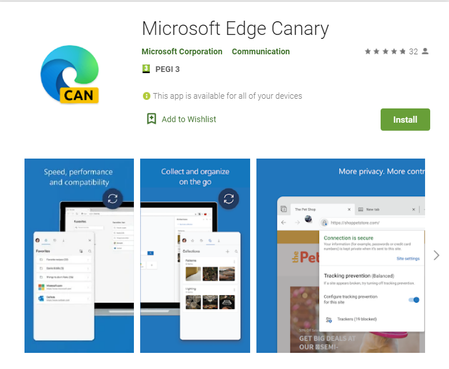
Microsoft Edge Canary is the newest Edge app on mobile. here is the app on Google play: https://play.google.com/store/apps/details?id=com.microsoft.emmx.canary The Chromium version is up to date, latest version, same as on Edge desktop. the UI has some different design elements. settings page is also different. sync is fully enabled and working. Flags are all available and working. you can set it as default browser on your phone. this has been promised a while ago, but now it's here. so go on and download it, comment down below what you think about it. https://www.youtube.com/watch?v=p2Ya2cfGDVI8.7KViews5likes15Comments