support
33 TopicsRemote Event Receivers retirement update in SharePoint Online
Remote Event Receivers are retiring as part of the announced SharePoint Add-In and Azure ACS retirements in SharePoint Online, but we've listened to your feedback and provided an option that will stay longer available and we're further improving webhooks to be a better alternative for Remote Event Receivers11KViews4likes34CommentsSharePoint Showcase: 5 Ways Organizations Improve Business Processes with Copilot in SharePoint
AI becomes most impactful when it helps with the work teams already do every day. The challenge is rarely a lack of information. It is turning trusted information into a clear, repeatable process without starting from scratch each time. That is where Copilot in SharePoint can help. It works with the content and structure already in SharePoint, including sites, pages, lists, libraries, and files. Teams can ask questions, compare and summarize content, organize information, create outputs, and turn repeatable multi-step processes into reusable skills. The examples below are based on real customer scenarios from organizations exploring Copilot in SharePoint. To protect customer confidentiality, organization names and identifying details have been generalized. What matters is the pattern: start with trusted SharePoint content, define the work that needs to happen, keep people in control, and make the process easier to repeat.2.6KViews1like0CommentsSharePoint - SSL Offloading
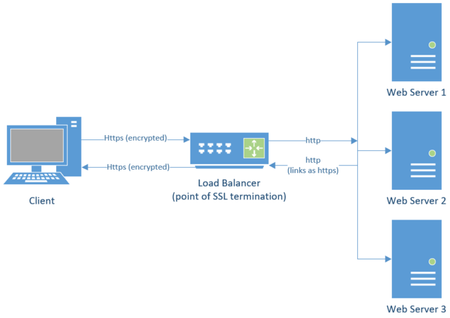
What is SSL Offloading? Configuring SSL Offloading with SharePoint Web Applications Host Names Site Collections SharePoint Apps (App Domain Common Issues URLs returned to users are incorrect List or library Dropdown menu not loading After configuring SSL offloading for a web application users receive a 404 or 503 Additional Information Creating IIS bindings for SharePoint Web Applications through PowerShell15KViews4likes4CommentsSharePoint Online Content Security Policy (CSP): Enforcement Dates and Guidance
Content Security Policy (CSP) is a critical browser security feature designed to protect web applications. SharePoint Online is rolling out CSP enforcement for all tenants starting March 1, 2026.22KViews2likes33Comments
Sharepoint link not working
Hi all, Not sure if anyone else has had this problem, I can't seem to to find any resources on it... But I'm having a problem where I created a sharepoint that people can't access. It's only the main link that isn't working (so sharepoint.com/sites/example isn't working but sharepoint.com/sites/example/images does work) would appreciate any help I can get for this75KViews0likes8Comments
Exclude Users From Delve and SharePoint Online People Search
In support, we receive requests from time to time for information on how-to configure SharePoint People search and Delve results so that specific users do not appear in search results. Many admins want to be able to do this without having to delete or move users to a non-synced OU.78KViews9likes23CommentsIntroduction to SharePoint Online Search
Microsoft SharePoint Online Search is an integral part of SharePoint Online and it is the backbone of many features across Office 365. Below is a list of a few features that are driven by search and used daily: Enterprise Search center Site Search List and library search Search Web Parts “Shared with me” view in OneDrive for business Usage and popularity trends DLP, eDiscovery Searches, and Retention25KViews7likes6Comments