sql server 2017
15 Topics
Browser for SQL Server 2017 and 2019
Hello, my question is the following. Despite having the latest updates released for SQL Server 2019 and 2017, I notice that SQL Server Browser does not change versions, remaining in the versions mentioned below. I would like to know if they are in fact the latest versions of SQL Server Browser released in the 2017 and 2019 packages. If the versions below are correct, if they really have not been updated. Browser for SQL Server 2017 14.0.1000.169 Browser for SQL Server 2019 15.0.2000.5874Views0likes1Comment
SQL Server audit logs incorrect info on column object_name
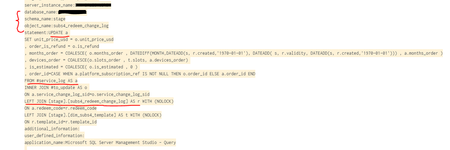
Hi, during an audit check on database events, i have noticed that sometimes on DDL events, when temp tables are mentioned, sql server 2017 logs incorrect information on columns schema_name and object_name and the statement column proves this: Moreover, on the two columns the info for the object on which the DDL was applied, is taken randomly, it may show the first table, or the second, making this difficult to prove the actions in case of audits: Sadly, i haven't found this reported anywhere..267Views0likes0Comments
Moving SQL Server 2017 from GDR Path to CU Path
Hello everyone, I have been scouring the internet and am not able to find the answer I need so I turn to you for assistance. Here is the situation, we have an AG set up on SQL Server 2017. Currently both of those servers are on patch 14.0.2052.1 or 5029375 Security update for SQL Server 2017 GDR: October 10, 2023. I would like to change us to be on at least CU 15 (yes I know CU 31 is the latest but the issue requiring this change is CU 15), but there is nothing I can find about how to change from the GDR Path to the CU Path. The only option I can see is to roll EVERYTHING back to the 2017 RTM, then apply CU 31. That isn't a great option as this is a 24/7 application. So, how in the world do you change from GDR to CU? Thanks in advance, Chap3.2KViews0likes2Comments
SQL Server Installer - Receive Failure error
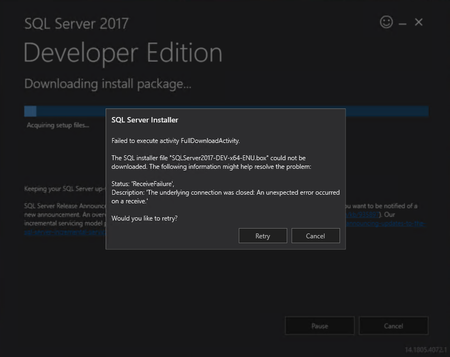
Hi, I am trying to install SQL Server 2017 but whenever I try to install I get the following error on all 3 installation types (Basic, Custom, Download Media). I am at a loss on what to do to resolve this. Any help would be greatly appreciated.1.1KViews0likes0Comments
SQL server 2017 Replication issue on specific tables and view
Hi, We got below error in our prod environment when added 2 more tables and 1 view to replicate to another server in existing replication setup. We tested out that scenario in our staging and dev environment and no issue occurred. We are not sure it's happened because of object schema or data issue. Please help advise how we can overcome below issue. 2021-11-13 10:46:30.094 Connecting to Subscriber 'ServerName' 2021-11-13 10:46:30.125 Initializing 2021-11-13 10:47:27.766 Skipping file 'ORC_MTL_ONHAND9ce349e7_148.pre' because it has already been delivered for a previous article or by a previously interrupted snapshot. 2021-11-13 10:47:27.766 Skipping file 'ORC_MTL_ONHANDa7c3e34f_116.pre' because it has already been delivered for a previous article or by a previously interrupted snapshot. 2021-11-13 10:47:27.781 Skipping file 'ORC_MTL_ONHANDc7c3e34f_115.pre' because it has already been delivered for a previous article or by a previously interrupted snapshot. 2021-11-13 10:47:27.828 Agent message code 1934. INSERT failed because the following SET options have incorrect settings: 'ANSI_PADDING'. Verify that SET options are correct for use with indexed views and/or indexes on computed columns and/or filtered indexes and/or query notifications and/or XML data type methods and/or spatial index operations. 2021-11-13 10:47:27.860 Category:COMMAND Source: Failed Command Number: Message: create procedure [sp_MSins_dboORC_MTL_ONHAND_QUANTITIES_1] @c1 numeric(15,0), @c2 int, @c3 int, @c4 datetime2, @c5 datetime2, @c6 int, @c7 datetime2, @c8 int, @c9 numeric(38,0), @c10 nvarchar(10), @c11 int, @c12 int, @c13 int, @c14 datetime2, @c15 int, @c16 numeric(38,0), @c17 numeric(38,0) as begin insert into [dbo].[ORC_MTL_ONHAND_QUANTITIES_1] ( [MTL_ONHAND_QUANTITIES_KEY], [INVENTORY_ITEM_ID], [ORGANIZATI 2021-11-13 10:47:27.860 Category:NULL Source: Microsoft SQL Server Native Client 11.0 Number: 1934 Message: INSERT failed because the following SET options have incorrect settings: 'ANSI_PADDING'. Verify that SET options are correct for use with indexed views and/or indexes on computed columns and/or filtered indexes and/or query notifications and/or XML data type methods and/or spatial index operations. Thanks & Best Regards, Theingi1KViews1like0CommentsWCF Service Hosted In IIS Unable to Connect to SQL Server and display In SharePoint Online External
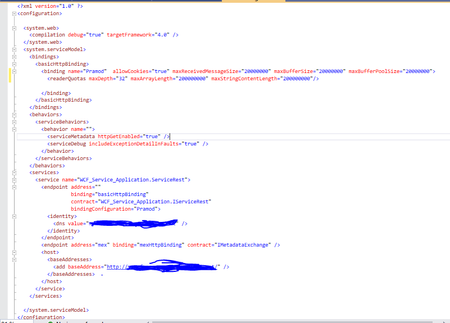
Hello , I have Hosted a WCF service in IIS and I am using SharePoint designer 2013 to connect to BCS of SharePoint online. I am able to create the external content type and external content list but when I access the external list I am getting the below error A network-related or instance-specific error occurred while establishing a connection to SQL Server. The server was not found or was not accessible. Verify that the instance name is correct and that SQL Server is configured to allow remote connections. (provider: SQL Network Interfaces, error: 26 - Error Locating Server/Instance Specified) I have given all the required permission in SQL server to make it accessible and have checked it its accessible I have hosted the same WCF service which is hosted in IIS in Azure App Service and its working fine and the data is getting pulled and being displayed in External list below is my web config of WCF Service Can you please help me Thank you Syed Shadab Mohammed1.2KViews0likes0CommentsStruggling with Rich Text Field
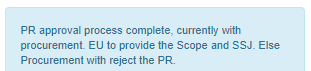
Hello Community, I have a SQL table which has a column containing rich text field tags. I am trying for 2 days now to get rid of the tags but nothing is working for me. <div class="ExternalClass00D082CB77D043AC975C783B3BC9B418">PR approval process complete, currently with procurement. EU to provide the Scope and SSJ. Else Procurement with reject the PR.</div> Below is how the text appears while in the actual website, the data appears like this: The removal process cannot be hard-coded because every record tags are different from another. For example see the below example: <div class="ExternalClass156752DF6D8A4BBF84D75235021E4A45">Demand status updated to Under Tech. Procurement - Pending PR Creation <div class="ExternalClass1A849FEC18A44CCE90E425ED0F54A1A2"><html> <p>One time Support Request.<br></p></html></div> </div> *I have attached the actual output of this from website If anyone can help me on how to clean the characters with a SQL function or maybe a C# code that will be very helpful. I have tried the below links and they do not solve my problem. https://www.codeproject.com/Tips/821281/Convert-RTF-to-Plain-Text-Revised-Again https://social.msdn.microsoft.com/Forums/en-US/143abeb5-f98a-4b47-a746-dd141bdd6df7/sql-query-to-retrieve-a-rich-text-memo-field?forum=sqlgetstarted Any help on this issue will be very much appreciated.1.9KViews0likes0Comments
Access Request Sharepoint Site
Hi Experts, I am looking for a SharePoint functionality to implement in our reporting project. I have a SQL server database table which has City Hierarchy data. Now I want to build a Reports Access Site which should have the City arranged in hierarchical order (Country->Region->State->City).In order to view the data for respective cities, the user need to go to this site and create an access request by selecting the cities/state/region/country he needs access to and then submit for approval. This request should then go through various approval levels and then store this request along with approval details/status in another database table in SQL SERVER so that it can be used by system to provide access. Is this doable and if yes then is there any links/videos which can guide me on how to do it. Thanks Nivi1.4KViews0likes1Comment