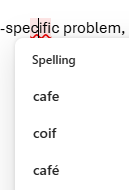
spell check
4 Topics
OWA spell checks part of the word
Something strange happened as I was typing an email today. I misspelled "specific" so I quickly fixed it using the spell checker. Then, it underlined the "cifi" part of the word "specific" suggesting spelling corrections as seen in the screenshot. There is no space in the word so I don't know why it focused on the part of the word (maybe because of the previous correction?). Do you know if this is an Outlook bug or an Edge bug? Not sure which spell checker is acting in OWA honestly.208Views0likes2Comments
Configure Outlook spell checker to ignore words with undescores
Suggested feature: i would like to have a configuration option for the Outlook spell checker to ignore all words that have interspersed undescore characters (words containing _ underscores); e.g. acct_id. I do not want to "Add to Dictionary" each of these technical terms one by one. I would prefer to configure the spell checker and be aware that there is not going to be any spell-checking done on any of the technical terms used in the e-mail.74Views0likes0CommentsTeams Spell Check Just Stops Working
Recently, I’ve had an issue with the spell check. It has stopped working which means that when I write, it no longer underlines the misspelled words. I have tried everything to fix this: I have uninstalled/reinstalled Teams numerous times. I even deleted all the data in %appdata%\Microsoft\Teams After I reinstall, the spell check works but then it stops working all of a sudden with hours. I don’t know what is causing it not to work but it just seems to stop for no reason. I look in Settings |General and keyboard language is set for English United States and Enable spell check is checked. Even if you uncheck, restart app and check again, it makes no difference. Teams version: 1.6.00.4472 (64-bit) - Windows 113.7KViews3likes4Comments
Spell checks works but it can't find correct spelling for many words
This is extremely frustrating. The spell check works for some words but not for really basic words. For example, I wrote "Tehy require..." and even in this site, it autocorrected it to "They" but had to misspell it again for it to stick. Even this site, which I am using MS Edge for, right-click and knows it's "They" but Teams shows "Tethys" as the recommended change. This happens for many, many words that are only off by a letter or letters switched. My language in Teams is set to English US. There is also no "Add to Dictionary" so can't get it to learn basic words.1.8KViews2likes1Comment